
JobTread Alternatives: 5 Options for Builders and Remodelers
JobTread is built for a wide range of trades. If you build custom homes, here is how five alternatives compare, and where the job stays connected from estimate to invoice.

Ressio Staff
October 9, 2026
JobTread is estimating and project management software built for a wide range of trades, from home builders and remodelers to pool builders, roofers and commercial contractors. If you are looking at JobTread alternatives, you may still be weighing JobTread itself. Or you may be using it and wondering if a tool built for your kind of work would fit better.
This guide covers five JobTread alternatives, what each one is built for, and how to choose. If you build custom homes or run complex remodels, start with Ressio. We built our software for custom builders and remodelers, and that focus shapes every part of the job.
JobTread alternatives at a glance
| Product | Built for | Strongest at |
|---|---|---|
| JobTread | Many trades, from home builders to roofers and commercial contractors | Estimating and job management with customer and vendor portals |
| Ressio | Custom and semi-custom home builders and remodelers | One connected job, from estimate to budget, selections, change orders and invoices |
| Buildxact | Residential builders who estimate first | AI-assisted takeoff, estimating and quoting |
| BuildBook | Smaller custom builders and remodelers | Client selections and a client dashboard |
| Houzz Pro | Design-led remodelers and designers | 3D floor plans, mood boards and Houzz marketing tools |
| Contractor Foreman | Small trade and general contractors, residential and commercial | Service tickets, work orders, permits and inspections |
What builders weigh when they compare JobTread alternatives
JobTread is well liked. Its scores on Capterra, Software Advice and G2 sit between 4.9 and 5.0, as our JobTread reviews breakdown shows.
So most builders who look at JobTread competitors are not running from a bad product. They are checking fit.
Three things come up again and again in JobTread reviews. Each one matters more on a custom build than on a simple job.
Setup time before the first real job
Reviewers who love JobTread still mention setup. Greg D. called it "time consuming to set up initially" and said "there are a lot of nooks and crannies to build out" (Capterra).
For a custom builder, that is time with no billable work behind it. While you build out templates, your next estimate still lives in a spreadsheet.
In Ressio, most teams are running their first real job within two hours of onboarding.
Selections that clients find hard to use
Philip K., a COO, put it in five words: "Selections has a clunky UI." Houston T. said that if he had to name one con, "it would be the selection item would be the most difficult to use" (Capterra).
On a custom home, selections are where the money moves. A client who cannot find the screen calls you instead.
In Ressio selections, your client approves from a link. The approved amount updates your estimate and budget on its own.
Client messages on the job
Donavyn A., a project manager and estimator, wrote: "If Jobtread can add a better messaging inclusion with the software it would be all there for our company" (Capterra).
JobTread's customer portal already keeps client comments and replies in one place. Donavyn wanted more from it.
In Ressio messaging, every task has its own thread. You pick the channel: internal, customer, vendor or public. Internal notes never reach your client.
1. Ressio: best for custom home builders who want one connected job
We build Ressio, construction management software for custom and semi-custom home builders and remodelers. Custom builders and remodelers are 99% of the builders we work with. So we built every workflow around a job that changes as the client makes decisions.
Here is how a custom job runs in Ressio, from the first number to the final draw.
The estimate becomes the budget
In Ressio estimating, you set your markup once. Enter a quantity and a unit cost, and we work out builder cost, markup and client price. You can use NAHB, CSI, NARI or your own divisions, and every project becomes a template for the next one.
When the client signs, you lock the estimate. It becomes your live construction budget. There is no second budget to keep and no spreadsheet to reconcile at month-end.
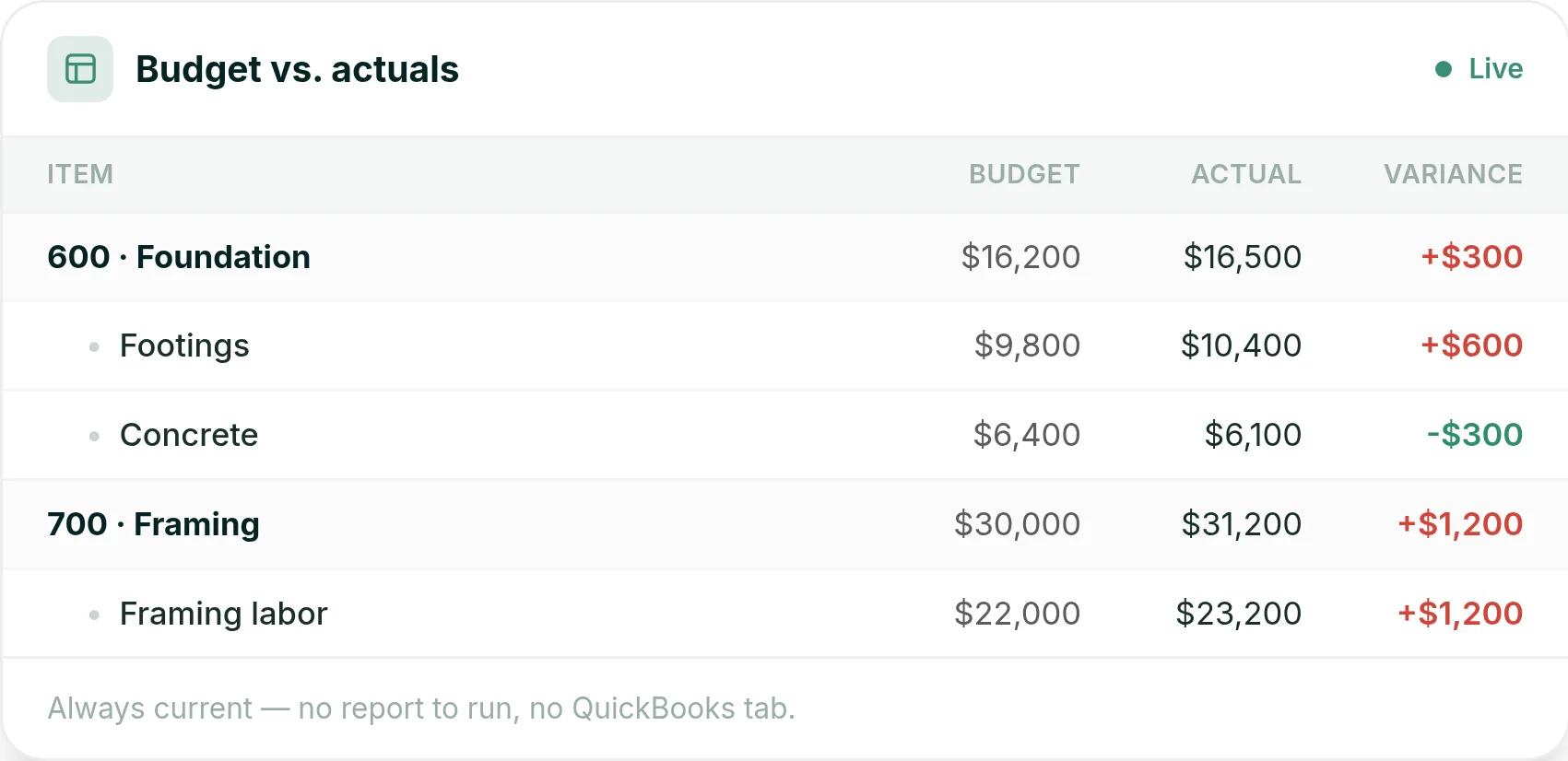
As bills and time entries post, budget vs. actuals updates on every line. You see an overrun while you can still fix it.
A walkthrough: one kitchen, three client decisions
The pain: a client picks a countertop over its allowance, and nobody updates the budget. A change gets agreed on site and a question arrives by text. Months later, nobody can find who approved what.
Here is a hypothetical. You are building a custom kitchen for the Baumann family, and the client is making decisions as the job moves.
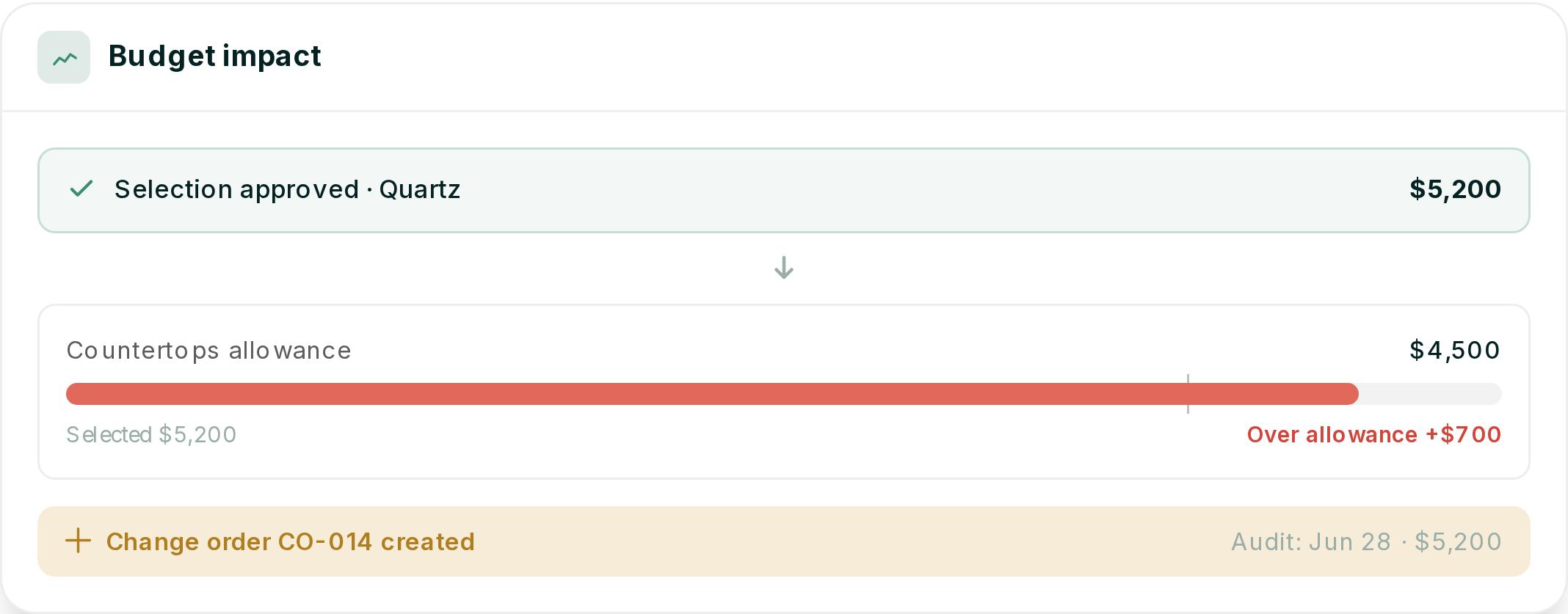
- A selection. You release a quartz countertop at $5,200 against a $4,500 allowance. Your client taps the magic link and approves it. We flag the selection $700 over the allowance and start a change order.
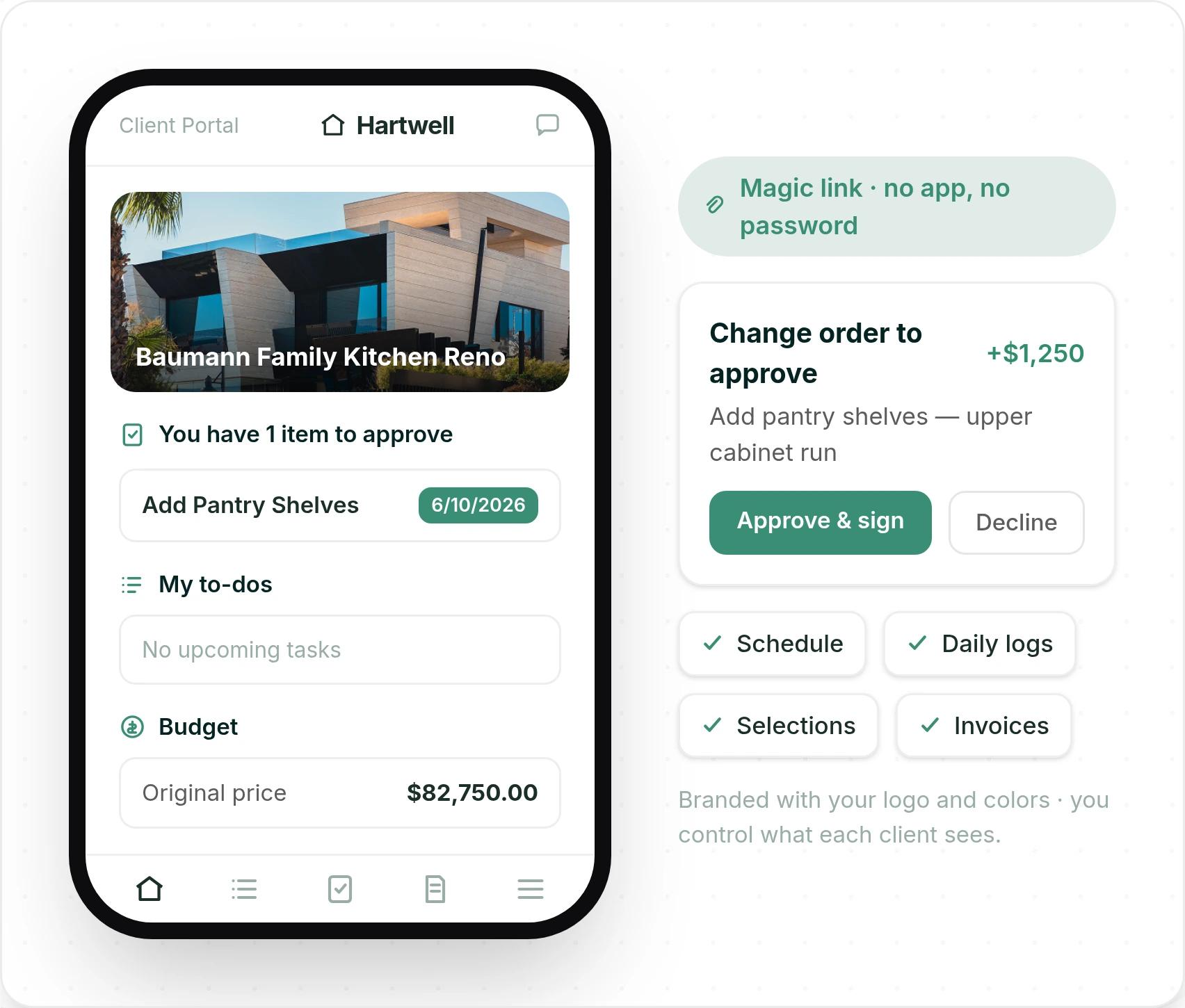
- A change order. Your client asks for pantry shelves on the upper cabinet run, so you build the change order from the estimate line for $1,250. Your client signs it from their phone in the client portal, with no account or password.
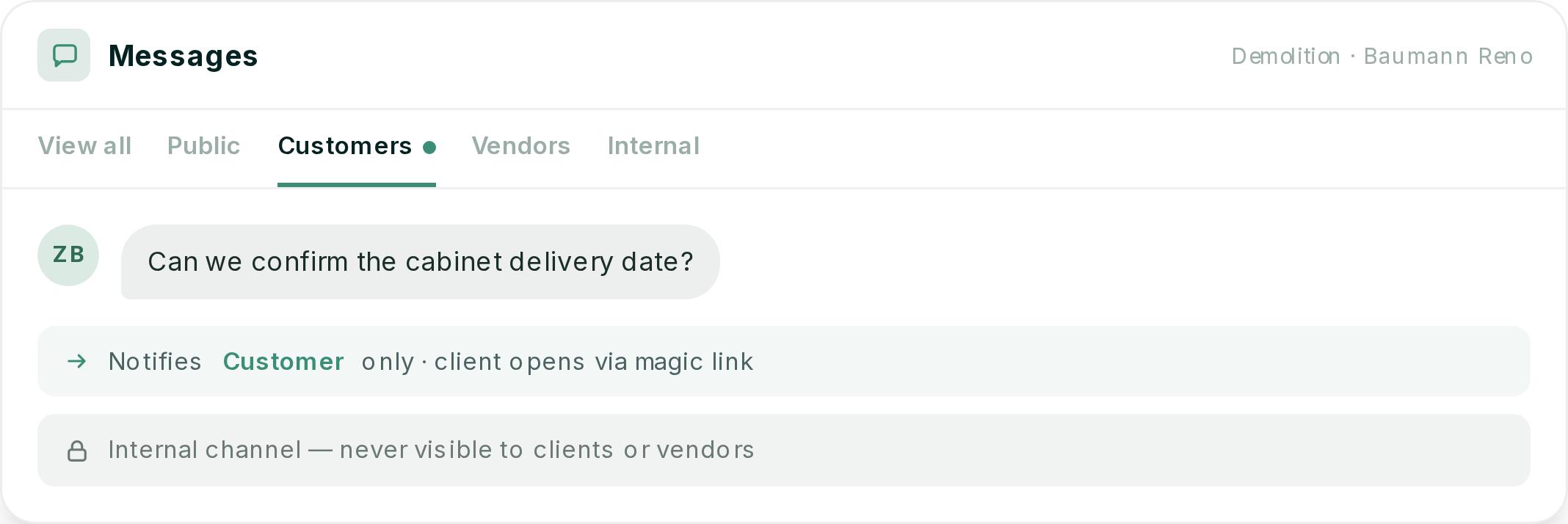
- A question. Your client asks, "Can we confirm the cabinet delivery date?" on the demolition task. Only the client is notified, and the thread stays on the job where your whole team can find it.
Every approval is timestamped and stored on the project. If a client disputes a change six months later, you have the record.
Invoices built from the budget
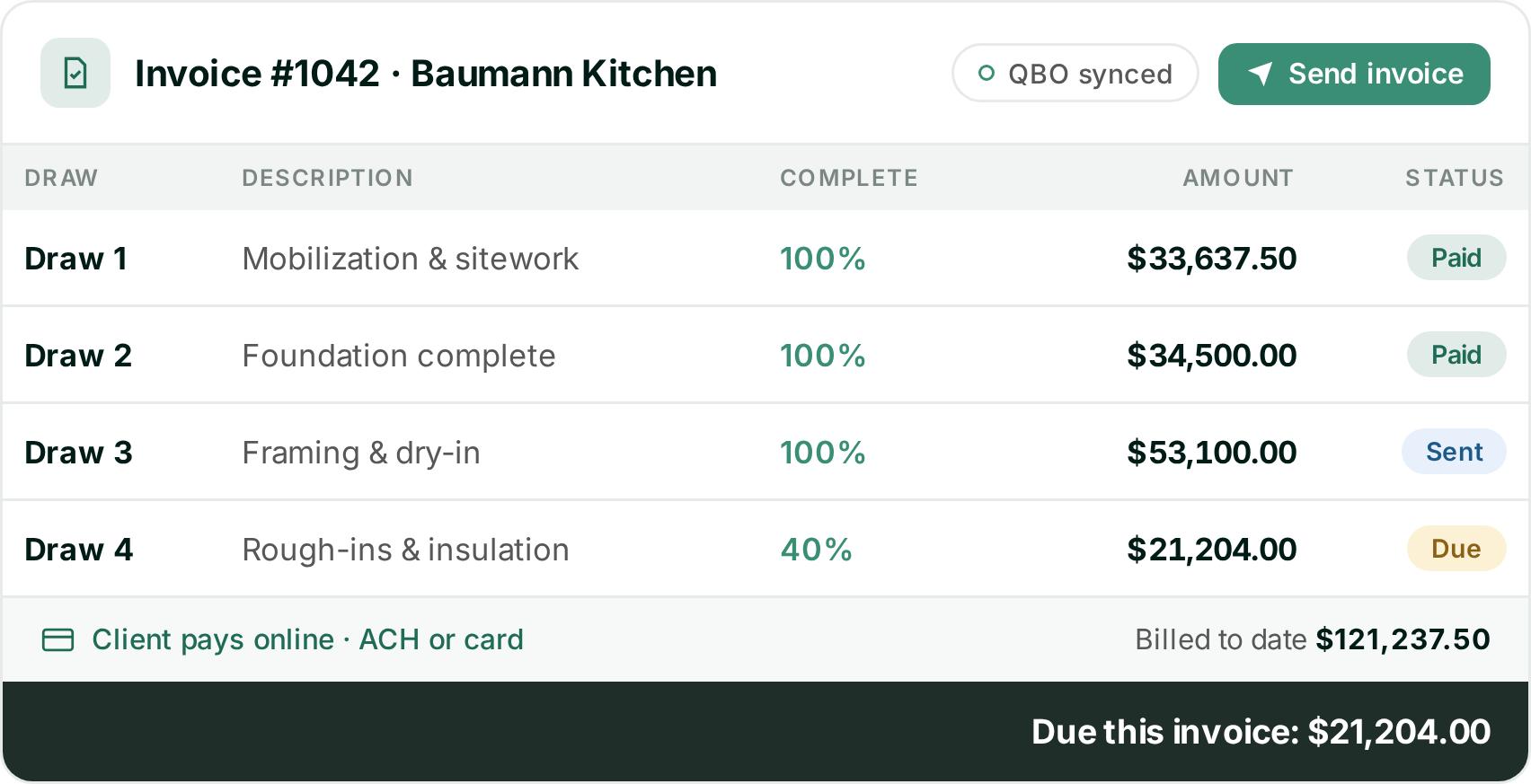
When it is time to bill, the approved selection and the pantry change order are already in the budget. Your invoice is built from that budget, so the numbers are right before you hit send.
You can bill by draw schedule, milestone or percentage complete. Your client pays online by ACH or card, and you see which draws are paid, sent or due.
Comparing JobTread with Ressio on a custom job? Book a Ressio demo and bring a live job. We will show you one selection reaching the budget and the next draw.
2. Buildxact
Buildxact is estimating and project management software for residential builders. It leads with AI-assisted takeoff, estimating and quoting.
Best for: builders and renovators whose biggest job is quoting, and who bid far more work than they win. If you mostly need takeoffs and fast quotes, it is built for that.
What it does well: takeoffs and professional quotes. Dario W., an estimator, wrote that it "makes it much easier to create accurate estimates without relying on multiple spreadsheets" (Capterra).
Where it struggles: job management on the base plan. Schedules, selections, change orders and the client portal start on the Pro plan. Jacob C., a managing director, wrote: "It doesnt have the ability to pre-set cost codes" (Capterra).
How Ressio compares: Ressio estimating works with NAHB, CSI, NARI or your own divisions. Our Buildxact alternatives guide goes deeper.
Pricing: Go is free. Foundation is $199 a month, Pro is $399 and Master is $599. Annual plans take 15% off.
3. BuildBook
BuildBook is residential construction management software for custom home builders and remodelers. It covers estimating, proposals, scheduling, client selections, budgets and a client dashboard, with a QuickBooks integration.
Best for: small builders and remodelers who want a light, simple app. BuildBook says its software "requires zero training."
What it does well: ease of use for your team and your clients. Justin W., an owner at a construction firm of 2 to 10 people, wrote: "It is set up to work well and its easy to navigate and use" (Capterra).
Where it struggles: depth on job costs and field setup. BuildBook's feature list does not name purchase orders. Kristyn D., a designer at a small builder, said foremen without a computer on site had to "create an account first on a desktop before being able to use the app" (Capterra).
How Ressio compares: Ressio purchase orders tie each commitment to a budget line and warn you before one pushes that line over.
Pricing: BuildBook does not show prices on its pricing page. New users start by booking a demo.
4. Houzz Pro
Houzz Pro is business software for home design and remodeling professionals. Alongside estimates, change orders and selections, it offers 3D floor plans, mood boards and marketing tools such as a custom website and lead generation.
Best for: interior designers and design-led remodelers who win work through Houzz and sell with visuals.
What it does well: design tools and the client view. Patrick K., a vice president at a construction firm of 11 to 50 people, said his clients "can track the job progress, approve material selections, and make secure payments online" (Capterra).
Where it struggles: the budget tool, for some users. Geoffrey P., a VP of project management, wrote: "The budget tool is way too basic. The takeoffs aren't linked with the associated estimate for live edits" (Capterra).
Pricing: the Design plan starts at $99 a month for one user. Change orders, budgets and schedules come with Pro, from $199 a month. Plans run yearly after a 30-day free trial, and advertising packages cost extra.
5. Contractor Foreman
Contractor Foreman is construction management software for small and medium residential and commercial trade and general contractors. Its feature list includes service tickets, work orders, permits, inspections and submittals, plus estimates and a client portal.
Best for: contractors who mix service calls, trade work and commercial jobs, and want many tools for a low monthly price.
What it does well: value. Nick H., a consultant at a firm of 11 to 50 people, wrote: "It is simplistic, and allows for great overall project management at a fair price" (Capterra).
Where it struggles: large estimates. Paul G., a project manager, wrote: "When making very large estimates the software slows down a lot" (Capterra).
How Ressio compares: we built Ressio estimating for complex, multi-phase custom builds. Selections, allowances and approvals live with the project, and the estimate becomes the live budget.
Pricing: plans start at $49 a month for one user on an annual plan. Standard is $105 a month for up to three users. There is a 30-day free trial and a 100-day money-back guarantee.
How to choose a JobTread alternative
Start with the kind of work you do most.
- You build custom homes or run complex remodels. Choose Ressio. The estimate becomes the budget, and selections, change orders and invoices all update it.
- Your main pain is quoting speed. Look at Buildxact.
- You are a design-led remodeler who wants marketing tools in the same place. Look at Houzz Pro.
- You run service calls and commercial jobs too. Look at Contractor Foreman.
If you run many trades and JobTread already fits, it may be the right tool to keep. Our Ressio vs JobTread comparison and JobTread pricing guide cover the details side by side.
See your next custom job in one place
Bring a recent estimate to a Ressio demo. We will turn it into a live budget, run a selection and a change order through it, and show you the draw invoice that comes out the other end.
Frequently Asked Questions
What is the best JobTread alternative for custom home builders?
For custom and semi-custom home builders and remodelers, the strongest JobTread alternative is Ressio, because we built our software for that work. The locked estimate becomes the live budget. Client selections and change orders update it when the client approves from a magic link, and invoices are built from that same budget.
Is JobTread good for custom home builders?
JobTread is well reviewed, with scores of 4.9 to 5.0 on Capterra, Software Advice and G2, and it serves many trades. Some reviewers mention long setup and hard-to-use selections.
How much does JobTread cost?
JobTread costs $199 a month with one internal user, plus $20 a month for each additional internal user up to ten. Customer, vendor and sub portal users are free. Our JobTread pricing guide works through the cost at three team sizes.
Can I switch from JobTread to another tool in the middle of a job?
Yes. When you move to Ressio, we migrate your active jobs for you, so running projects come with you. Most teams are running their first real job in Ressio within two hours of onboarding, and a dedicated account manager helps your team settle in.
What are the main JobTread competitors?
The main JobTread competitors for residential work are Ressio, Buildxact, BuildBook, Houzz Pro and Contractor Foreman. We build Ressio for custom home builders and remodelers. Buildxact leads with estimating, BuildBook with client tools, Houzz Pro with design and marketing, and Contractor Foreman with trade and commercial work.