
Buildxact Alternatives: 7 Options for Builders and Remodelers
Buildxact is an estimating tool first. If your problem is estimating, one of these may fit better. If your problem is everything after the estimate, you need a different kind of system.

Ressio Staff
October 2, 2026
Buildxact is estimating and takeoff software for residential builders and remodelers, with job management on its higher plan. If you are looking at Buildxact, you are probably comparing it with a few other tools before you commit.
This guide covers seven Buildxact alternatives, what each one is built for, and how to pick. If quoting speed is all you need, an estimating-first tool may be enough. If you want the estimate to run the rest of the job too, start with Ressio.
Buildxact alternatives at a glance
| Product | Built for | Strongest at |
|---|---|---|
| Buildxact | Smaller builders and remodelers | Takeoff and fast residential quotes |
| Ressio | Custom and semi-custom home builders | An estimate that becomes the budget, change orders and invoices on the same job |
| JobTread | Builders and remodelers | Estimating and job management with customer and vendor portals |
| Contractor Foreman | Small crews | Estimates, takeoffs and job tools for a small team |
| Houzz Pro | Design-led remodelers | Software attached to the Houzz lead channel |
| BuildBook | Small teams | Client communication |
| Clear Estimates | Remodelers who only need estimates | Residential remodeling estimates |
| STACK | Estimators | Plan takeoff |
What to look for in a Buildxact alternative
Most builders who look past Buildxact want one of two things. Some want a different estimating tool. Others want the estimate connected to everything that happens after the client signs.
That second group usually feels the same pain. The quote lives in one tool, and the budget, change orders and client approvals live somewhere else. A few months into the build, the numbers stop agreeing.
So check three things on any tool you look at:
- Does the signed estimate become the job budget, or do you rebuild it?
- Do change orders and selections update that budget on their own?
- Can your clients approve things without an account?
1. Ressio: best for custom home builders who want the estimate to run the whole job
Ressio is construction management software for custom and semi-custom home builders. We built Ressio so you enter the numbers once. Your estimate flows into the proposal, the budget, change orders and invoices, with no re-entry.
If estimating is what drew you to Buildxact, start there. One builder said what they like most about Ressio is "the estimating tool and the ability to produce fast, accurate, professionally organized estimates and proposals."
Estimates that do the math for you
In Ressio estimating, you set your markup once. Enter a quantity and unit cost, and Ressio works out builder cost, markup and client price. Start typing and items pull from your cost catalog with your pricing.
You can use NAHB, CSI, NARI or your own divisions. And every project you build becomes a template for the next one.
Here is a hypothetical cabinet line. Ten cabinets at $1,200 each is a $12,000 builder cost, and an 18% markup puts the client price at $14,160, all worked out before you send the proposal.

The proposal goes out in one click
When the estimate is ready, you create the proposal from it in one click. You choose what the client sees: quantities, unit costs, markup or just totals. Then you send it by magic link, and the client signs without a login.
The signed estimate becomes your budget
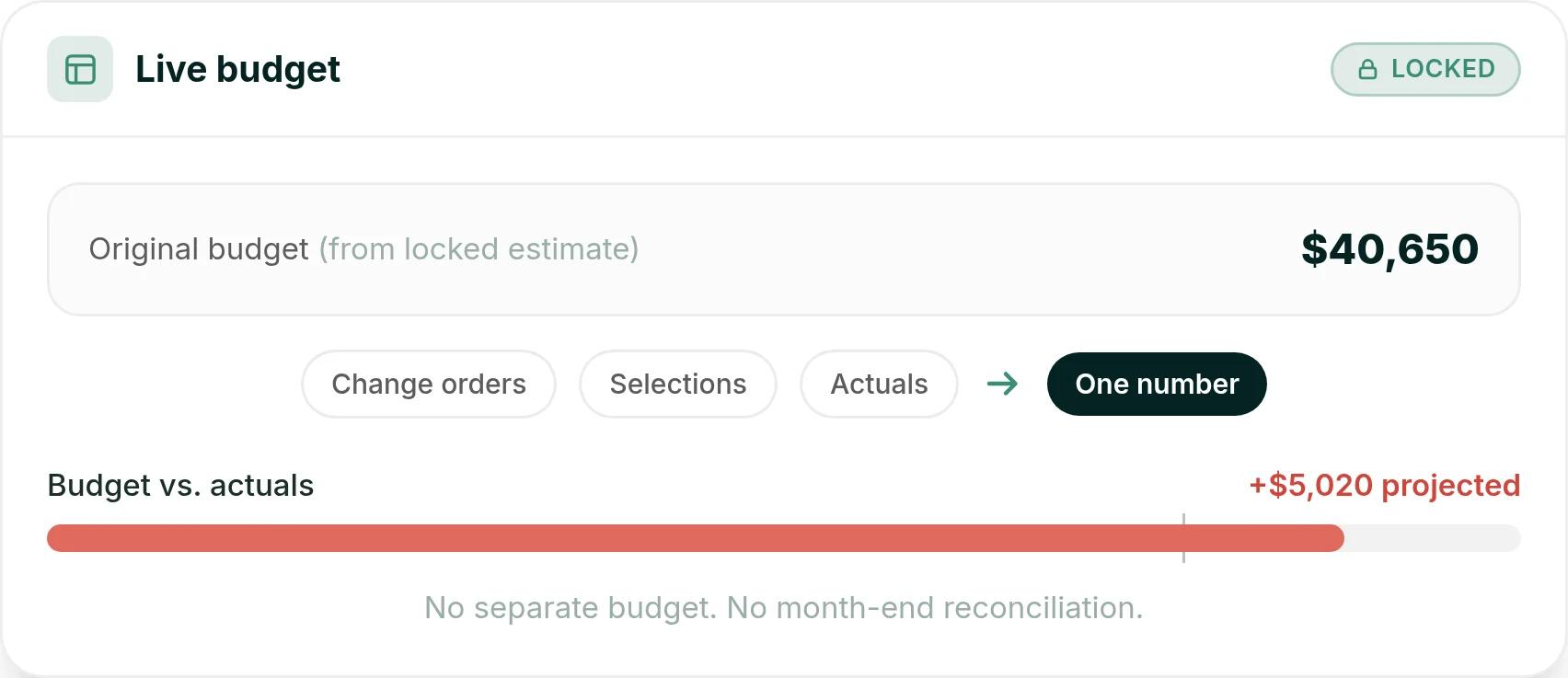
Once the client signs, you lock the estimate and it becomes your live construction budget. Change orders, selections and actual costs all flow back to that same number.
On a hypothetical job, a proposal signed at $40,650 becomes an original budget of $40,650. From then on, every change and every bill lands against it, so there is no second budget to keep.
Changes and selections update the numbers
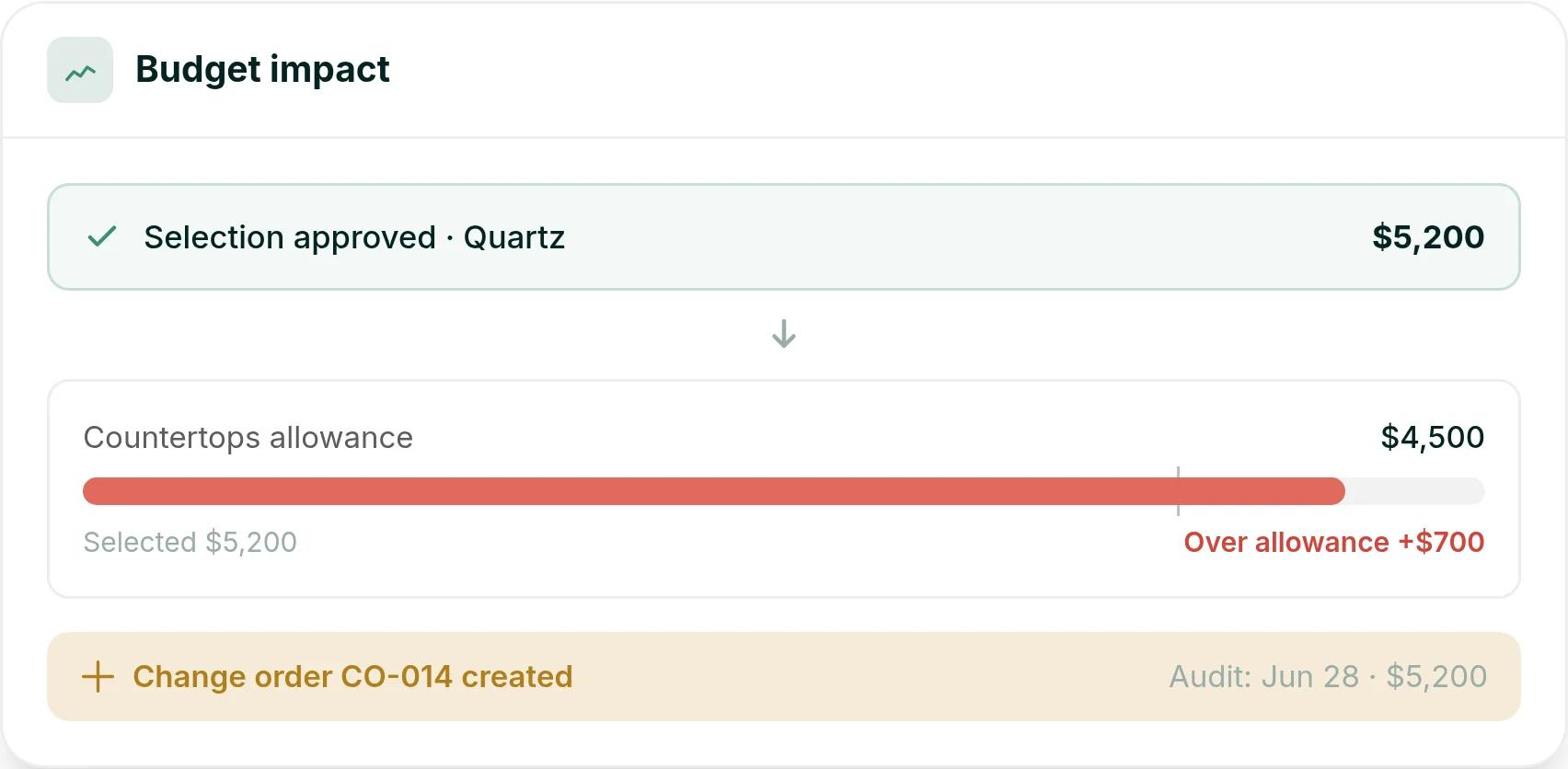
Change orders are built from the line items in your estimate. Client selections work the same way: when a client approves one, the estimate and budget update automatically.
Say a hypothetical client picks a quartz countertop at $5,200 against a $4,500 allowance. Ressio shows the selection $700 over the allowance and creates change order CO-014, before anyone orders the slab.
More than an estimating tool
The same job file carries your schedule, where moving one task reschedules everything after it. Clients see their schedule, approvals and invoices in the client portal. And if you are coming from another tool, we migrate your active jobs for you.
Want to see your own estimate turn into a live budget? Book a Ressio demo and bring a recent quote.
2. JobTread
JobTread covers estimating, takeoff, change orders, customer and vendor portals, and a QuickBooks Online integration. It suits builders and remodelers who want estimating and job management together.
3. Contractor Foreman
Contractor Foreman lists estimates, takeoffs, a client portal, change orders, and QuickBooks and Xero integrations. It suits small crews who want estimating and job tools in one place. Ressio has no feature tiers, so every plan includes the whole product.
4. Houzz Pro
Houzz Pro is software for builders, remodelers and designers, with estimates, takeoffs, scheduling, a client dashboard and change orders. It is the one option here that comes attached to a lead channel, which helps a design-led remodeler whose clients already browse Houzz.
5. BuildBook
BuildBook is aimed at custom home builders, general contractors and remodelers. It has scheduling, change orders and a QuickBooks integration, with a strong focus on client communication.
6. Clear Estimates
Clear Estimates is estimating software for residential remodelers and contractors. It covers the estimating half of what Buildxact does, and its site does not mention scheduling, a client portal or change orders.
7. STACK
STACK is a takeoff and estimating platform. It fits estimators who spend most of their day measuring plans, more than builders who run the whole job.
How to choose a Buildxact alternative
Pick the tool that matches the problem you want solved.
- If you only need faster takeoff, STACK or Clear Estimates cover that.
- If you want the client side to be the focus, look at BuildBook.
- If you build custom homes and want one number to run the job from the first estimate to the final invoice, choose Ressio. The signed estimate becomes the budget, and change orders, selections and invoices all update it.
The best test is a real one. Bring a recent estimate to a Ressio demo and see it become a proposal, a budget and a change order on the same job.
Frequently Asked Questions
What is the best alternative to Buildxact?
For custom and semi-custom home builders, Ressio is the strongest Buildxact alternative. Ressio estimating does the markup math for you, and the signed estimate becomes the job budget, so change orders, selections and invoices all run off one number. For takeoff alone, STACK and Clear Estimates are the closest swaps.
Does Buildxact do project management?
Yes, from its Pro plan, which adds job management, schedules and the Buildxact Onsite mobile app. Its lower plans focus on estimating, takeoffs and quotes. Ressio includes estimating, scheduling, budgets, change orders and a client portal for custom home builders.
Which Buildxact alternative is best for custom home builders?
Ressio is built for custom and semi-custom home builders. The estimate becomes the budget, client selections update it, and clients approve changes from a magic link with no login. That keeps the numbers on a custom build in one place as the job changes.
Can I move my estimates from Buildxact to another tool?
Yes. Ressio migrates your active jobs for you, and every project you build in Ressio becomes a reusable estimate template.