
JobTread pricing explained
JobTread pricing starts with a headline number. The number that matters is not the headline, though. It is the headline plus your team, and that depends on who in your company counts as a paid user.

Ressio Staff
October 9, 2026
How much does JobTread cost?
JobTread costs $199 a month, and that includes one internal user. Each additional internal user is $20 a month, and the per-user price drops in tiers as the team grows.
An annual subscription saves 20%, and there is no contract and no setup fee. Prices are in US dollars.
So a three-person office pays $239 a month on the monthly plan. The tiers only start to matter once you pass ten internal users.
We build Ressio, construction management software for custom home builders and remodelers. This guide covers JobTread pricing first. Then it shows how JobTread and Ressio compare for builders running custom jobs.
How JobTread pricing tiers work
JobTread charges these per-user rates for each additional internal user:
| Internal users | Monthly plan | Annual plan |
|---|---|---|
| 1 | Included | Included |
| 2 to 10 | $20 each | $16 each |
| 11 to 20 | $15 each | $12 each |
| 21 to 30 | $10 each | $8 each |
| 31 and up | $5 each | $4 each |
The price breaks apply only to the users inside each tier. Your eleventh user costs $15, but users two to ten still cost $20 each. Adding users does not lower the rate for the ones you already have.
What JobTread costs at three team sizes
Here is the monthly plan worked through from those rates:
- 3 internal users: $199 plus 2 users at $20, which is $239 a month.
- 8 internal users: $199 plus 7 users at $20, which is $339 a month.
- 15 internal users: $199, plus 9 users at $20, plus 5 users at $15, which is $454 a month.
The annual plan takes about 20% off, per JobTread.
Who counts as a paid user
This is where your JobTread number can move the most.
JobTread charges for internal users. It defines those as employees who need access to manage jobs, see customer and vendor information, build schedules, track time or read reports. Accountants and some other non-employees can count as internal users too, if they need that access.
Some people are free:
- Customers, vendors and subcontractors use an external portal, and those users are free and unlimited.
- Some field crew can also be free users, if all they do in JobTread is upload photos, log daily notes, view their schedule or check off tasks.
A field hand who only uploads photos may be free, while a lead carpenter who also tracks time or edits the schedule is likely a paid user. Which group each person lands in changes your total more than the tiers do.
What JobTread's price includes
The monthly price includes:
- every feature, with no separate modules to buy
- implementation, training and support, at no extra charge
- no contract and no setup fee
- a 30-day money-back guarantee on the monthly plan
JobTread vs Ressio: how they compare
JobTread is built for a wide range of trades, from home builders and remodelers to pool builders, roofers and commercial contractors. Ressio is built specifically for custom home builders and remodelers.
| JobTread | Ressio | |
|---|---|---|
| Built for | Home builders, remodelers, pool builders, roofers, specialty and commercial contractors | Custom home builders and remodelers |
| Estimate to budget | A budget-first setup that ties estimates, orders and bills to budget items | The approved estimate locks and becomes your live budget |
| Selections and allowances | Selections tied to allowances, with change orders for overages | A selection over allowance creates a change order and updates the budget |
| Client and sub access | Customer, sub and vendor portals opened from an emailed link, with no username or password | Clients and subs tap a link, with no account or password |
| Spend control | POs and work orders tied to budget items, shown as committed cost | Purchase orders tied to a budget line, with an alert before one goes over |
| Getting paid | Invoices from the estimate, payment schedules, and ACH or card payments | Invoices built from the budget, with draw schedules and payment by ACH or card |
| AI | Built-in AI tools for budgets, formulas and forms | Mason, an AI layer connected to your project data |
Ressio users rate us 5 out of 5 on Capterra, with 5.0 for customer service. For a side-by-side on more than price, see our full Ressio vs JobTread comparison.
When a signed change is missing from your next draw
Custom jobs change, and every change has to reach the contract, the budget and the next invoice. Miss one of the three and the draw you send no longer matches what your client signed.
In Ressio that happens once, from one approval. Here is a hypothetical kitchen job.
Partway through, your client asks for pantry shelves on the upper cabinet run. You build the change order from the estimate line for $1,250 and send it to the client portal. Your client opens it from a link and signs it from their phone.
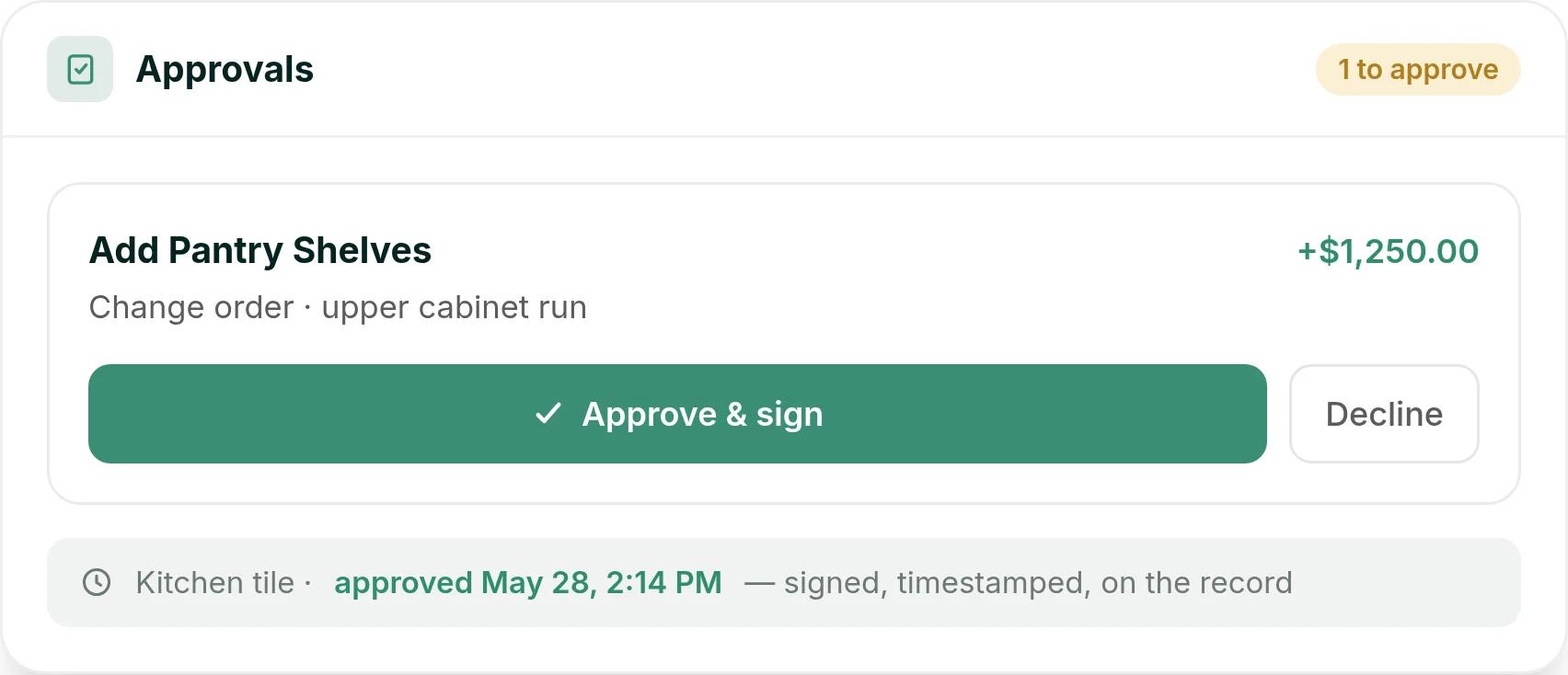
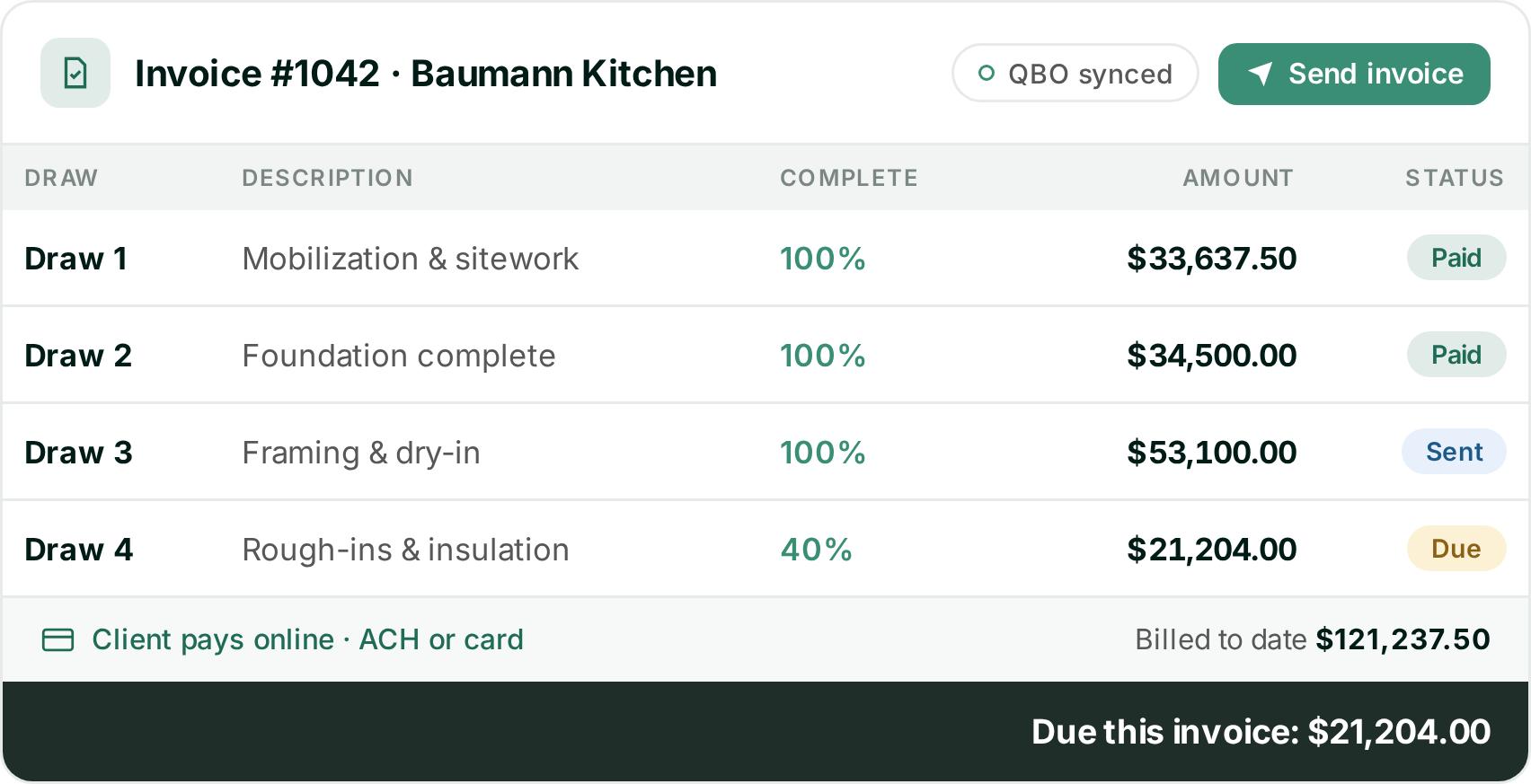
The approved change is already in the budget when you bill the next draw. Your invoice is built from that budget, shows each draw as paid, sent or due, and your client pays online by ACH or card.
Before you sign up
The split between paid and free users moves your JobTread price more than the tier rates do.
If your jobs are custom builds with allowances, change orders and draws, book a Ressio demo. You will see how one approval reaches the contract, the budget and the next invoice on a job like yours, with no commitment.
Frequently Asked Questions
How much does JobTread cost per month?
JobTread costs $199 a month with one internal user included, plus $20 a month for each additional internal user up to ten. After ten users the per-user price drops in tiers. Prices are in US dollars.
Does JobTread charge per user?
Yes, for internal users. Customers, vendors and subcontractors use a free external portal, and some field crew can be free if they only upload photos, log daily notes, view their schedule or check off tasks.
Does JobTread have a setup fee or a contract?
No. There is no contract and no setup fee, and implementation, training and support are included.
Is JobTread cheaper on an annual plan?
Yes. JobTread says an annual subscription saves 20%, and its annual per-user rates are lower in every tier, for example $16 instead of $20 for users two to ten.
What does JobTread cost for a team of 10?
On the monthly plan, $199 plus nine additional users at $20 each, which is $379 a month.