BuildBook Alternatives: 5 Options for Custom Home Builders
BuildBook is a simple all-in-one app for builders and remodelers. If you want purchase orders tied to your budget, here are the options worth a look.

Ressio Staff
October 31, 2026

BuildBook is residential construction management software for custom home builders and remodelers. It puts sales, estimating, scheduling, selections, budgets and a client dashboard in one simple app.
If you're looking at BuildBook, you're probably comparing a few BuildBook alternatives before you commit. Some builders are still deciding. Others have read BuildBook reviews, tried the app, and want tighter control of the money on each job.
This guide covers five options and who each one fits. We build Ressio, construction management software for custom and semi-custom home builders, so that's the lens we use.
BuildBook alternatives at a glance
| Product | Built for | Strongest at |
|---|---|---|
| BuildBook | Custom home builders and remodelers | A simple all-in-one app that needs zero training |
| Ressio | Custom and semi-custom home builders | One estimate that runs the budget, selections, change orders, purchase orders and invoices |
| JobTread | Builders, remodelers and specialty trades | Estimating and job finances with customer and vendor portals |
| Buildxact | Residential builders and remodelers | Takeoff and estimating, with job management on its higher plan |
| Houzz Pro | Remodeling and design pros | Estimates and client tools tied to the Houzz platform |
| Contractor Foreman | Small residential and commercial contractors | A long list of office and field tools |
Why builders compare BuildBook with other tools
BuildBook is built to be simple, and that suits a small team. As custom jobs get bigger, builders need tight control of three things: allowances, change orders, and what they've promised to pay subs and suppliers.
BuildBook lists budgets, client selections, and bills and expenses, and you can invite subs to a project. It doesn't list purchase orders.
On a custom home, that gap is where margin slips away. A sub's bill shows up higher than the number you agreed to, and you find out when you pay it.
1. Ressio: best for custom home builders who want one budget to run the job
With Ressio, we help custom builders enter the numbers once. Your estimate becomes the budget.
Then selections, change orders, purchase orders and invoices all update that same number. Here's how that works on a hypothetical custom home.
Your estimate becomes your live budget
The pain: you win the job with an estimate, then rebuild it as a budget somewhere else. Two sets of numbers start to drift.
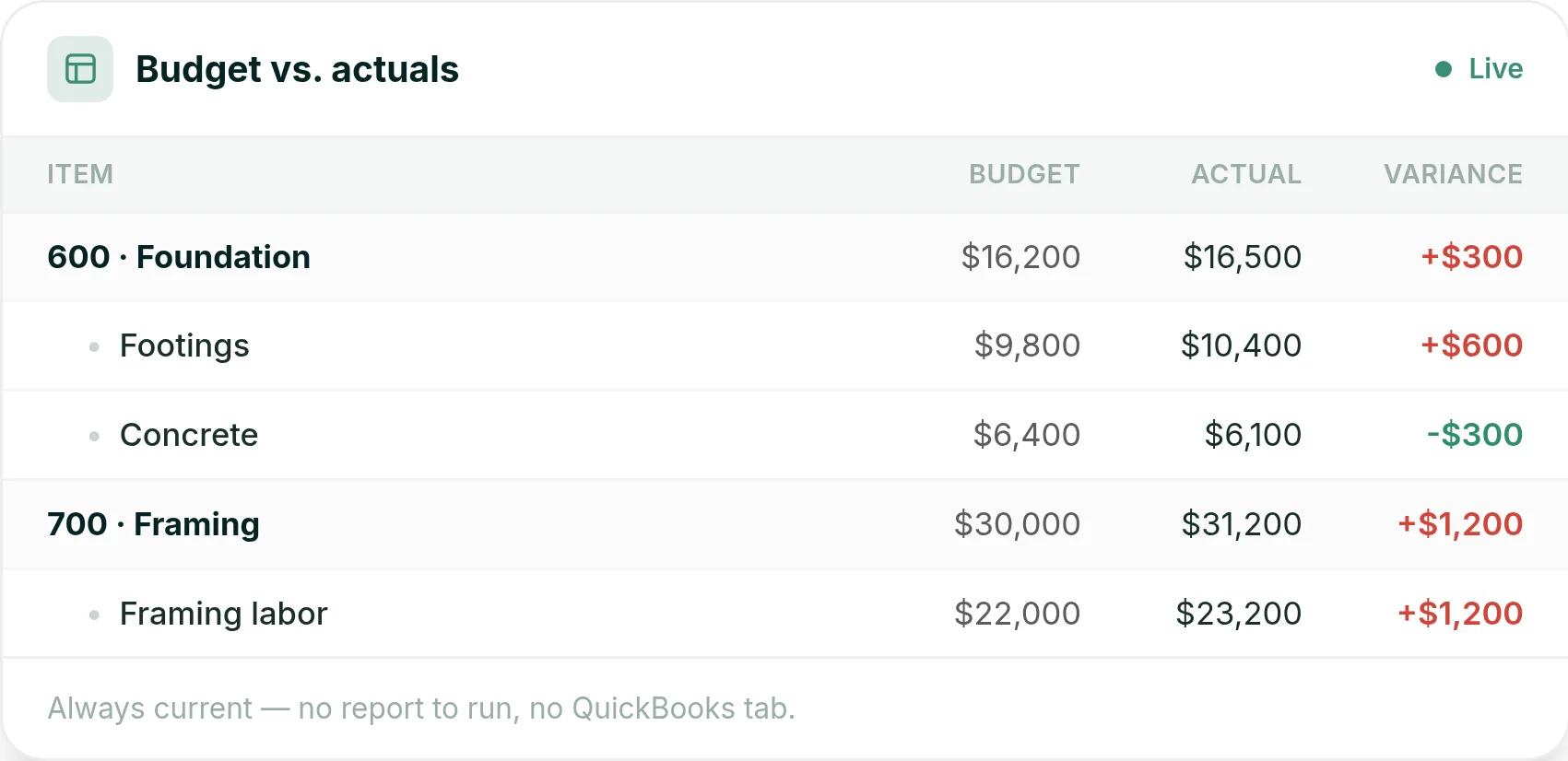
In Ressio estimating, you build the estimate with your own cost codes. When the client signs, you lock it and it becomes your live budget. Bills, time entries and expenses post against it as they happen.
Say your framing labor line is $22,000. Bills come in at $23,200. You see the $1,200 overrun the day it posts, not at closeout.
Every bill lands on its cost code, so the overrun shows up while you can still act on it.
Selections over allowance turn into change orders
The pain: a client picks a pricier countertop, and nobody updates the budget. At closeout, you argue about who agreed to pay the difference.
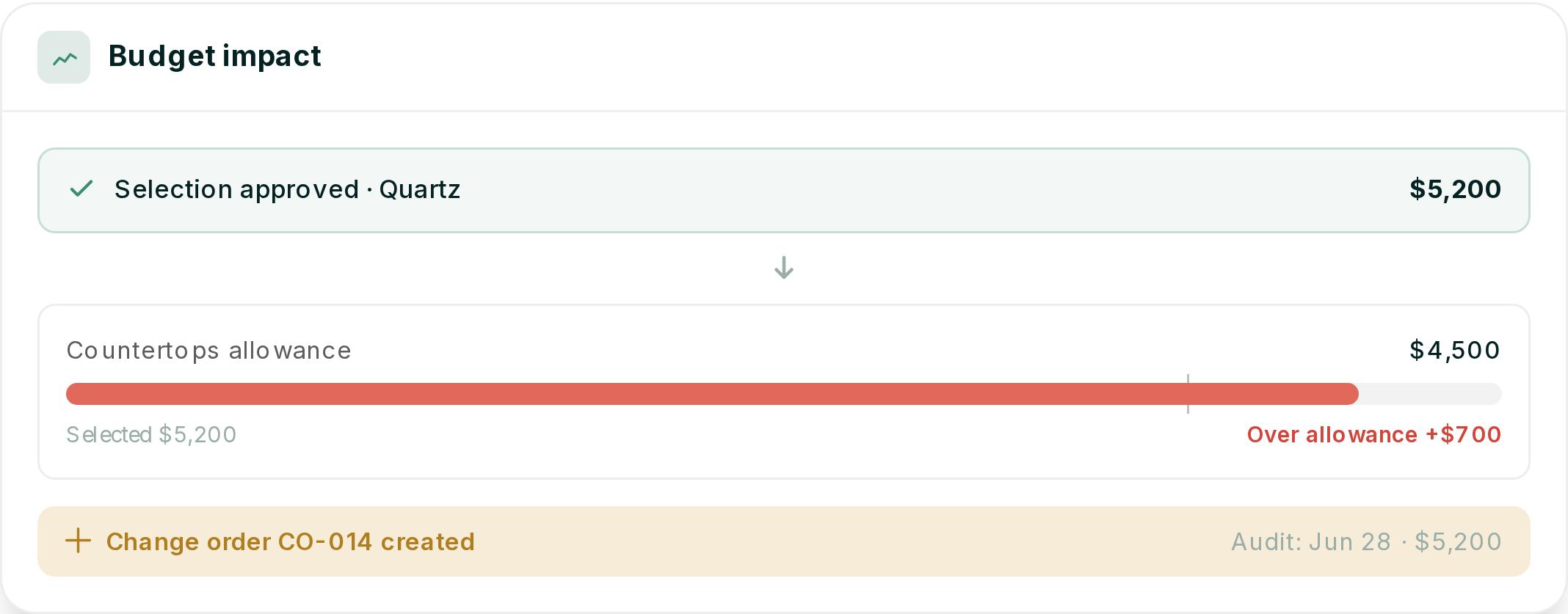
With Ressio selections and approvals, each selection tracks against its allowance.
Picture a client who picks a quartz countertop at $5,200 against a $4,500 allowance. When they approve it, we flag it $700 over and create change order CO-014. The budget updates on its own.
Clients approve changes from one link
The pain: approvals happen by text or on site. Months later, the client says they never agreed to the extra cost.
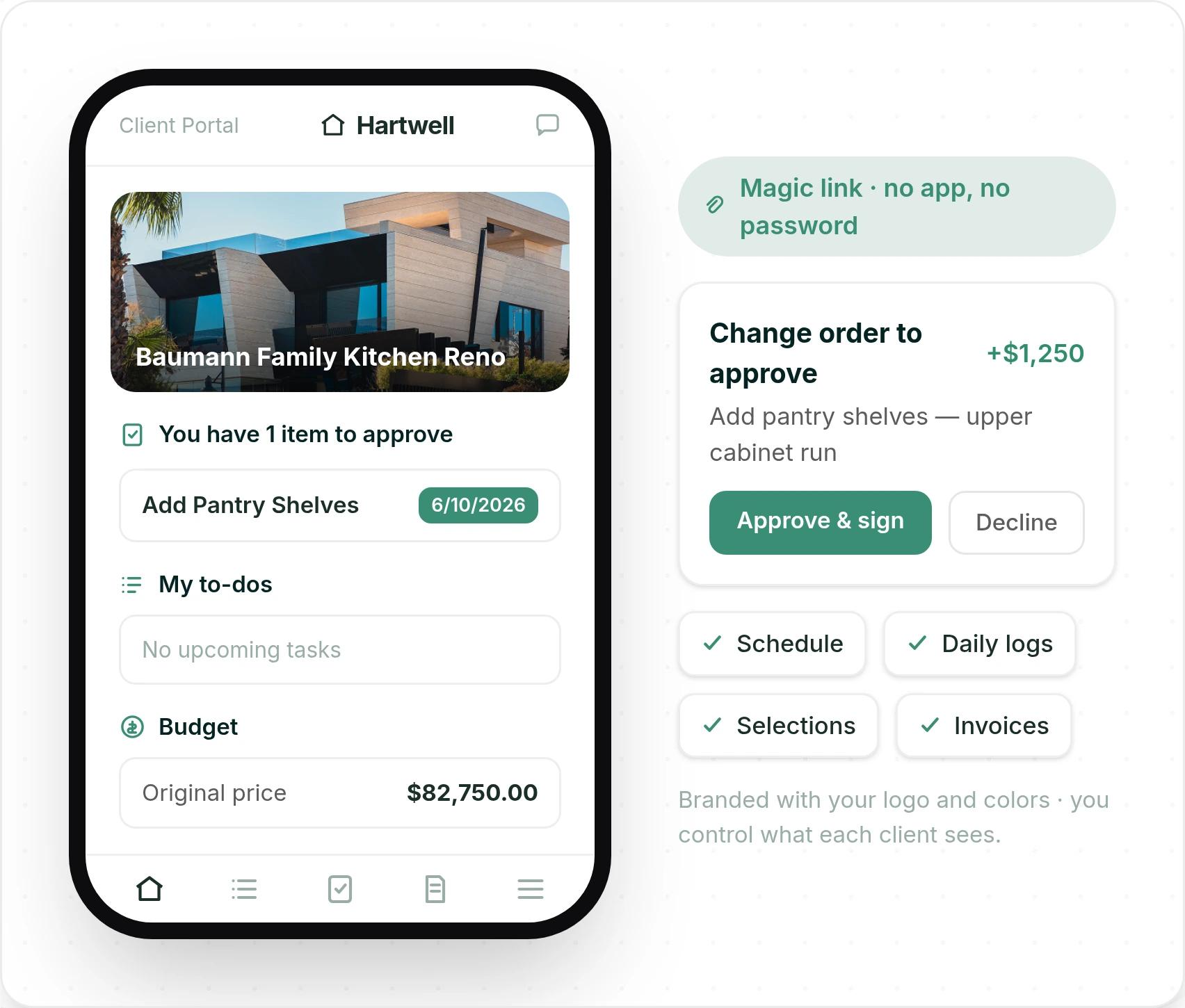
In Ressio, every approval request goes out with a magic link. Your client taps it and lands in their client portal, with no account, no password and no app.
Say your client wants pantry shelves added to the upper cabinet run. They see the $1,250 change order, tap Approve and sign, and the approval is timestamped on the project.
One tap from the email, and the signed approval is on the record with the date and time.
Purchase orders catch overruns before you pay
The pain: a supplier bill arrives bigger than you expected, and the money is already gone.
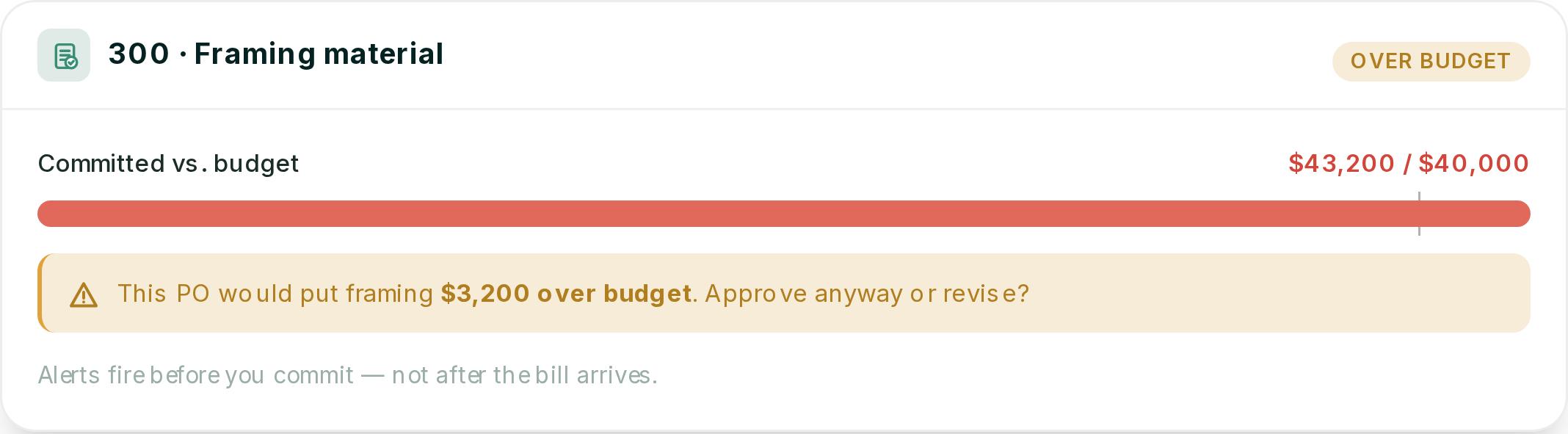
Ressio purchase orders tie each commitment to a job and a budget line. If a new PO would push framing $3,200 over budget, you get an alert before you issue it.
When the bill arrives, you match it to the PO, and we flag anything over the agreed amount. Your subs and suppliers see their POs, tasks and drawings in the vendor portal, also by magic link.
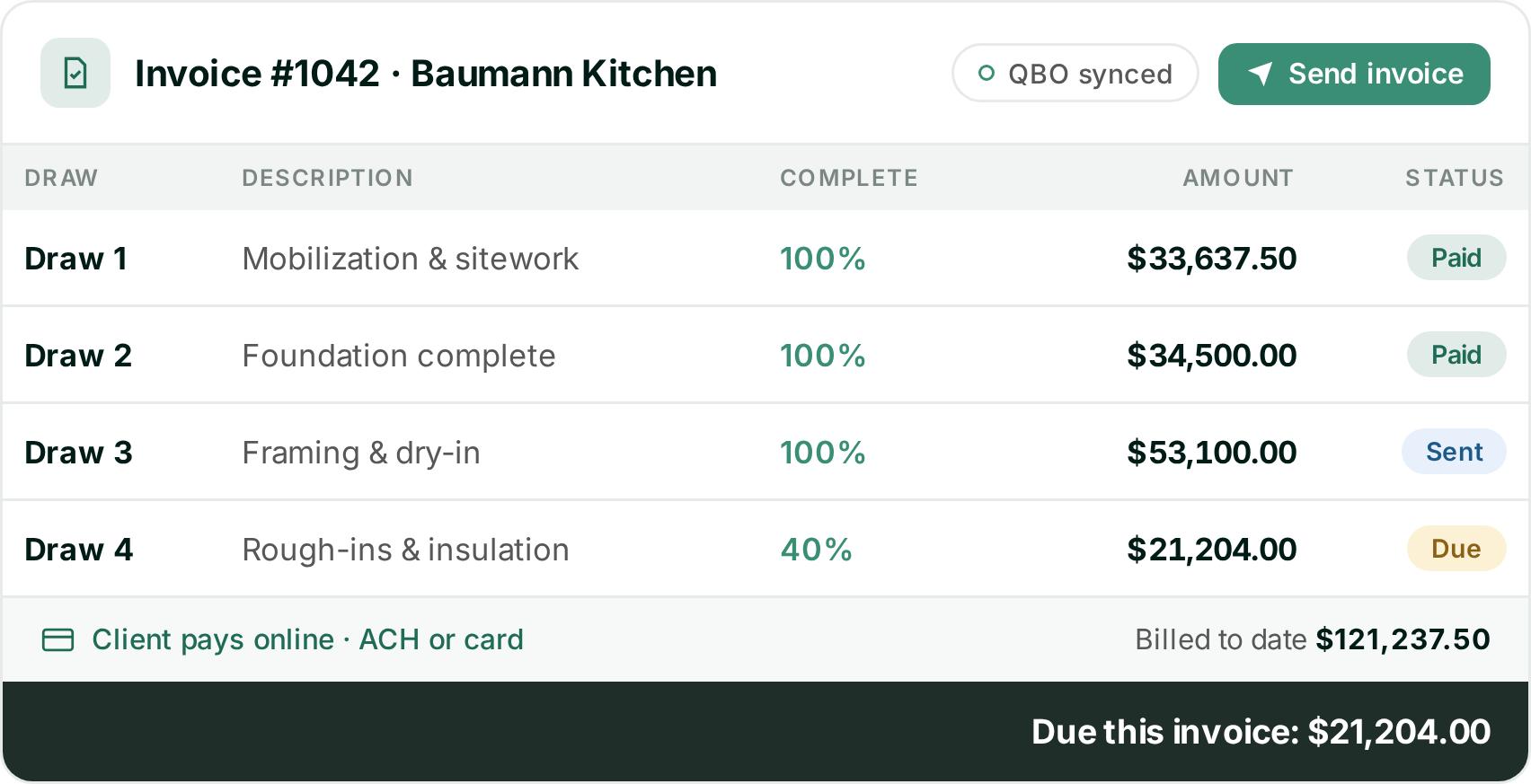
Draws come straight from the budget
The pain: you build each draw invoice by hand, then type it into QuickBooks again.
With Ressio invoicing, draws are built from the budget, with approved change orders already counted. Your client pays online by ACH or card. Bills, invoices and payments sync to QuickBooks Online, so your books match the job.
Each draw shows its percent complete and status, and the invoice syncs to QuickBooks when you send it.
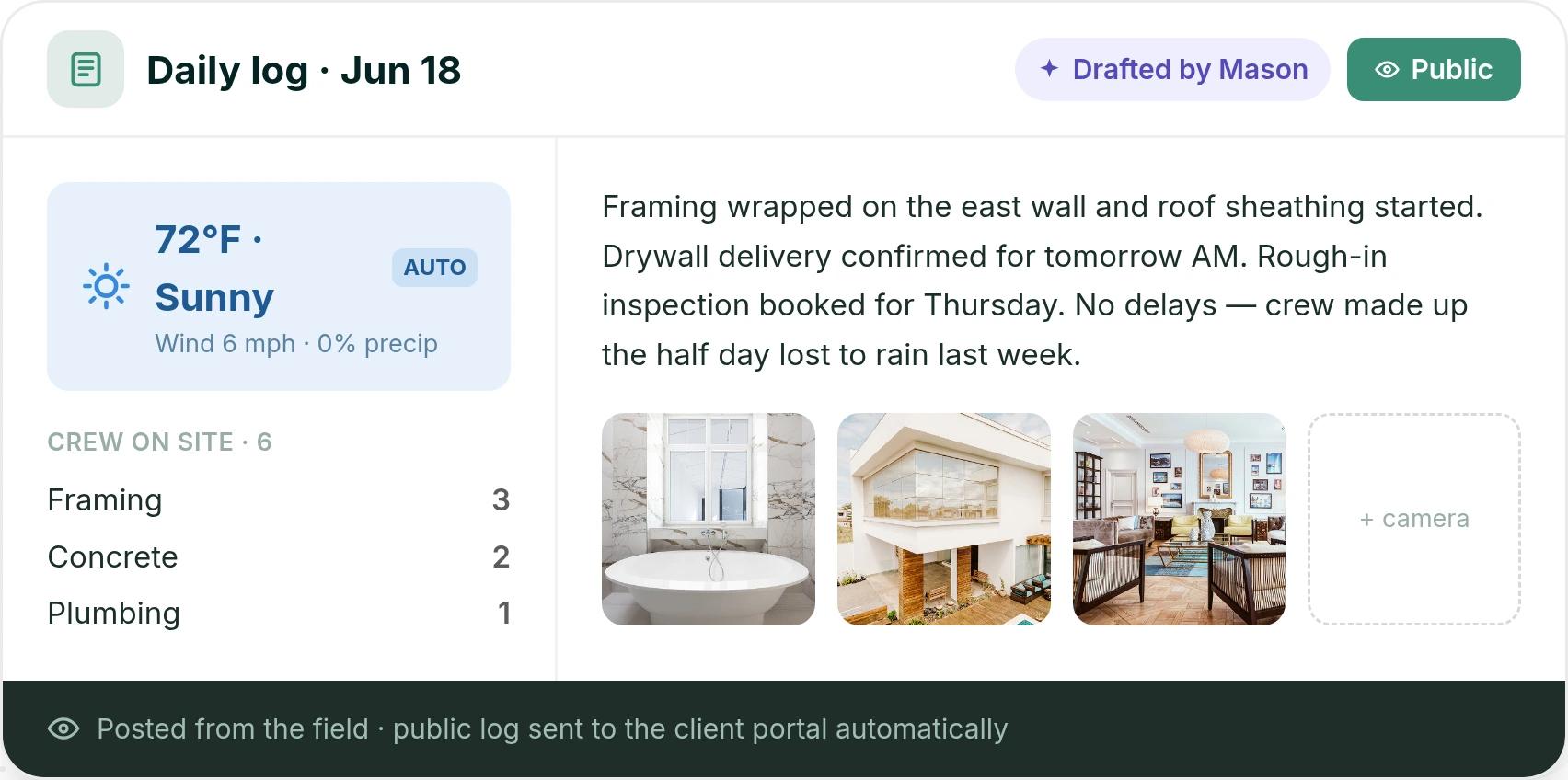
Clients see progress without calling you
Your super fills in the daily log from the field. Weather fills in on its own. Logs you mark public show up in the client portal, and your internal notes stay hidden.
A public log goes to the client portal the moment it's posted, so fewer "just checking in" calls.
Switching tools mid-build is the part most builders dread. We migrate your active jobs for you. A former BuildBook onboarding specialist also wrote about why they chose Ressio.
Want to see your allowances, change orders and draws run off one budget? Book a Ressio demo and bring a job you're running now.
2. JobTread
JobTread is construction estimating and project management software. It lists budgeting, change orders, purchase orders, selections, and customer and vendor portals.
Best for: contractors who work across many trades. JobTread serves home builders and remodelers, but also pool builders, roofers, specialty trades and commercial contractors.
What it does well: estimating, job costing and support. Customer and vendor portal users are free and unlimited. Bob H., an owner, wrote: "It saves me hours on budgeting, estimating, and job costing" (Capterra).
Where it struggles: selections and first setup. Philip K., a COO at a firm of 2 to 10 people, put it in five words: "Selections has a clunky UI" (Capterra). Reviewers also mention a long first setup.
How Ressio compares: we build Ressio only for custom and semi-custom homes. See the full Ressio vs JobTread comparison.
Pricing: JobTread is $199 a month with one internal user, plus $20 a month for each added internal user up to ten. Annual plans save 20%, and there is no contract or setup fee.
3. Buildxact
Buildxact is estimating and takeoff software for residential builders and remodelers. Its plans split between "I need to estimate and bid" and "I need job management," with job management on the higher plan.
Best for: builders and renovators whose biggest job is quoting, and who mostly need takeoffs and fast estimates.
What it does well: estimating. Dario W., an estimator, wrote that it "makes it much easier to create accurate estimates without relying on multiple spreadsheets" (Capterra).
Where it struggles: job management on the base plan. Schedules, selections, change orders and the client portal start on the Pro plan. Jacob C., a managing director, wrote: "It doesnt have the ability to pre-set cost codes" (Capterra).
How Ressio compares: Ressio estimating works with NAHB, CSI, NARI or your own divisions. Our guide to Buildxact alternatives covers that choice in more detail.
Pricing: Go is free. Foundation is $199 a month, Pro is $399 and Master is $599. Annual plans take 15% off.
4. Houzz Pro
Houzz Pro is software for the home remodeling and design industry, from interior designers to new construction. It lists estimates, takeoffs, a client dashboard, change orders, selections and scheduling, plus marketing tools tied to Houzz.
Best for: interior designers and design-led remodelers whose work starts on Houzz.
What it does well: design tools and the client view. Patrick K., a vice president at a construction firm of 11 to 50 people, said his clients "can track the job progress, approve material selections, and make secure payments online" (Capterra).
Where it struggles: the budget tool, for some users. Geoffrey P., a VP of project management, wrote: "The budget tool is way too basic. The takeoffs aren't linked with the associated estimate for live edits" (Capterra).
How Ressio compares: our side-by-side page covers the differences. See Ressio vs Houzz Pro.
Pricing: the Design plan starts at $99 a month for one user. Change orders, budgets and schedules come with Pro, from $199 a month. Plans run yearly after a 30-day free trial, and advertising packages cost extra.
5. Contractor Foreman
Contractor Foreman is built for small and medium residential and commercial contractors, including trade and service contractors. It lists a long set of tools, from service tickets and permits to purchase orders and time cards.
Best for: mixed shops that run service calls, trade work and commercial jobs, and want many tools for a low monthly price.
What it does well: value. Nick H., a consultant at a firm of 11 to 50 people, wrote: "It is simplistic, and allows for great overall project management at a fair price" (Capterra).
Where it struggles: large estimates. Paul G., a project manager, wrote: "When making very large estimates the software slows down a lot" (Capterra).
How Ressio compares: we built Ressio estimating for complex, multi-phase custom builds, and that estimate feeds one budget. See Ressio vs Contractor Foreman.
Pricing: plans start at $49 a month for one user on an annual plan. Standard is $105 a month for up to three users. There is a 30-day free trial and a 100-day money-back guarantee.
Comparing Buildertrend too? We cover that in Ressio vs Buildertrend.
How to choose between BuildBook and its alternatives
Pick the tool that matches the problem you want gone.
- If you want a simple app for a small team, BuildBook is a fair fit.
- If estimating speed is your main problem, look at Buildxact.
- If your work starts on Houzz, look at Houzz Pro.
- If you build custom homes and want allowances, change orders, purchase orders and draws on one budget, choose Ressio.
For a closer look at BuildBook's plans, see our BuildBook pricing guide.
See one budget run the whole job
A custom home changes every week. The tool you pick should keep every change on the same budget, from the first estimate to the final draw.
Book a Ressio demo and we'll walk a job like yours from estimate to final invoice.
Frequently Asked Questions
What is the best BuildBook alternative for custom home builders?
For custom and semi-custom home builders, we built Ressio to be the strongest BuildBook alternative. Your signed estimate becomes the budget. Selections, change orders, purchase orders and draw invoices all update that one number.
Is BuildBook good for custom home builders?
Yes, for many small teams. BuildBook is aimed at custom home builders and remodelers, and it's built to need no training. Builders who want purchase orders tied to budget lines often look at Ressio as well.
Can I switch from BuildBook without starting over?
Yes. When you move to Ressio, we migrate your active jobs for you. That means jobs already under way come with you, so you don't rebuild them by hand.
Do clients need an account to approve changes in Ressio?
No. In Ressio, clients get a magic link by email and tap it to approve selections, sign change orders and view invoices from their phone. Every approval is timestamped on the project.
Does BuildBook have a free trial?
BuildBook's sign-up link now leads to a demo request. Its site shows no plan prices.