
BuildBook Pricing Explained: Plans, Features and How It Compares
Every BuildBook plan includes the full product. Here is what each plan covers and how BuildBook compares with Ressio for custom builders.

Ressio Staff
October 9, 2026
BuildBook says every plan includes every feature, so BuildBook pricing is not a choice between feature tiers.
We build Ressio, construction management software for custom home builders and remodelers. This guide covers what BuildBook pricing includes first. Then it shows how BuildBook and Ressio compare, so you can see which one fits the way you build.
How much does BuildBook cost?
BuildBook does not list prices on its pricing page. The page covers who BuildBook is for and how it differs from other software, with no plan names or monthly rates. What it does publish is that every plan carries every feature, covered below.
What BuildBook pricing includes on every plan
BuildBook says every plan includes every feature, with no features blocked. Its comparison pages also list unlimited projects on all paid plans.
The product itself covers the sales side of a residential build, including a contact manager, sales pipeline, estimating and proposals. On the project side it covers scheduling, client selections, budgets, bills and expenses, invoices, daily logs, team and client chat, and a QuickBooks integration.
BuildBook vs Ressio: how they compare
BuildBook and Ressio both serve custom home builders and remodelers. BuildBook is built to be simple, with every feature on every plan and a promise of zero training. Ressio is built around one idea: the estimate you win the job with should run the rest of the job.
| BuildBook | Ressio | |
|---|---|---|
| Built around | A simple tool for a small team | One estimate that drives the budget, change orders, approvals and invoices |
| Estimate to budget | Won estimates convert into a full budget in one click | The approved estimate locks and becomes your live budget |
| Change orders | Change orders tracked, with client visibility controls | Built from the estimate lines, and the budget updates when the client approves |
| Client selections | Client selections, with allowances tracked against actual costs | Selections tracked against allowances, and one over allowance creates a change order |
| Client and sub access | Client dashboard, team and client chat, and public links with no app required | Clients and subs tap a link, with no account or password |
| Spend control | Bills and expenses | Purchase orders tied to a budget line, with an alert before one goes over |
| Accounting | QuickBooks integration | Two-way QuickBooks Online sync of bills, invoices and payments |
If a small team and a simple tool matter most, BuildBook is a good fit. If you want purchase orders tied to budget lines, Ressio is built for that. Ressio users rate us 5 out of 5 on Capterra, with 5.0 for customer service.
How Ressio keeps a custom build on budget
If you build custom homes, the bigger cost is usually a budget that drifts while allowances and change orders pile up. An upgrade over the allowance often goes unpriced until the invoice arrives. A purchase order may not show on the budget until it is billed.
Ressio connects the client’s choices to your budget the moment they make them. Here is how that plays out on a hypothetical kitchen job.
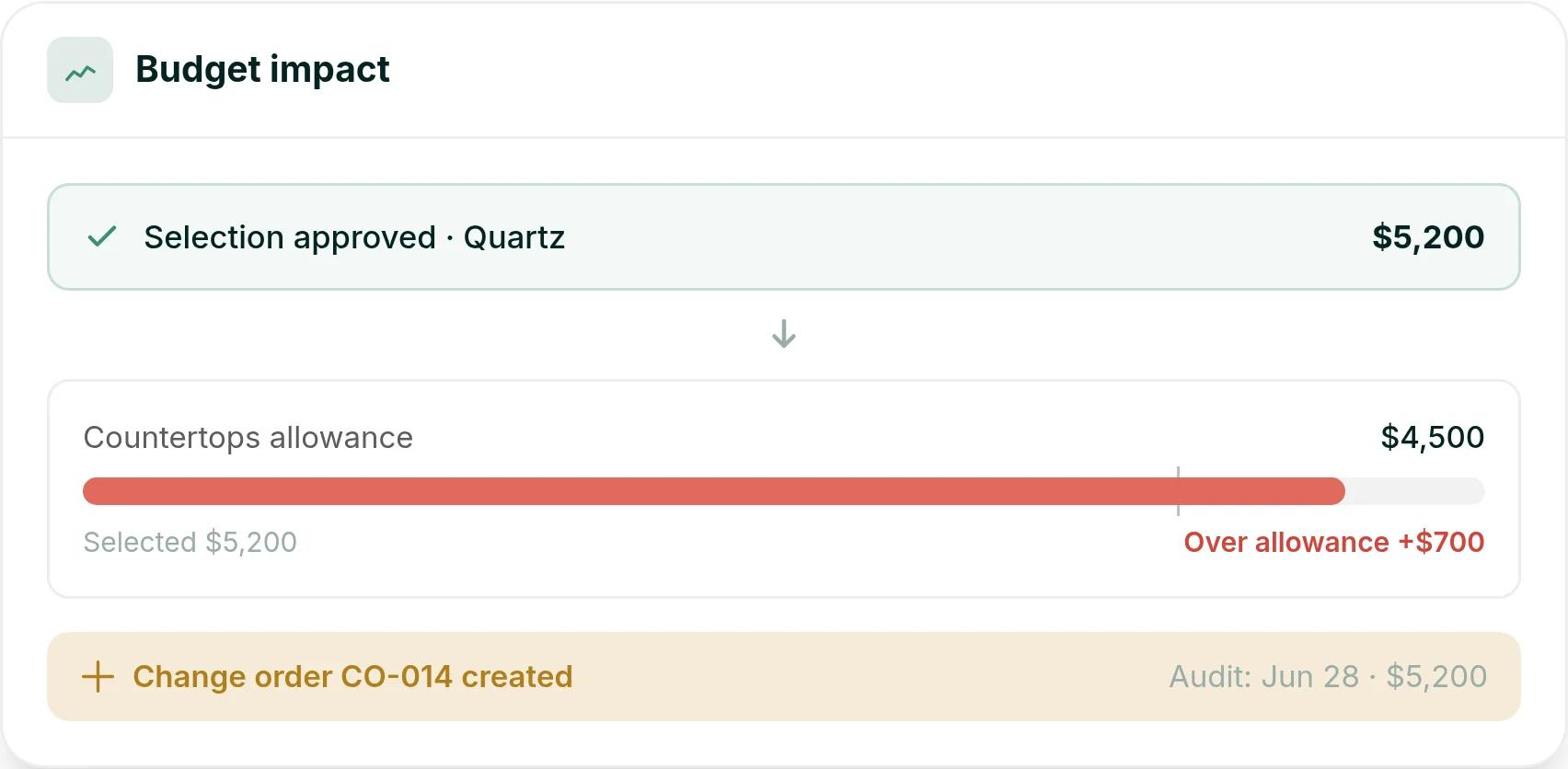
Your client picks a quartz countertop at $5,200 against a $4,500 allowance. They approve it from a magic link on their phone, with no account to set up. Ressio timestamps the approval, flags it $700 over the allowance and creates change order CO-014.
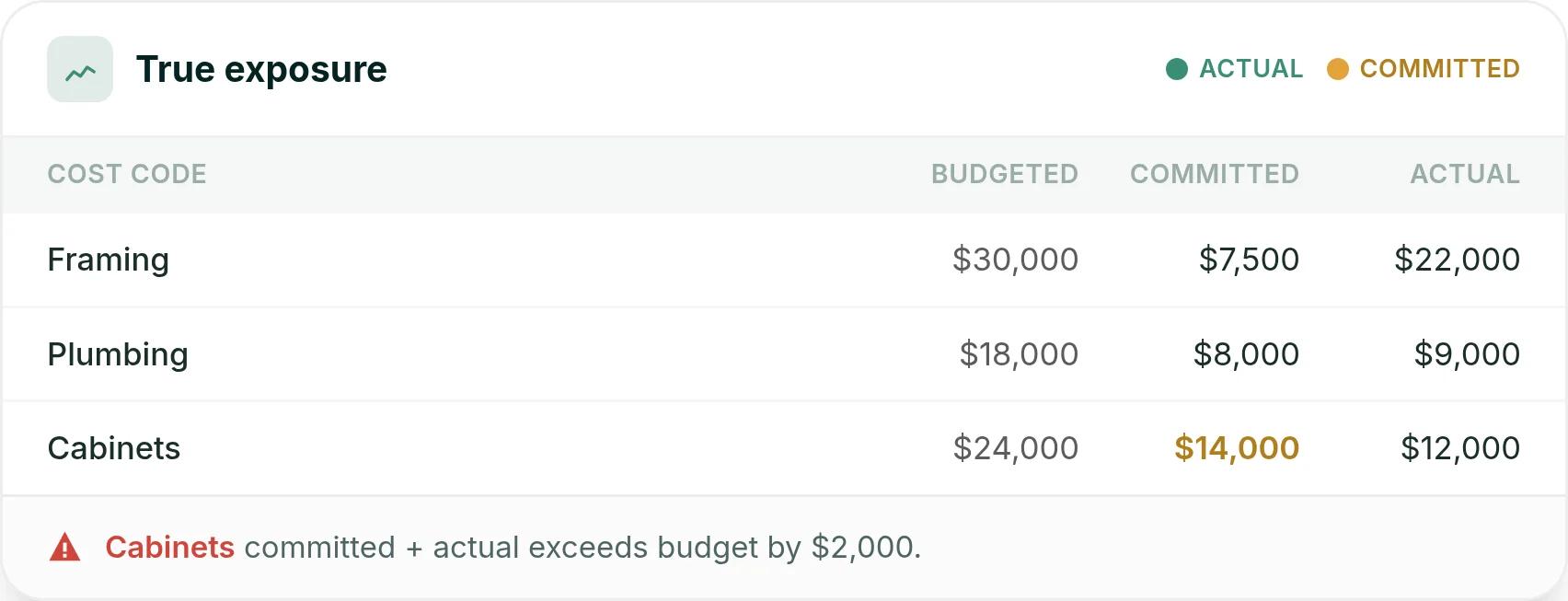
Halfway through the build, the cabinet line has $14,000 committed on approved purchase orders and $12,000 already billed against a $24,000 budget. Ressio counts both in your budget view. So you see cabinets running $2,000 over before the last bill arrives.
A former BuildBook onboarding specialist explains the move to Ressio, covering scheduling history, a single approvals view and lead tracking that runs through to warranty.
Frequently Asked Questions
How much does BuildBook cost per month?
BuildBook does not list a monthly price on its pricing page, and it publishes no plan names or rates.
Does BuildBook charge per user?
The BuildBook pricing page does not say how users affect the price, and it lists no plan rates.
Does BuildBook have a free trial?
Not as a self-serve sign-up. The sign-up link on the BuildBook site now leads to a demo request form, so new users start with a demo.
Are all BuildBook features on every plan?
Yes. BuildBook says every feature is on every plan, with no features blocked.
Does BuildBook limit projects?
No. The comparison pages on the BuildBook site list unlimited projects on all paid plans.
Before you sign up
With every feature on every BuildBook plan, the choice comes down to how you run a job: a simple tool for a small team, or one estimate that drives the budget.
Book a Ressio demo and see how a job like yours runs from estimate to final draw, with no commitment.