
NAHB Cost Codes: A Starter List for Custom Home Builders
NAHB cost codes give every dollar on a custom home a place to land. Here is a starter list built on NAHB's eight construction stages, and how to run it from estimate to budget.

Ressio Staff
October 9, 2026
NAHB cost codes are the numbered categories that home builders use to sort every construction cost, based on the National Association of Home Builders chart of accounts. They give each bill, PO and hour of labor a place to land, so you can see what a house cost you to build.
This guide gives you a starter NAHB cost code list, laid out by the eight stages of building a home. It also covers construction phase codes, how many codes a custom builder needs, and where a spreadsheet stops keeping up.
At Ressio, we build construction management software for custom and semi-custom home builders. Our estimates can run on NAHB divisions from day one, so the code list below drops straight into a Ressio estimate.
What are NAHB cost codes?
NAHB cost codes are the job cost categories that sit under the NAHB Chart of Accounts. That chart is the standard bookkeeping layout NAHB publishes for builders. NAHB cost codes break one big number, direct construction cost, into trades and stages you can track.
In the NAHB Chart of Accounts, account 1430 holds all direct construction cost. That covers permits, labor, materials, trade contractors and equipment rentals.
The chart says this account must be backed by a job cost record for each house. Your cost codes are that record.
Remodelers and some builders post costs straight to cost of sales instead. For them, the chart offers the 3800 series:
- 3810 Direct labor
- 3820 Labor burden
- 3830 Building material
- 3840 Trade contractors
- 3850 Rental equipment
- 3860 Other direct construction costs
- 3870 Professional design fees
NAHB cost code list for custom home builders
The list below follows the eight construction stages NAHB uses in its Cost of Constructing a Home 2024 study. We give each stage its own block of 100.
The numbering is our starter layout, not an official NAHB list. The last column shows that item's share of total construction cost in the 2024 survey, where the average construction cost was $428,215.
| Code | Cost item | Share of construction cost |
|---|---|---|
| 100 | Site work | 7.6% |
| 101 | Building permit fees | 1.8% |
| 102 | Impact fees | 1.5% |
| 103 | Water and sewer fees, inspections | 1.5% |
| 104 | Architecture and engineering | 1.5% |
| 199 | Other site work | 1.4% |
| 200 | Foundations | 10.5% |
| 201 | Excavation, foundation, concrete, retaining walls and backfill | 10.0% |
| 299 | Other foundation | 0.4% |
| 300 | Framing | 16.6% |
| 301 | Framing, including roof | 11.6% |
| 302 | Trusses | 3.0% |
| 303 | Sheathing | 1.5% |
| 304 | General metal and steel | 0.4% |
| 400 | Exterior finishes | 13.4% |
| 401 | Exterior wall finish | 5.7% |
| 402 | Roofing | 3.9% |
| 403 | Windows and doors, including garage door | 3.7% |
| 500 | Major systems rough-ins | 19.2% |
| 501 | Plumbing, except fixtures | 6.3% |
| 502 | Electrical, except fixtures | 6.4% |
| 503 | HVAC | 6.3% |
| 600 | Interior finishes | 24.1% |
| 601 | Insulation | 1.6% |
| 602 | Drywall | 3.3% |
| 603 | Interior trim, doors and mirrors | 3.0% |
| 604 | Painting | 2.6% |
| 605 | Lighting | 1.3% |
| 606 | Cabinets and countertops | 4.5% |
| 607 | Appliances | 1.8% |
| 608 | Flooring | 3.6% |
| 609 | Plumbing fixtures | 1.9% |
| 610 | Fireplace | 0.6% |
| 700 | Final steps | 6.5% |
| 701 | Landscaping | 2.2% |
| 702 | Outdoor structures: deck, patio, porches | 1.1% |
| 703 | Driveway | 2.3% |
| 704 | Clean up | 0.7% |
| 800 | Other | 2.1% |
Interior finishes and rough-ins together make up 43.3% of construction cost. That is where a custom home's numbers move the most, because those are the codes your clients' selections touch.
What are construction phase codes?
Construction phase codes group costs by the stage of the build, like site work, framing or interior finishes. The 100-level headers in the starter list above are phase codes. The numbered lines under them are the cost codes.
Phase codes answer "which part of the house went over?" Cost codes answer "which trade or material did it?" You want both.
A framing phase that runs $4,000 over tells you where to look. The truss line inside it tells you why.
Some builders run on phase codes alone for small jobs. On a custom home, that is usually too coarse. Cabinets and flooring both sit in interior finishes, and they go over budget for different reasons.
How many cost codes does a custom home builder need?
Start with 20 to 40 cost codes. That is enough to see which trade went over, and few enough that your team codes every bill the same way. The starter list above has 31 codes under its eight stage headers.
Add a code only when you need to track something on its own. Split framing into labor and material if you self-perform.
Add a code for a pool or an elevator if you build them often. Delete codes nobody uses, because an unused code is one somebody will pick by mistake.
For the full job costing process, from estimate to closeout, see our guide to construction job costing.
Where do indirect costs and warranty work go?
Indirect costs and warranty work stay out of your direct cost codes. NAHB's chart puts indirect construction cost, like supervision and field office costs, in account 1440 or in the 4000 series. Warranty work after the owner moves in has its own block, 4700 to 4790.
The NAHB warranty accounts are:
- 4710 Salaries and wages, warranty
- 4720 Material, warranty
- 4730 Trade contractor, warranty
- 4790 Other warranty expenses
Keeping these apart matters. If a warranty call on last year's house lands on this year's drywall code, both jobs report the wrong margin.
How do you set up NAHB cost codes in a spreadsheet?
You can run NAHB cost codes in a spreadsheet, and plenty of builders start there. Here is the manual way:
- Copy the cost code list into one tab. Lock it so nobody adds codes on the fly.
- Build each estimate on those codes, one row per code.
- Copy the signed estimate into a budget tab for the job.
- Code every bill, PO and time sheet to a line as it comes in.
- Add approved change orders to the right line by hand.
- Compare budget to actual each week.
That works for one or two houses. It breaks when you have five going at once.
The estimate, the budget and the books each hold their own copy of the numbers. A change order gets added to one and not the other.
A lumber PO sits in an email, so the budget looks fine until the bill shows up. And your bookkeeper re-keys every bill into QuickBooks with a code that may not match yours.
In Ressio, the estimate, the budget, your purchase orders and your QuickBooks sync all run on the same cost codes, so there is one copy of the numbers. A PO counts against its budget line as committed cost the moment you issue it, so that lumber order no longer sits unseen in an email.
Catch an overrun on the PO, not the bill
Here is how that plays out on a hypothetical custom home. You split framing into labor and material, and your budget carries $40,000 on code 300, framing material.
You issue lumber purchase orders against 300, so the budget shows that money as committed before any bill arrives. Then a second lumber order comes up that would take committed cost on 300 to $43,200.
That is $3,200 over the line's $40,000 budget. We show you that alert before you issue the PO, and you choose to approve it anyway or revise it.
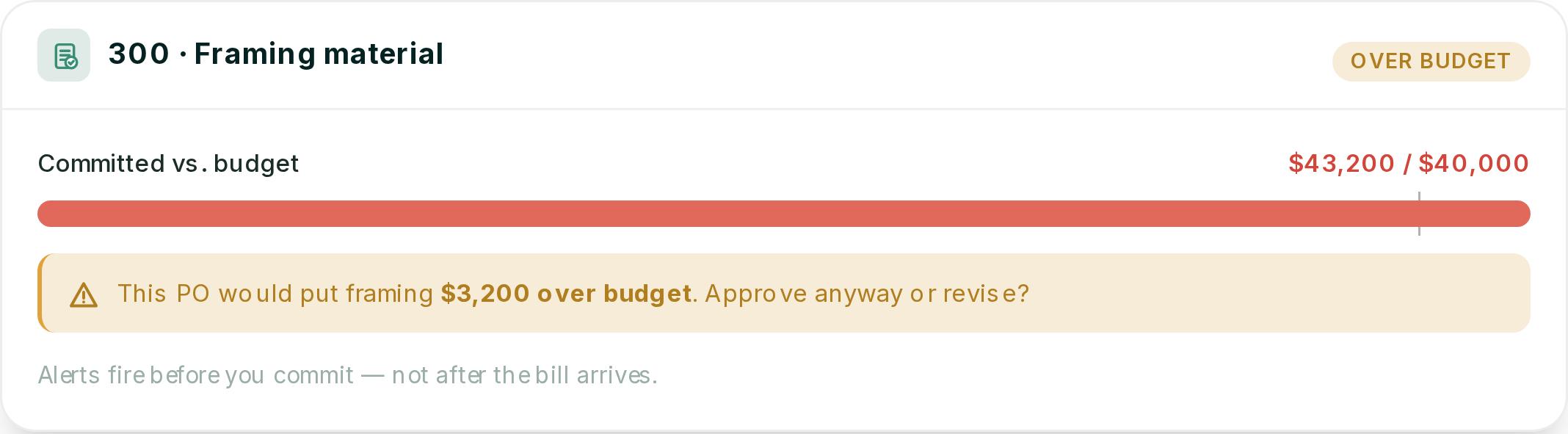
You can push back on the supplier, find the savings elsewhere, or price it to the client while there is still time.
How we run NAHB cost codes in Ressio, from estimate to closeout
In Ressio, you set up your NAHB cost codes once and they follow the job all the way through. The same codes run your estimate, your budget, your purchase orders, your change orders and your QuickBooks sync. You never copy a number from one place to the next.
Build the estimate on NAHB divisions
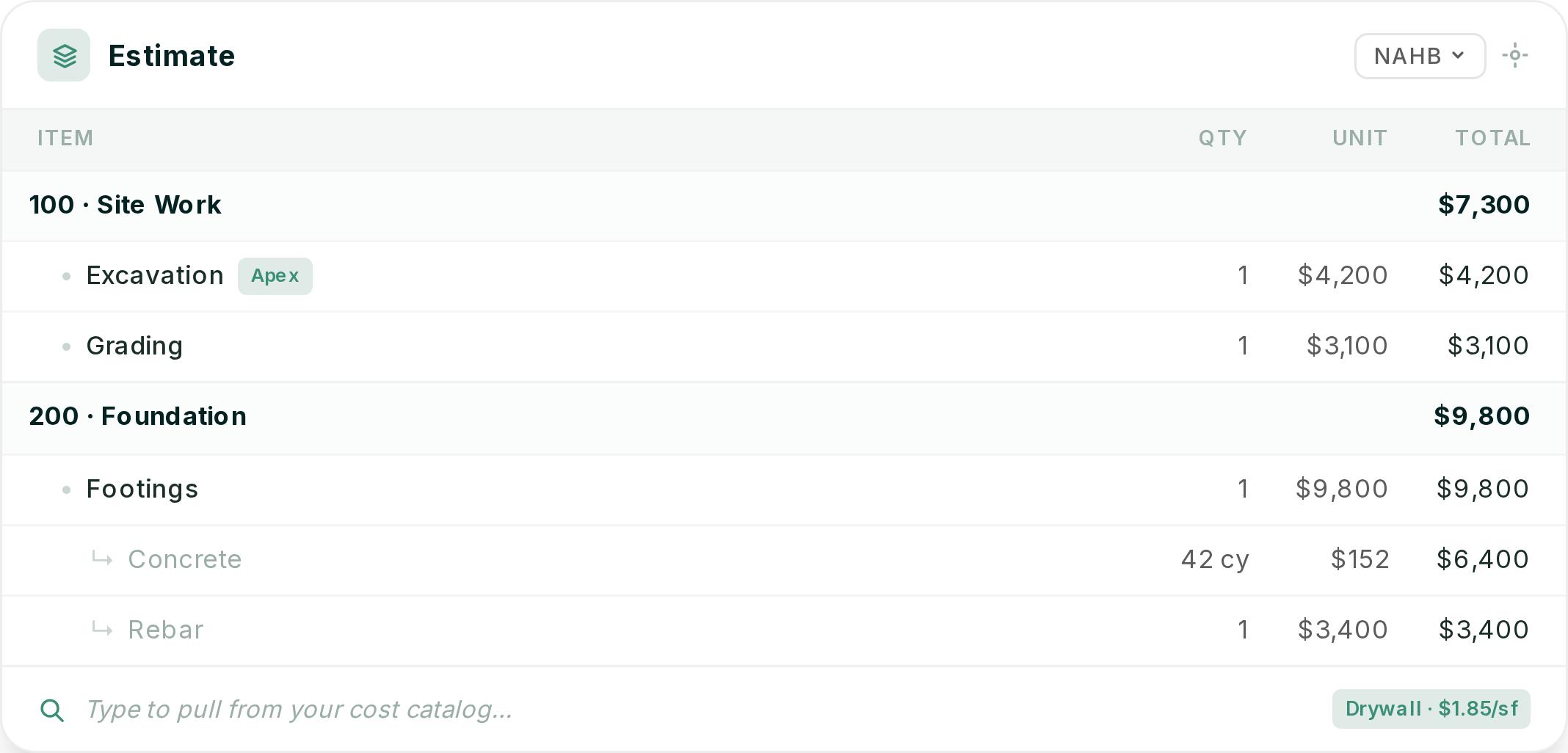
In Ressio estimating, you choose NAHB, CSI, NARI or your own custom divisions. You add cost items under each category and assign vendors and cost codes to each line.
Start typing and items pull from your cost catalog with your pricing. Every project you build becomes a template for the next one.
The signed estimate becomes your budget
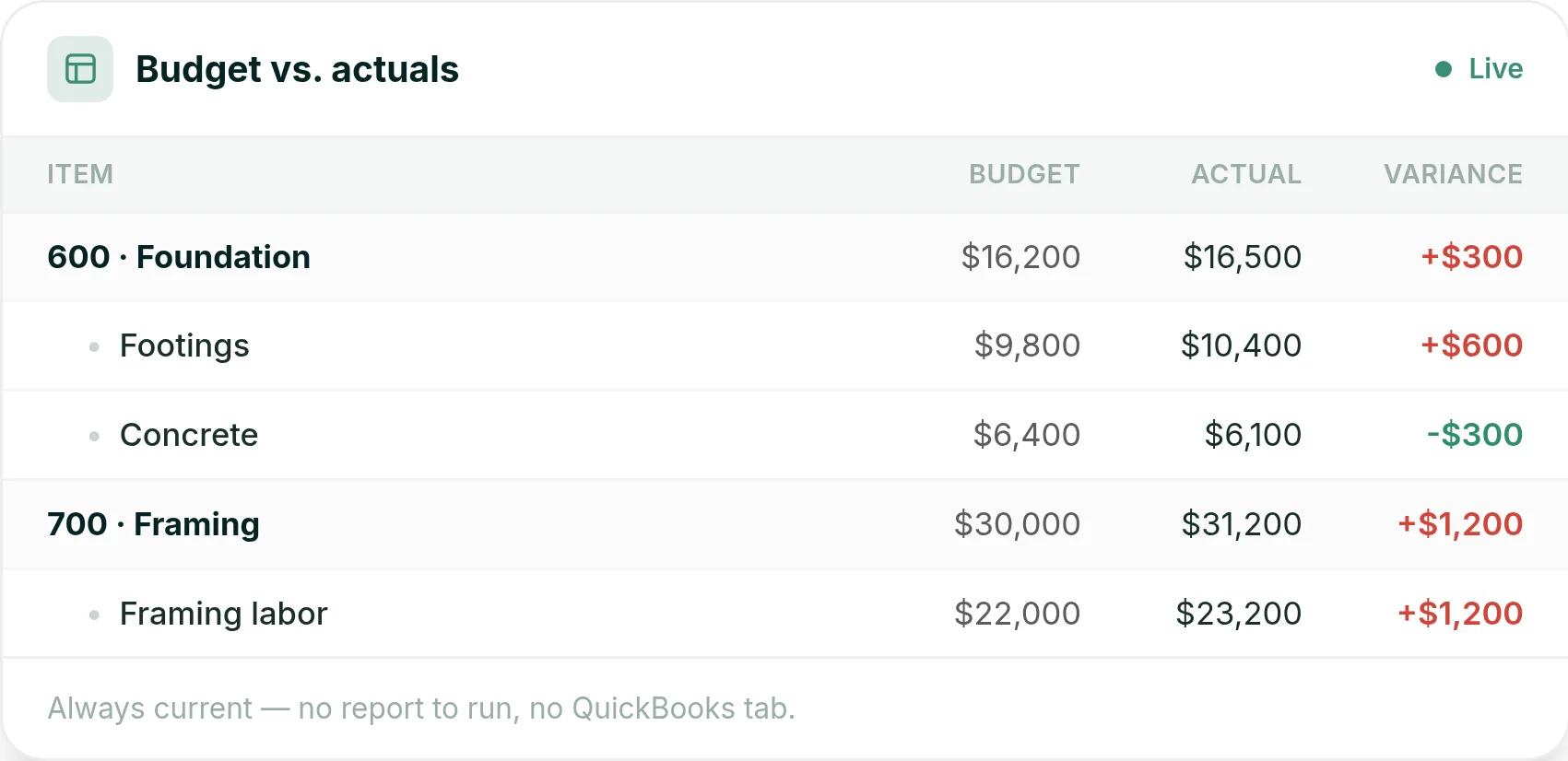
When the client signs, you lock the estimate and it becomes your construction budget on the same codes. As bills, time entries and expenses post, actuals update against each code. Click any code to see the bills, time and POs behind it.
Change orders land on the right code
Say a client adds a covered porch halfway through. You flag the estimate lines on code 702, and we build the change order from them. Your client approves it from a magic link, with no login.
The moment they approve, the contract value and the 702 budget update.
Your codes map to QuickBooks
With our QuickBooks Online integration, you map your cost codes to QuickBooks Products & Services and expense accounts. Setup takes under 30 minutes. After that, every bill you enter in Ressio lands in the right QuickBooks account, so your bookkeeper stops re-keying.
Want to see your own cost codes run a live budget? Book a Ressio demo and see a job run on NAHB divisions from estimate to budget.
Get one set of cost codes running every job
A good NAHB cost code list only pays off when every estimate, PO, bill and change order uses it. Bring your current code list or a recent estimate to a Ressio demo. See that job turn into a live budget, coded the way you already work.
Frequently Asked Questions
What is the NAHB chart of accounts?
The NAHB Chart of Accounts is the standard bookkeeping layout the National Association of Home Builders publishes for residential builders and remodelers. It numbers accounts from 1000 to 9000, covering assets, liabilities, sales, cost of sales, indirect costs and overhead. Account 1430 holds direct construction cost, which builders break down with NAHB cost codes.
What is the difference between cost codes and phase codes?
Phase codes group costs by stage of the build, like framing or interior finishes. Cost codes break each phase into trades and materials, like trusses or drywall. So a phase code tells a builder where a house went over budget, and a cost code tells the builder which trade or material caused it.
Should I use NAHB or CSI cost codes?
Many residential builders use NAHB cost codes because they follow the order a house is built. CSI divisions come from commercial construction and group work by material type, and either system works if every job uses the same codes. In Ressio estimating, you can pick NAHB, CSI, NARI or your own divisions.
What is the biggest cost stage in building a home?
Interior finishes are the biggest stage, at 24.1% of construction cost in NAHB's 2024 Cost of Constructing a Home survey. Major systems rough-ins came second at 19.2%, and framing third at 16.6%. Cabinets and countertops were the largest single interior finish item, at 4.5%.