Construction Job Costing: A Step-by-Step Guide (2026)
Learn how construction job costing works, how to set up cost codes, and how to read a WIP report. A practical guide for custom home builders.

Ressio Staff
September 1, 2026

The house closed last month. The money hit the account. And you still can't say which parts of that job made you money.
You think framing went over. You're not sure by how much. You're also not sure whether something else is quietly covered for it.
Construction job costing fixes that. It ties every dollar to the job it belongs to, so you finish each house knowing what it cost you to build.
This guide covers what job costing is, how to set up cost codes, how to read a WIP report, and the five mistakes that cost builders the most.
What is construction job costing?
Construction job costing is the practice of tracking every cost on a single job — labor, materials, subcontractors, and overhead — against the budget for that job. It tells you the profit on each house you build, instead of the profit on your whole company at year end.
Your P&L answers a different question. It tells you how the business did last quarter. It won't tell you that the Henderson build lost money on framing and made it back on cabinets.
Job costing works one level down. Same dollars, sorted by job and by phase.
Why job costing matters for custom home builders
Custom homes are one-offs. Last year's numbers don't predict this build, because the lot is different, the plans are different, and the selections are different. Job costing is how you learn what a house actually costs you, and it's the input for every estimate you write after it.
The margins make the case. NAHB's Cost of Doing Business Study put the average home builder's gross profit margin at 20.7% and net profit margin at 8.7% for fiscal year 2023. At 8.7%, a job that runs 2% over contract price gives up close to a quarter of its profit.
Job costing pays off in four places:
- Bids. You price from your own history instead of a per-square-foot rule of thumb.
- Live jobs. You catch an overrun at 30% complete, while you can still do something about it.
- Cost-plus contracts. You're billing actual cost, so your cost records are the invoice.
- Banks and bonding agents. Both will ask for a WIP report (also known as a WIP schedule), and a WIP report is built from job cost data.
The four cost categories in construction job costing
Costs on a custom build fall into four buckets: labor, materials, subcontractors, and overhead. Every dollar belongs in one of them, tied to one job.
| Cost type | What it covers | Where builders slip |
|---|---|---|
| Labor | Wages for your own crew | Leaving out labor burden |
| Materials | Lumber, fixtures, anything installed | Charging one delivery to one job when it covered two |
| Subcontractors | Framing, plumbing, electrical, HVAC | Coding a sub invoice to the wrong phase |
| Overhead | Trucks, insurance, office, PM salary | Not allocating any overhead to jobs at all |
Labor burden is the one to get right. A carpenter's wage is not what that carpenter costs you. On top of the hourly rate you're paying payroll taxes, workers' comp, unemployment insurance, and whatever benefits you offer.
The Bureau of Labor Statistics publishes what employers spend on wages and on benefits, broken out by industry, in its Employer Costs for Employee Compensation release. Pull the construction row and divide benefit cost by wage cost. That gives you a floor for your own burden rate.
How to set up cost codes
Cost codes are the numbered categories you assign every expense to. A framing invoice goes to the framing code. A plumbing draw goes to plumbing. Most residential builders start from the NAHB Chart of Accounts, published through NAHB's BuilderBooks, and trim it down. Some use the 16-division set instead. Either works. Picking one and sticking to it is what matters.
Three rules make cost codes work:
Use the same codes on every job. That's the whole point. Different codes on different jobs means you can't compare, and comparison is what you're after.
Start with 20 or 30 codes, not 300. The NAHB list is long by design, so a code exists when you need one. A code nobody uses is a code somebody miscodes.
Split each code by cost type if you can. Framing labor and framing material tell you different things. Lump them and you'll know framing went over without knowing why.
How to do job costing step by step
- Build the estimate on cost codes. Not a lump sum. The estimate becomes the budget, so its structure decides everything downstream.
- Turn the accepted estimate into the job budget. Same codes, same numbers, no retyping.
- Code every expense as it arrives. Sub invoices, material receipts, purchase orders, timecards. Same week, not month end.
- Track committed costs, not just paid costs. A signed sub contract is money spent, even though the invoice hasn't landed. Ressio logs a cost as committed the moment you release the PO, so it's in the budget before the bill ever shows up.
- Update the cost to complete on each code. What's left to spend, based on what you know today.
- Compare actual against budget weekly. Monthly is too late on a nine-month build.
- Run a post-job review. Pull the final numbers into your next estimate.
You can run all seven steps in a spreadsheet. A tab per job, a row per cost code, columns for budget, committed, actual, and variance. Plenty of builders do it, and for two or three jobs it works.
What is a WIP report in construction?
A WIP report — short for work in progress, and sometimes called a WIP schedule — shows how much you've spent on each open job, how much you've billed, and how much of the work is done. It tells you whether you're overbilled or underbilled. In plain terms, whether the client is funding the job or you are.
A WIP report runs on four numbers per job:
- Contract value
- Costs to date
- Estimated total cost
- Billings to date
From those you get percent complete: costs to date divided by estimated total cost. Multiply percent complete by contract value and you have earned revenue — the money you've actually worked for.
Compare earned revenue to what you've billed:
- Overbilled means you've collected ahead of the work. The client is funding the build.
- Underbilled means you've done work you haven't invoiced. You're funding the build out of your own account.
Here's a single job as an example:
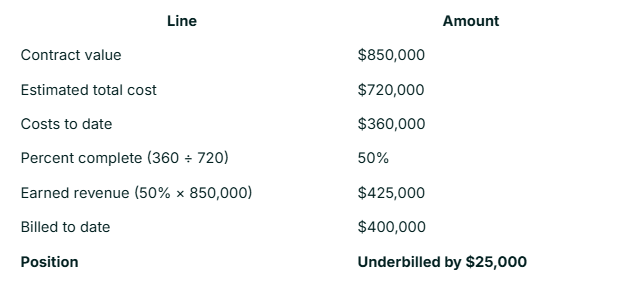
That builder has done $25,000 of work they haven't invoiced. Not a disaster on one job. Across five jobs it's a cash flow problem.
The most important number on the report is the estimated total cost. Get it wrong and percent complete is wrong, earned revenue is wrong, and your over/under position is wrong. Update it every month, using what the job looks like now rather than what you hoped in January.
Your CPA will ask for a WIP report at year end. So will your bank, and your bonding agent if you carry bonds.
Where spreadsheets fail for construction job costing
There are some commons areas that builders get tripped up on when using spreadsheets:
- Committed costs live in your inbox. Signed sub contracts and open POs sit in email, not in the sheet. The budget looks fine because it's counting the wrong thing.
- The sheet is only current as of the last update. Which was two weeks ago, on a Sunday.
- Costs get coded once and only once. The sub invoice lands in QuickBooks, gets coded there, and never makes it back to the job sheet. Now you have two versions.
- Change orders leave the budget outdated. The scope changed, the baseline didn't, and the variance column stops meaning anything.
- Three jobs is manageable. Six is not. Data entry becomes a time consuming task.
How Ressio handles construction job costing
Ressio keeps the estimate, the budget, and the costs in one place, so the numbers move on their own instead of getting retyped between tools.
Lock the estimate and it becomes the job budget. You can run that budget on cost items that match your estimate, or on a standard code set like NAHB or the 16 divisions. Cost codes are the better choice, and they're required if you want the QuickBooks sync.
From there the columns fill themselves:
- Committed counts released and approved purchase orders. Money you've promised, from the day you promise it.
- Actuals pull from bills and receipts, plus labor from the time clock if you self-perform.
- Cost to complete calculates from projected cost minus actual cost, so you're not maintaining it by hand. Ressio’s Mason AI recalculates as bills and POs land, so you can see a code drifting at 30% into the job and not just at the final draw.
- Approved and revised move when change orders and selections get approved, so the baseline keeps up with the scope.
Ressio syncs with QuickBooks Online, so a bill coded once is coded everywhere. Your bookkeeper keeps working the way they work, and the job budget stays current without a second entry.
Change orders update the budget instead of sitting beside it. When scope moves, the baseline moves with it, and the variance column keeps telling you something true.
The budget exports to a spreadsheet, which is what your bank wants when a draw comes due.
What that adds up to on a Tuesday: you open a job and see budget, committed, actual, and cost to complete on every code, current as of this morning. No Sunday spreadsheet session.
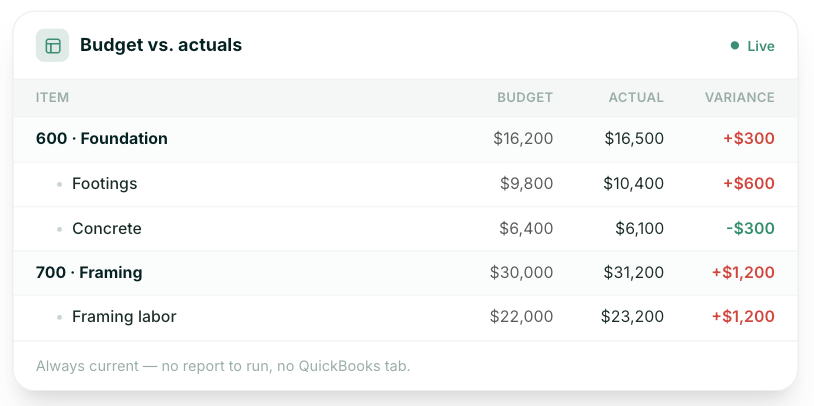
Want to see your own jobs looking like this with budget, actual, and variance updating on their own? Book a Ressio demo and bring one of your live jobs to walk through.
Five job costing mistakes that cost builders money
1. Costing at the job level, not the code level. Knowing the Henderson build made $60,000 doesn't tell you what to bid next time. Knowing framing ran 12% over does.
2. Ignoring labor burden. Every hour of your own crew's time costs meaningfully more than the wage. Cost at the wage and self-performed work looks cheaper than subbing it out, which leads you to self-perform the wrong things.
3. Tracking paid costs instead of committed costs. Money you've promised is money you've spent. A budget that only counts invoices tells you about last month.
4. Never updating the cost to complete. An estimate made in January isn't a forecast in July. Refresh it monthly.
5. Skipping the post-job review. The whole exercise exists to make your next estimate better. Cost the job, close it out, and never look at the numbers again, and you've done the work for nothing.
Frequently asked questions
What's the difference between job costing and process costing?
Job costing tracks costs by individual job. Process costing averages costs across many identical units. Home builders use job costing because no two custom homes are the same. A factory making identical windows uses process costing, because averaging works when the output is uniform.
How do you calculate job cost?
Add up four categories for one job: labor including burden, materials, subcontractors, and allocated overhead. Track each against its cost code as costs come in. Total job cost subtracted from contract value gives you gross profit on that job. Divide gross profit by contract value for gross margin.
Can you do job costing in QuickBooks?
Yes, to a point. Intuit's documentation shows QuickBooks Online Advanced offers project profitability, work in progress, cost to complete, and committed cost reports, using project phases in place of construction cost codes. Lower QuickBooks Online tiers don't include those reports. Many builders run QuickBooks for accounting and a construction platform like Ressio for job-level costing, with the two synced.
What should a job cost report include?
A job cost report should show, for every cost code: the original budget, approved changes, committed costs, actual costs to date, cost to complete, and the variance. Add percent complete if you're using the report for WIP. Anything less and you can't see where a job is drifting.
How often should builders update job costs?
Weekly for costs, monthly for the cost to complete. Coding expenses weekly keeps the data honest while people still remember what a receipt was for. Reviewing the cost to complete monthly catches the overruns that build slowly, which are most of them.
Stop rebuilding your job costs every Sunday. Book a Ressio demo and see your budgets, costs, and change orders in one place.