
ConstructionOnline Alternatives: 6 Options for Home Builders
ConstructionOnline is built to serve almost every kind of construction business. If you build custom homes or remodel, here is how six alternatives compare, starting with the one built only for you.

Ressio Staff
October 9, 2026
ConstructionOnline is the all-in-one construction management software from UDA Technologies. It serves custom home builders, but also production builders, multifamily teams, commercial contractors, subs, architects and engineers. If you are looking at it, you may still be weighing it against a few other tools.
This guide covers six UDA ConstructionOnline alternatives, who each one is built for, and how to pick.
If you build custom homes or remodel, start with Ressio. We built our software for custom and semi-custom home builders and remodelers.
ConstructionOnline alternatives at a glance
| Product | Built for | Strongest at |
|---|---|---|
| ConstructionOnline | Residential, commercial, multifamily and specialty firms | A wide platform with planroom, RFIs, submittals and business intelligence |
| Ressio | Custom and semi-custom home builders and remodelers | One number from estimate to final invoice, and client approvals with no login |
| Buildertrend | Home builders, remodelers and commercial contractors | A large platform with CRM, proposals and job costing |
| JobTread | Builders, remodelers and many specialty trades | Estimating and budgeting with customer portals |
| Contractor Foreman | Small and mid-sized residential and commercial contractors | Job tools for a small team |
| BuildBook | Custom home builders and residential remodelers | The client experience |
| Houzz Pro | Remodeling and design professionals | 3D floor plans and lead generation |
What to look for in a ConstructionOnline alternative
The right alternative depends on the kind of building you do. ConstructionOnline is made to cover a lot of ground, from multifamily to commercial work. A custom home builder or remodeler needs something narrower: the numbers, the client and the schedule on one job, in one place.
Three problems come up on custom work. Two come from a platform this wide, and the third comes up on any custom build.
Pain one: a platform built for everyone. ConstructionOnline lists RFI tracking, submittals, transmittals and a planroom next to its residential tools. Those come from commercial work.
Picture a three-person team running five custom homes. For that team, RFIs and transmittals are tools built for someone else's jobs.
Pain two: client portals behind a login. ConstructionOnline's ClientLink gives each client a login page. That works until a homeowner forgets their login on the night you need a change order signed.
Now the framers wait, and you are on the phone doing tech support.
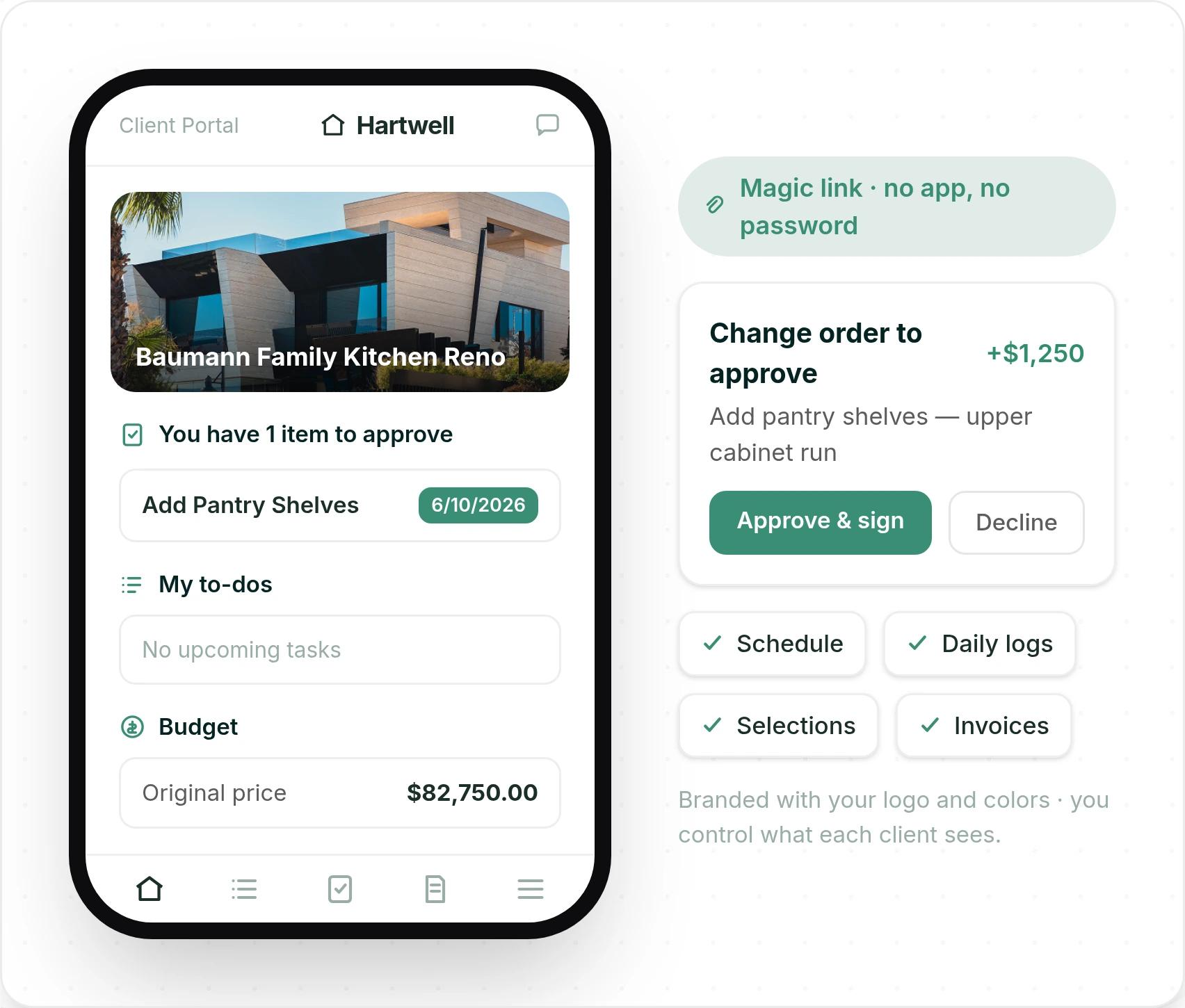
In Ressio, our client portal opens from a magic link. Your client taps the link in a text or email and signs the change order that night. There is no account, no password and no app to download.
Pain three: numbers that drift apart. On a custom build, the estimate, the budget, the change orders and the selections all move. If they live in different places, they stop agreeing by drywall.
You find the gap at closeout, when the margin is already gone.
In Ressio, the signed estimate becomes the live budget, and change orders and selections update it. Here is how it plays out. Say a hypothetical client is building a $900,000 custom home with you.
- On Monday, they pick Upgrade #1 for the appliance package at $25,000 against a $22,400 baseline. They approve it from their phone, with no login.
- The $2,600 difference flows into your estimate and budget. Nobody retypes it.
- On Tuesday, the framer finds a beam that needs to change. Your PM flags the line in the estimate and sends the change order. The client approves it that night from the link.
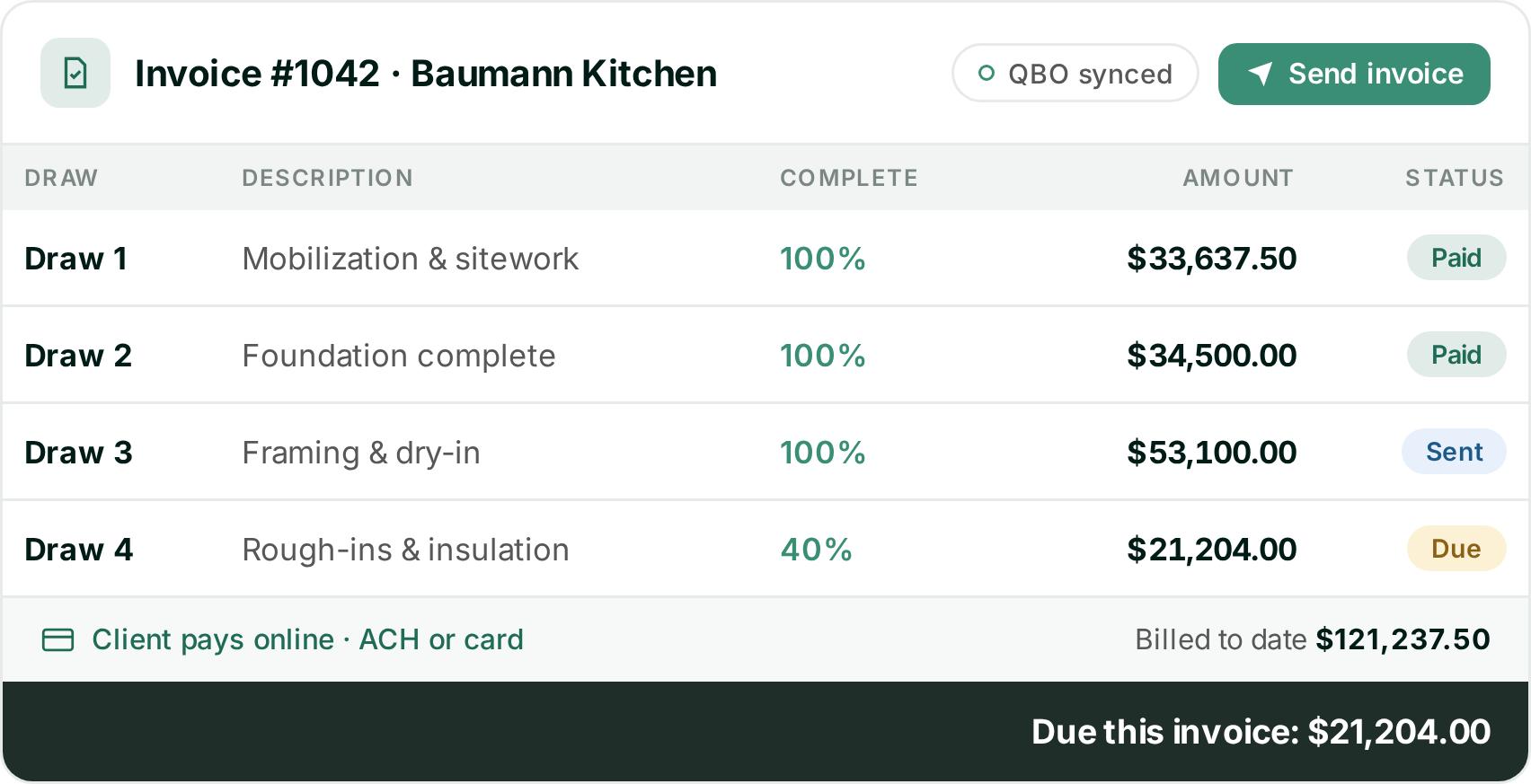
- On Friday, you send the next draw. Our invoices build from the budget, so the approved change order is already in the billable total. The invoice then syncs to QuickBooks Online.
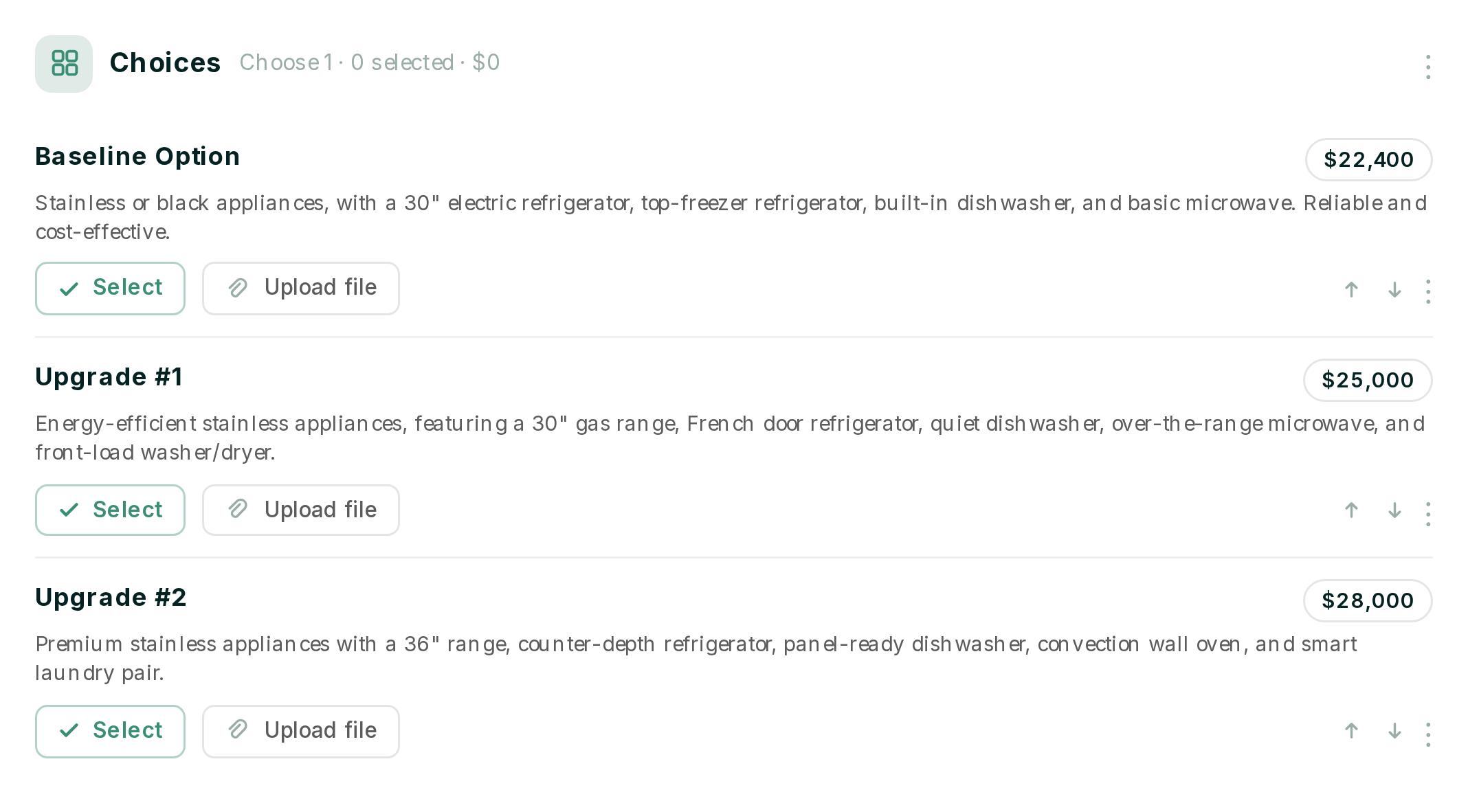
That is one number, from the first estimate to the last draw.
So check three things on any tool:
- Is it built for the work you do, or for every kind of builder?
- Can your clients approve things without an account?
- Does the signed estimate become the budget that change orders, selections and invoices update?
1. Ressio: best for custom home builders and remodelers
Ressio is construction management software for custom and semi-custom home builders and remodelers. We built it so you enter the numbers once. Your estimate becomes the proposal, the budget, the change orders and the invoices on the same job.
Built for custom builds, not for every kind of builder
We build for custom home builders, remodelers and design-build firms. Our scheduling is made for the way custom builds run: several jobs at different stages, with the same trades moving between them. When one task moves, every task after it reschedules.
That focus also keeps the product simple to buy. We have no feature tiers, so every plan comes with the whole product and with phone and chat support.
Clients approve from a link, with no login
From their magic link, clients see their schedule, daily logs, selections and invoices. They approve change orders and sign off on selections, and every approval is timestamped. You control what each client can see, and the portal carries your logo and colors.
The signed estimate becomes your live budget
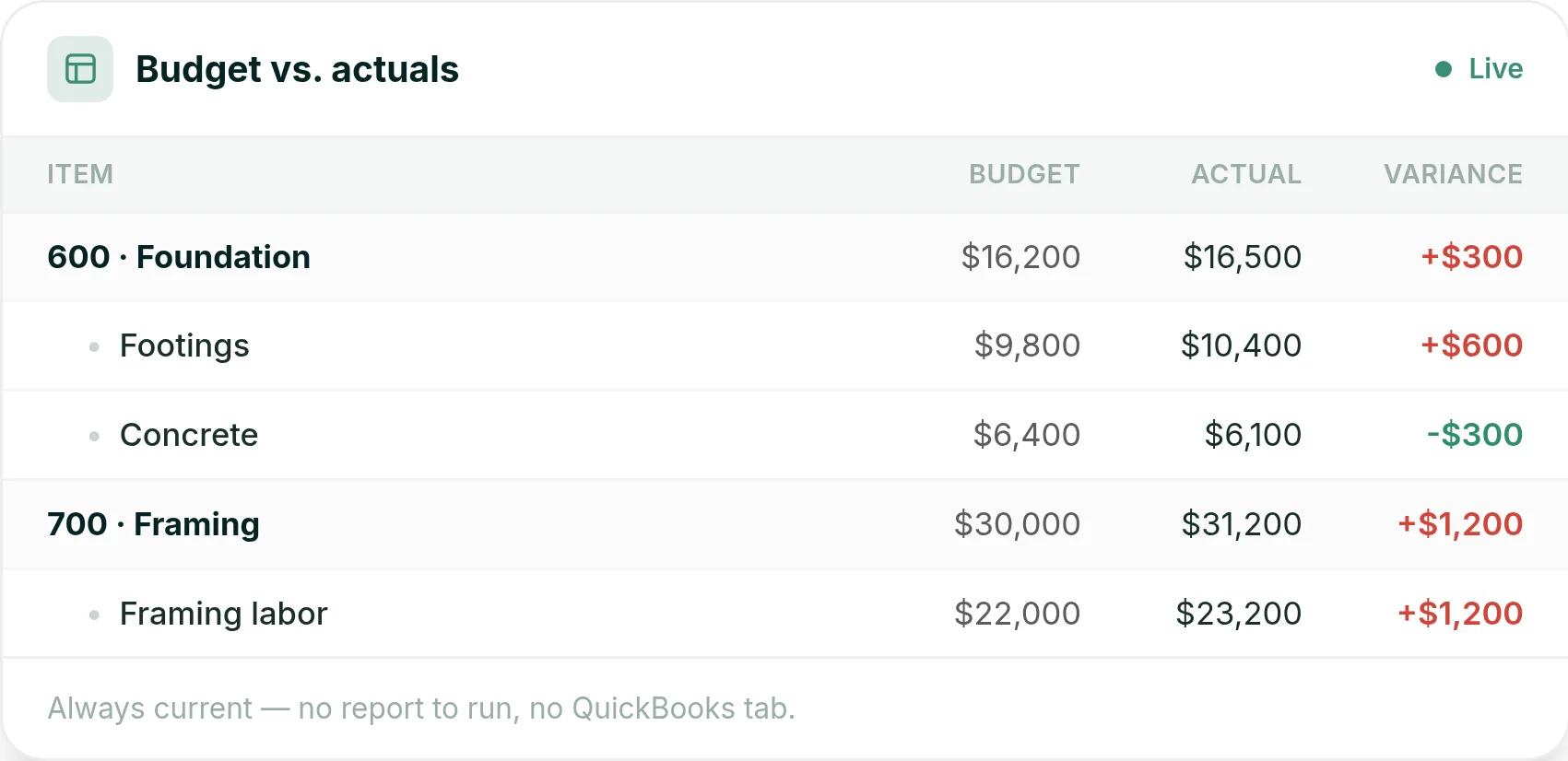
In Ressio estimating, you set your markup once and we work out builder cost, markup and client price. When the client signs, you lock the estimate. It becomes the baseline for your construction budget.
As bills, time entries and expenses post, the budget shows actuals against that baseline on every line. You can click any cost code to see the bills behind it. Overruns show up while there is still time to act.
Changes and selections update the same numbers
Change orders start from the line items in your estimate, so the costs are already filled in. When the client approves from their magic link, the budget updates on its own. Client selections work the same way, and your invoices build from that budget.
The field stays connected too
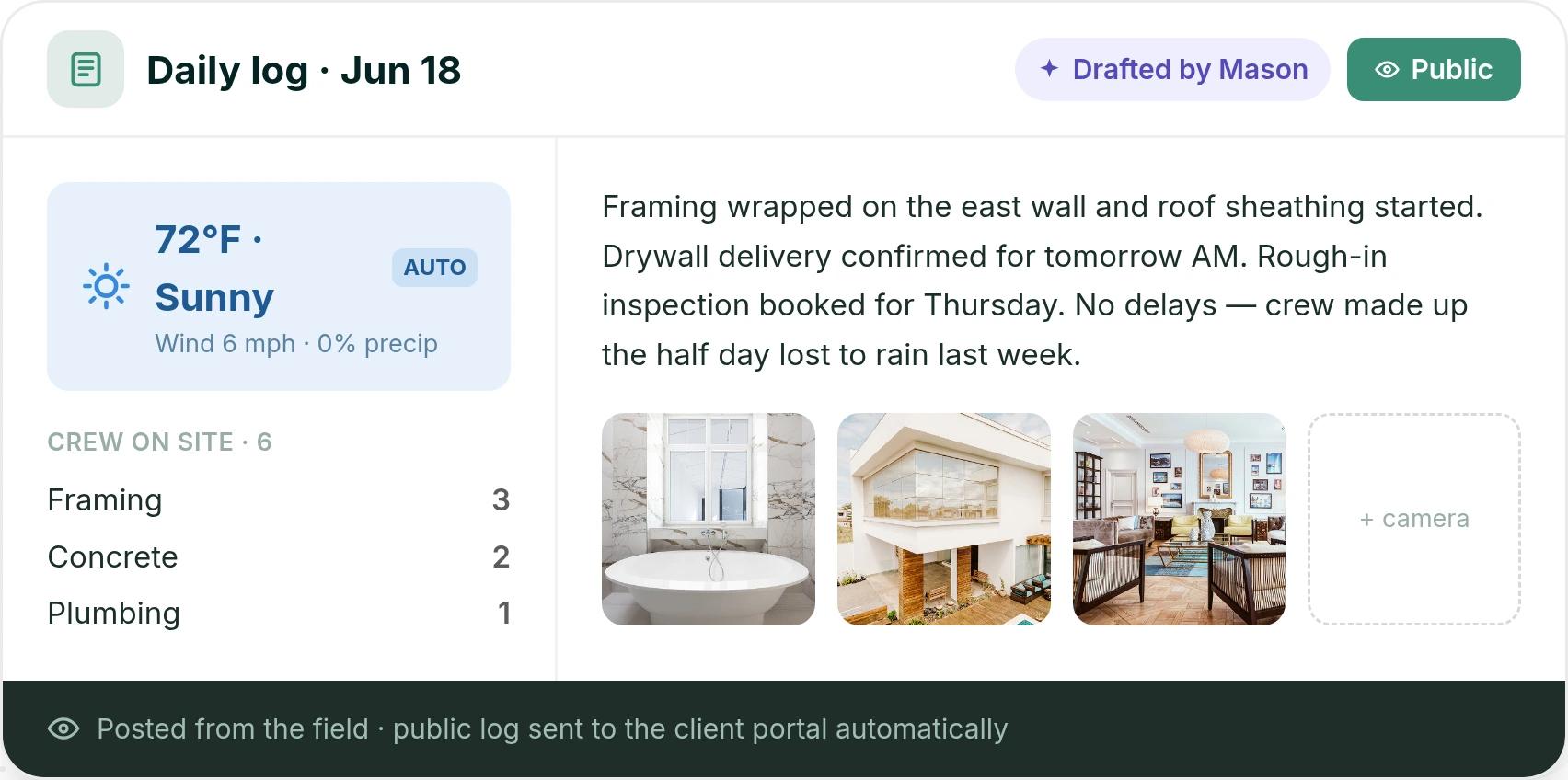
Your super fills in the daily log from the mobile app in a couple of minutes. Weather fills in on its own, and Mason AI drafts the log from the day's scheduled tasks. Public logs post to the client portal, so the homeowner sees progress without calling you.
And if you are switching from another tool, we migrate your active jobs for you.
Want to see one of your own jobs run on one number? Book a Ressio demo and bring a recent estimate and change order.
2. Buildertrend
Buildertrend is a large platform for home builders, remodelers and commercial contractors. It covers CRM, proposals, estimates, job costing, schedules, change orders, daily logs, and client and sub portals.
Best for: larger builders running many jobs at once, plus commercial and specialty contractors. Buildertrend says it is built for builders who run five or more projects a year and want to grow "from 6 to 8 figures."
What it does well: breadth and onboarding. Users are unlimited, and setup, data migration and live training are included. Jessica S., an admin at a firm of 2 to 10 people, said it "streamlines scheduling, budgeting, and communication between teams and clients, which saves a lot of time" (Capterra).
Where it struggles: a platform this broad takes time to learn, and each sub needs their own login for its Sub Portal. Ben T., a renovation project manager, wrote that "not all subcontractors were fast to transition to the app" (Capterra).
How Ressio compares: in Ressio, subs and clients open a magic link in a text, with no app and no password. See how Ressio compares to Buildertrend.
Pricing: Buildertrend starts at $499 a month. The final price depends on your yearly construction volume and onboarding package.
3. JobTread
JobTread is estimating and project management software. It has budgeting, change orders, selections and allowances, customer portals and a QuickBooks Online integration.
Best for: contractors who work across many trades. JobTread serves home builders and remodelers, along with pool builders, roofers, outdoor living, commercial contractors and franchises.
What it does well: estimating, job costing and support. Customer and vendor portal users are free and unlimited. Bob H., an owner, wrote: "It saves me hours on budgeting, estimating, and job costing" (Capterra).
Where it struggles: selections and first setup. Philip K., a COO at a firm of 2 to 10 people, put it in five words: "Selections has a clunky UI" (Capterra). Reviewers also mention a long first setup.
How Ressio compares: we build Ressio only for custom and semi-custom homes. Our Ressio vs JobTread page covers how the two fit a custom builder.
Pricing: JobTread is $199 a month with one internal user, plus $20 a month for each added internal user up to ten. Annual plans save 20%, and there is no contract or setup fee.
4. Contractor Foreman
Contractor Foreman is made for small and mid-sized residential and commercial trade and general contractors. It lists estimates, a client portal, change orders, scheduling and QuickBooks.
Best for: a small crew that mixes service calls, trade work and commercial jobs, and wants many tools for a low monthly price.
What it does well: value. Nick H., a consultant at a firm of 11 to 50 people, wrote: "It is simplistic, and allows for great overall project management at a fair price" (Capterra).
Where it struggles: large estimates. Paul G., a project manager, wrote: "When making very large estimates the software slows down a lot" (Capterra).
How Ressio compares: we built Ressio estimating for complex, multi-phase custom builds, and the signed estimate becomes the live budget. Here is how Ressio compares to Contractor Foreman.
Pricing: plans start at $49 a month for one user on an annual plan. Standard is $105 a month for up to three users. There is a 30-day free trial and a 100-day money-back guarantee.
5. BuildBook
BuildBook is aimed at custom home builders and residential remodelers. It focuses on the client experience, with a client dashboard and client selections, plus scheduling, change orders, estimates and a QuickBooks integration.
Best for: small builders and remodelers who want a simple app their team can pick up fast. BuildBook says its software "requires zero training."
What it does well: ease of use. Justin W., an owner at a construction firm of 2 to 10 people, wrote: "It is set up to work well and its easy to navigate and use" (Capterra).
Where it struggles: depth on job costs and field setup. BuildBook's feature list does not name purchase orders. Kristyn D., a designer at a small builder, said foremen without a computer on site had to "create an account first on a desktop before being able to use the app" (Capterra).
How Ressio compares: Ressio purchase orders tie each commitment to a budget line and warn you before one pushes that line over. Subs see their POs and tasks in our vendor portal by magic link.
Pricing: BuildBook does not show prices on its pricing page. New users start by booking a demo.
6. Houzz Pro
Houzz Pro serves the home remodeling and design industry. It stands out for 3D floor plans, lead generation and email marketing, next to estimates, takeoffs, selections and a client dashboard.
Best for: interior designers and design-led remodelers whose clients already browse Houzz.
What it does well: design tools and the client view. Patrick K., a vice president at a construction firm of 11 to 50 people, said his clients "can track the job progress, approve material selections, and make secure payments online" (Capterra).
Where it struggles: the budget tool, for some users. Geoffrey P., a VP of project management, wrote: "The budget tool is way too basic. The takeoffs aren't linked with the associated estimate for live edits" (Capterra).
How Ressio compares: our side-by-side page shows how Ressio compares to Houzz Pro.
Pricing: the Design plan starts at $99 a month for one user. Change orders, budgets and schedules come with Pro, from $199 a month. Plans run yearly after a 30-day free trial, and advertising packages cost extra.
How to choose among ConstructionOnline alternatives
Pick the tool that matches the work you do.
- If you run commercial, multifamily and residential jobs side by side, a wide platform like ConstructionOnline or Buildertrend covers more ground.
- If you are a design-led remodeler who wants leads, look at Houzz Pro.
- If you build custom homes or remodel and want one number to run the job, choose Ressio. The signed estimate becomes the budget, and change orders, selections and invoices all update it. Your clients approve from a link with no password.
The best test is your own job. Book a demo and watch a real estimate become a budget, a change order your client signs from their phone, and an invoice.
Frequently Asked Questions
Who makes ConstructionOnline?
ConstructionOnline is made by UDA Technologies. It is all-in-one construction management software with plans for residential, commercial, specialty and multifamily work. Its tools include OnCost estimating, OnPlan scheduling, client selections, ClientLink client logins and TrueVision business intelligence.
What is the best ConstructionOnline alternative for custom home builders?
For custom and semi-custom home builders, our pick is Ressio. We built it for that work.
The signed estimate becomes the job budget, change orders and selections update it, and invoices build from it. Clients approve everything from a magic link with no login.
Is ConstructionOnline good for residential builders?
Yes, ConstructionOnline has residential plans and tools like client selections and the ClientLink portal. It also carries tools from commercial work, like RFIs and submittals. Builders who only do custom homes or remodels often want a tool made just for that, like Ressio.
Do my clients need a login to approve change orders in Ressio?
No. In Ressio, your clients open their portal from a magic link on any phone, tablet or computer. They need no account, no password and no app.
Each change order and selection approval is timestamped, and an approved change order updates your budget right away.
Can I switch from ConstructionOnline to Ressio without starting over?
Yes. When you move to Ressio, we migrate your active jobs for you, so you are not rebuilding them by hand. After that, every project you build in Ressio estimating becomes a reusable template for the next one.