How to Offset Your Software Costs With a Technology Fee
Your software doesn’t have to come out of your margin. Learn how custom home builders add a technology fee to each job, why homeowners accept it, and how to explain it with confidence.

Ressio Staff
Picture your next sales meeting. A couple is building their dream home, but they live three states away. They found you online, flipped through your portfolio and like your work. Now you're on a video call and one of them asks: "What software do you use? How will we know what's happening on site when we can't be there?"
Builders who ran their business on spreadsheets for years are getting that question constantly.
Software has become part of how you win the job. The homeowner wants to know they'll be kept in the loop on a project that will be one of the biggest purchases they ever make.
But your project management tools, client portal and jobsite tech add up, and most builders absorb that cost out of their own margin.
That's understandable. Software is billed to your business as a monthly or annual subscription, not to a specific job, so it ends up in overhead next to insurance and office costs. It doesn't feel like a project cost. And many builders worry that adding a fee will make their bid look higher than the next builder's, or make homeowners feel nickel-and-dimed.
But a $500 fee on a $1 million home is hard to notice, let alone object to. Many custom builders already price jobs on a cost-plus basis, and software is a cost of doing the work like any other tool or material on the job. A small technology fee on each project can offset what you spend. A few builders we work with already do this, and we think more should. Homeowners benefit directly from these tools: they see daily logs and their schedule in one place, get updates without texting your project manager, and always know where their build stands.
Below, we cover why homeowners accept technology fees and how to set them up.
Why homeowners accept a technology fee
A technology fee works because the homeowner gets clear value from it. Construction management software keeps homeowners in the loop and makes the whole project run more efficiently. When budgets, selections, and schedules live in one system instead of spreadsheets and text threads, there are fewer miscommunications, fewer costly errors, and a better chance of finishing on time and on budget.
We saw this with one of the first builders we onboarded. They were managing a million-dollar custom home in Excel. When we reviewed their budgets for selections like countertops, tile and appliances, we found formula errors across two projects that added up to more than $20,000. Mistakes like that eventually land on someone. Either the homeowner gets a surprise charge late in the build, or the builder eats the cost to keep the relationship intact. Catching them early protects both sides.
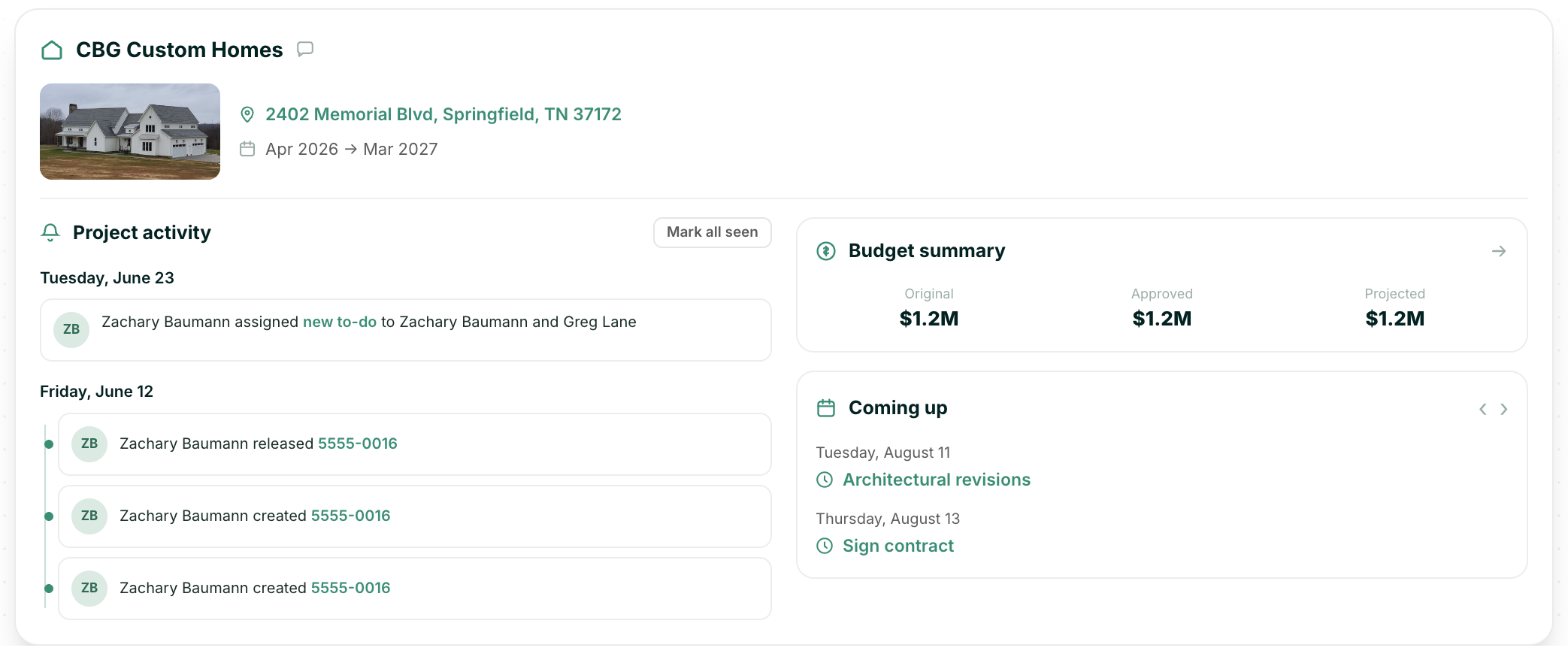
In Ressio, the Project Hub shows you every job from one dashboard and lets you share scheduled tasks and daily logs with your homeowners.
A homeowner receives:
- One place for every update, instead of digging through text and email threads
- Daily logs and photos from the jobsite
- A clear view of the budget, selections, and change orders
- A simple way to review and pay invoices
Homeowners investing hundreds of thousands – often millions – of dollars expect professionalism and clear communication, so on a project that size, a few hundred dollars for that experience is easy to justify.
It's also easy for homeowners to use. In Ressio, clients can see their tasks through a magic link, with no login or app to learn. And you stay in control of what they see: daily logs can be shared with the client or kept internal. Homeowners get transparency, and you decide how much. That access matters even more for homeowners who are building from out of town and can't drive by the site every week.
How to add a technology fee to your construction estimate
1. Decide what your technology fee covers
A technology fee doesn't have to cover only one tool. Bundle everything that makes the homeowner experience possible:
- Project management software and the client portal
- Jobsite internet, such as Starlink
- Jobsite cameras or other tools your homeowners benefit from
A bundled fee reads as a package of services. It's also easier to explain than a charge for one piece of software.
2. Calculate your technology fee per job
Add up what you spend each year on everything in that bundle, then divide it by the number of jobs you build.
For example, if your tools cost $10,000 a year and you build ~20 homes per year, that's ~$500 per job. On a $1 million home, the homeowner barely notices $500, but across 20 jobs, you've covered your software bill.
3. Choose a line item or cost-plus markup
You have two options:
- A separate line item. Call it a technology fee and list what it includes. This works best when the homeowner experience is part of your pitch.
- Folded into your overhead or project management fee. This works best when you're bidding against other builders, and the homeowner is comparing totals line by line.
Either approach is fine. Pick the one that fits how you sell.
4. Add it to your estimate and explain it to your homeowner
Include the fee in your estimate and your contract from day one. It should be part of the price the homeowner agrees to, not something that shows up later on an invoice.
When you walk the homeowner through the estimate, keep the explanation short and tie the fee to what they get. The strongest message is transparency: the homeowner will always know where their project stands and where their money is going.
Here's one way to explain it:
"We include a technology fee on every project. It covers the tools we use to keep you informed, including your own client portal. You'll see daily logs and your project schedule in one place instead of waiting on texts and phone calls. We believe you should always know exactly where your home and your money stand, and this is how we make that happen."
How to handle homeowner objections
Based on what we hear from builders, homeowners rarely push back on the fee, but it’s always a good idea to be prepared. Here are a few ways to answer common concerns:
"Why am I paying for your software?" You're paying for the experience it gives you. The fee covers your client portal and daily updates from the jobsite. It's a cost of building your home, like any other tool we use on the job.
"Isn't that just part of your overhead?" These tools are tied directly to your project. They're how we track your schedule, your budget, your selections, and all communications related to your home.
"Other builders don't charge this." Many builders use similar tools and include the cost somewhere in their price. We list it so you can see exactly what you're paying for and what you get.
"What if I don't use the portal?" The portal is one part of it. The same tools keep your schedule, budge,t and change orders organized on our end, which protects your project whether you log in daily or once a month.
Technology fee mistakes custom home builders should avoid
- Adding it mid-project. A fee that appears halfway through the build feels like a surprise charge. Put it in the original estimate.
- Using a vague name. An "admin fee" with nothing attached invites questions. Name it for what it covers and list what's included.
- Charging for tools your team doesn’t use. If your team still runs the job through texts and spreadsheets, the fee is hard to justify. Keep the schedule current, post daily logs, and invite every homeowner to the portal at kickoff, so they see what the fee pays for.
- Overthinking it. When our sales team suggests a technology fee, builders usually see the logic right away. It's a small number on a big project.
Turn your construction software into a selling point
Homeowners are already asking about your software. Instead of treating it as a cost you absorb, make it part of the experience you offer and price it that way.
The next time a homeowner asks what software you use, you'll have a good answer, and a line item to go with it. Start with your next estimate: add the fee, name what it covers and walk your homeowner through what they'll see.
Want to see what your homeowners would get for their technology fee? Book a demo and we'll walk you through the Ressio client portal, so you can show homeowners exactly what the fee pays for.