
CoConstruct Alternatives: 6 Options for Custom Home Builders
CoConstruct is folding into Buildertrend. Whether you are moving now or still weighing it, here is how six options compare for a custom home builder.

Ressio Staff
October 9, 2026
CoConstruct told its customers that its "transition to Buildertrend is entering its final phase." If you run custom homes on CoConstruct, you now have a choice to make. You can follow the move to Buildertrend, or you can look at CoConstruct alternatives first.
Not everyone reading this is leaving. Some builders are still weighing it. This guide covers six options, what each one is built for, and which fits a custom home builder who relied on CoConstruct for selections, budgets and client approvals.
If you want the CoConstruct way of working on a product that is still moving forward, start with Ressio.
CoConstruct alternatives at a glance
| Product | Built for | Strongest at |
|---|---|---|
| CoConstruct | Custom builders and remodelers | Selections and client communication, now being moved into Buildertrend |
| Ressio | Custom and semi-custom home builders | One connected job: estimate, selections, change orders, budget and client approvals, with new features every week |
| Buildertrend | The product CoConstruct customers are being moved to | The official migration path |
| JobTread | Many trades, from home builders to roofers and pool builders | Estimating and job costing with unlimited portal users |
| BuildBook | Custom home builders and remodelers | Client selections and a client dashboard |
| Houzz Pro | Remodelers, designers and architects | Design tools and marketing tied to the Houzz network |
| Contractor Foreman | Residential and commercial contractors | Estimates, change orders and scheduling for small teams |
What to look for in a CoConstruct alternative
A good CoConstruct alternative keeps what made CoConstruct work for custom builders. That means selections tied to the budget, change orders tied to the estimate, and clients who can approve things without a fight.
A real CoConstruct replacement has to cover the same ground. Most CoConstruct users picked it because it was built around custom homes.
So check three things on any tool:
- Do selections update the budget? An approved upgrade should change the numbers without anyone retyping them.
- Do change orders come from the estimate? A blank change order form means double entry.
- Can clients and subs act without a login? Every password is a reason they call you instead.
Why builders are leaving CoConstruct or weighing a move
The clock is set by someone else
Picture a builder with four homes under way. CoConstruct says the move is in its final phase. The builder now has to plan a software switch in the middle of framing season, on a timeline they did not choose.
That pressure is the real problem. A rushed switch is how jobs get rebuilt by hand and client history gets lost.
Ressio takes that work off your plate. We have helped hundreds of builders move off Buildertrend, CoConstruct and other platforms. We migrate your active jobs, templates and workflows, including jobs in progress, so you do not start over.
Moving to Buildertrend is still a migration
Buildertrend is the path CoConstruct points you to. But it is a different product. Your team still learns new screens, and your clients still get a new portal.
If you are going to retrain your team and your clients anyway, it is worth comparing where you land. Our Buildertrend vs CoConstruct guide covers that side by side.
Selections were the reason you chose CoConstruct
Selections were CoConstruct's signature feature. Losing that workflow is the biggest risk in any switch.
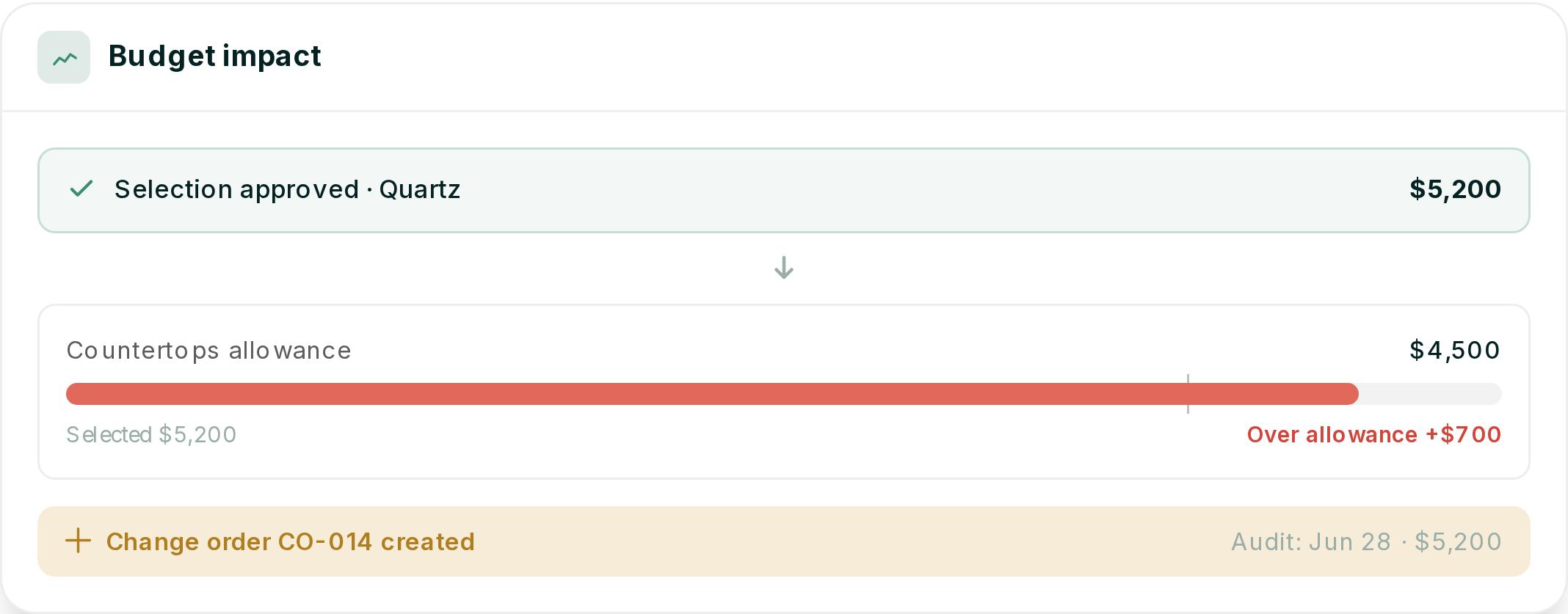
Here is a hypothetical. Your client is choosing countertops on a $4,500 allowance. They text a photo of a quartz slab, then call to say yes.
Three months later, nobody can find the approval, and the $700 overage turns into an argument at closeout.
In Ressio, that decision lives on the record. Your client approves the $5,200 quartz from a link, with no login. The approval is timestamped and stored on the job.
Because $5,200 is $700 over the $4,500 allowance, we start change order CO-014 before anyone orders the slab. At closeout, nobody goes looking through a text thread.
1. Ressio: best for custom home builders who want the CoConstruct workflow, still moving forward
Ressio is construction management software for custom and semi-custom home builders. We built Ressio on the same principles CoConstruct was built on, by some of the same people, and we ship new features every week.
One of our own customer success coaches started his career at CoConstruct. He wrote about why he chose Ressio, and the Lock Estimate Baseline button was one of the reasons.
Your estimate runs the whole job
In Ressio estimating, you use NAHB, CSI, NARI or your own divisions. Set your markup once, and we work out builder cost, markup and client price as you enter quantities.
When the estimate is ready, you build the proposal from it in one click. Your client signs by magic link. Then you lock the estimate, and it becomes your live budget.
Selections that update the numbers
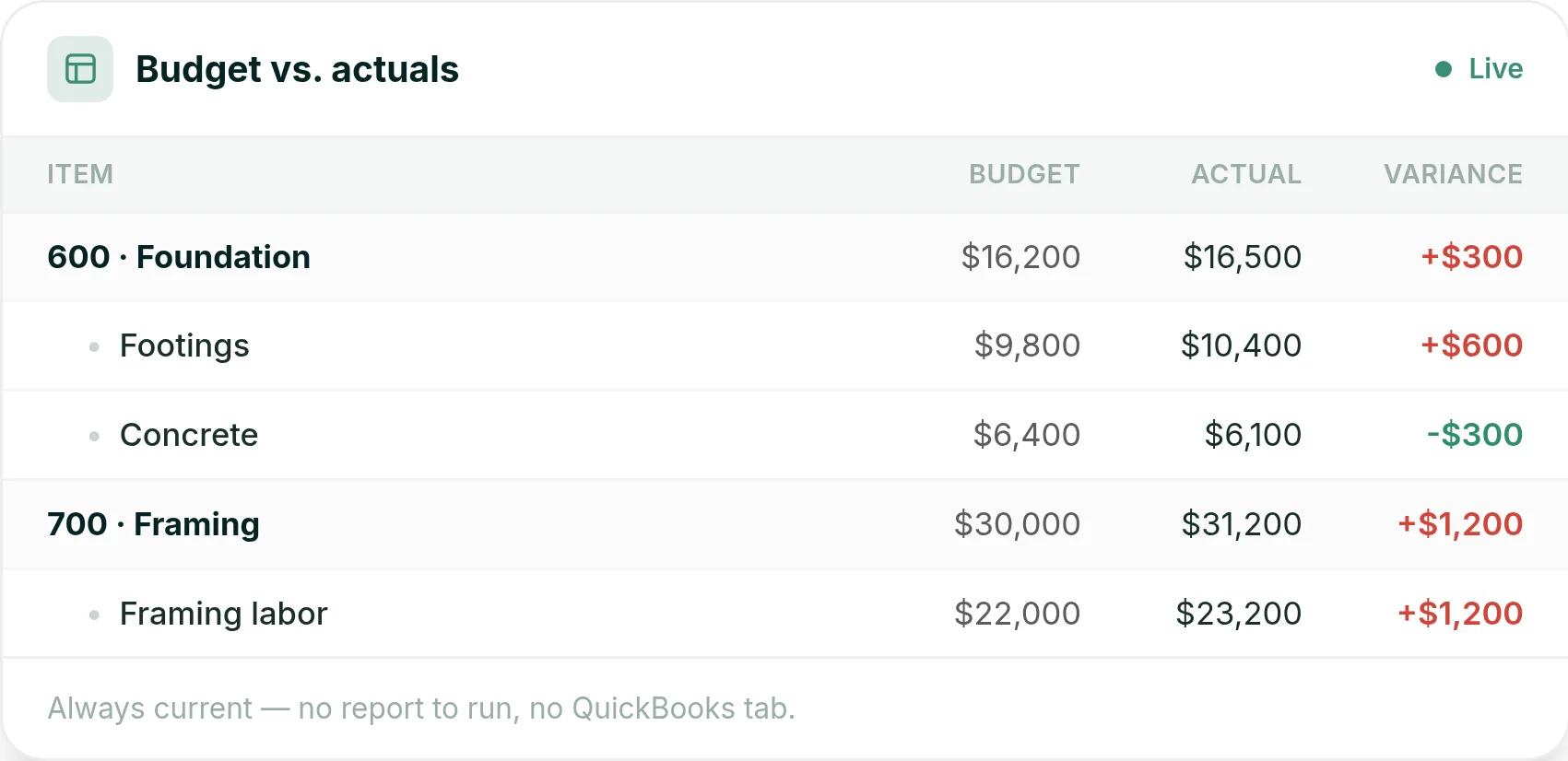
In Ressio selections, you release each option to your client's portal, and the approved amount updates your estimate and budget on its own.
Change orders built from the estimate
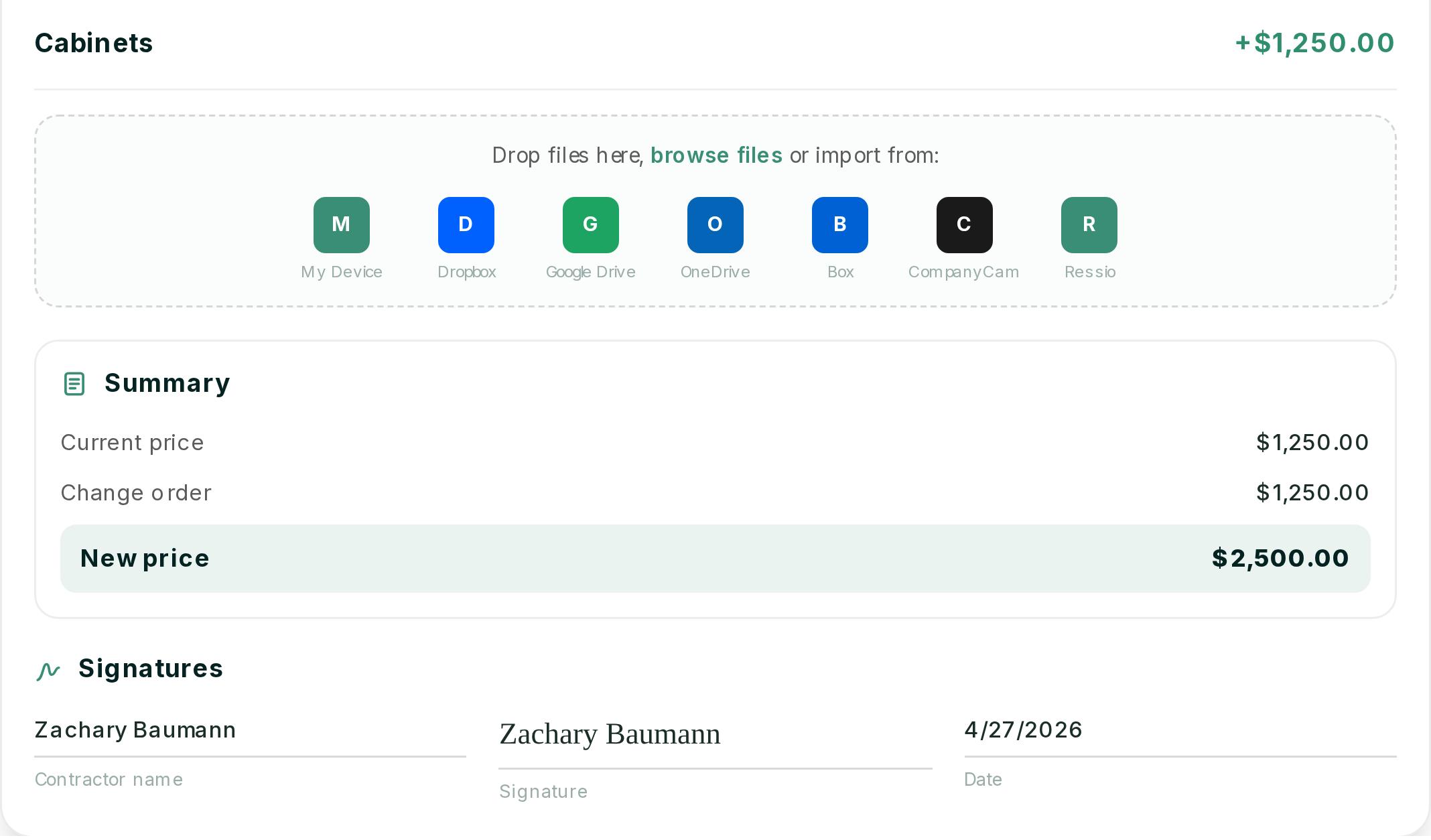
When scope changes, you flag the line items in your estimate. We build the change order from them, with quantities and costs already filled in.
Your client approves from their phone. The contract value and budget update the moment they tap. Every change order keeps a full history of who sent it, when the client viewed it and when they signed.
A portal your clients will open
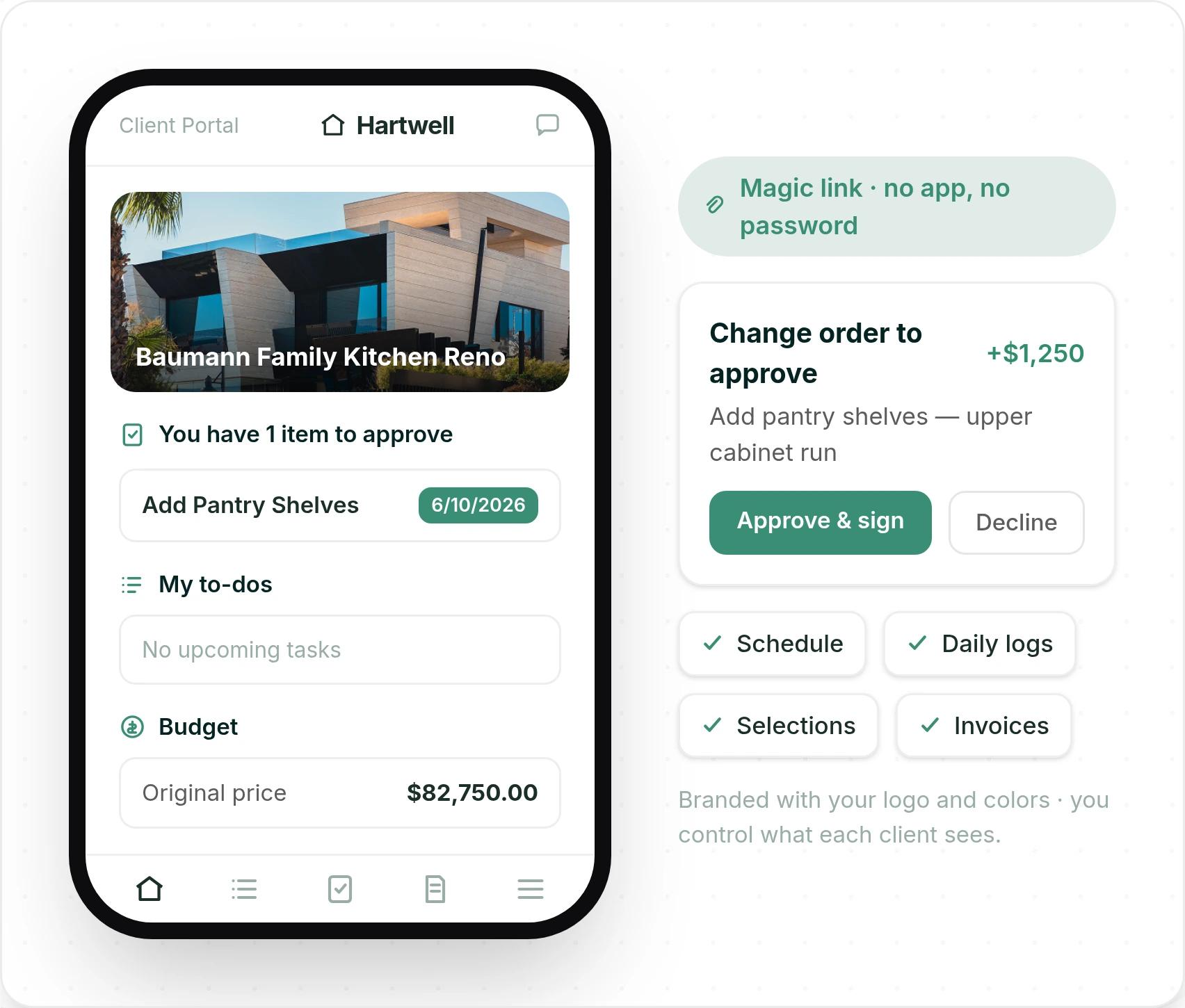
Your clients reach their client portal through a magic link. No app, no password. They see their schedule, daily logs, selections and invoices, branded with your logo, and you choose what each client sees.
Subs get the same no-login access through our vendor portal. They open a link and see only their own tasks, specs and documents.
Schedules and daily logs from the field
In Ressio scheduling, move one task and every task after it reschedules. Changes save as you go, and undo is built in.
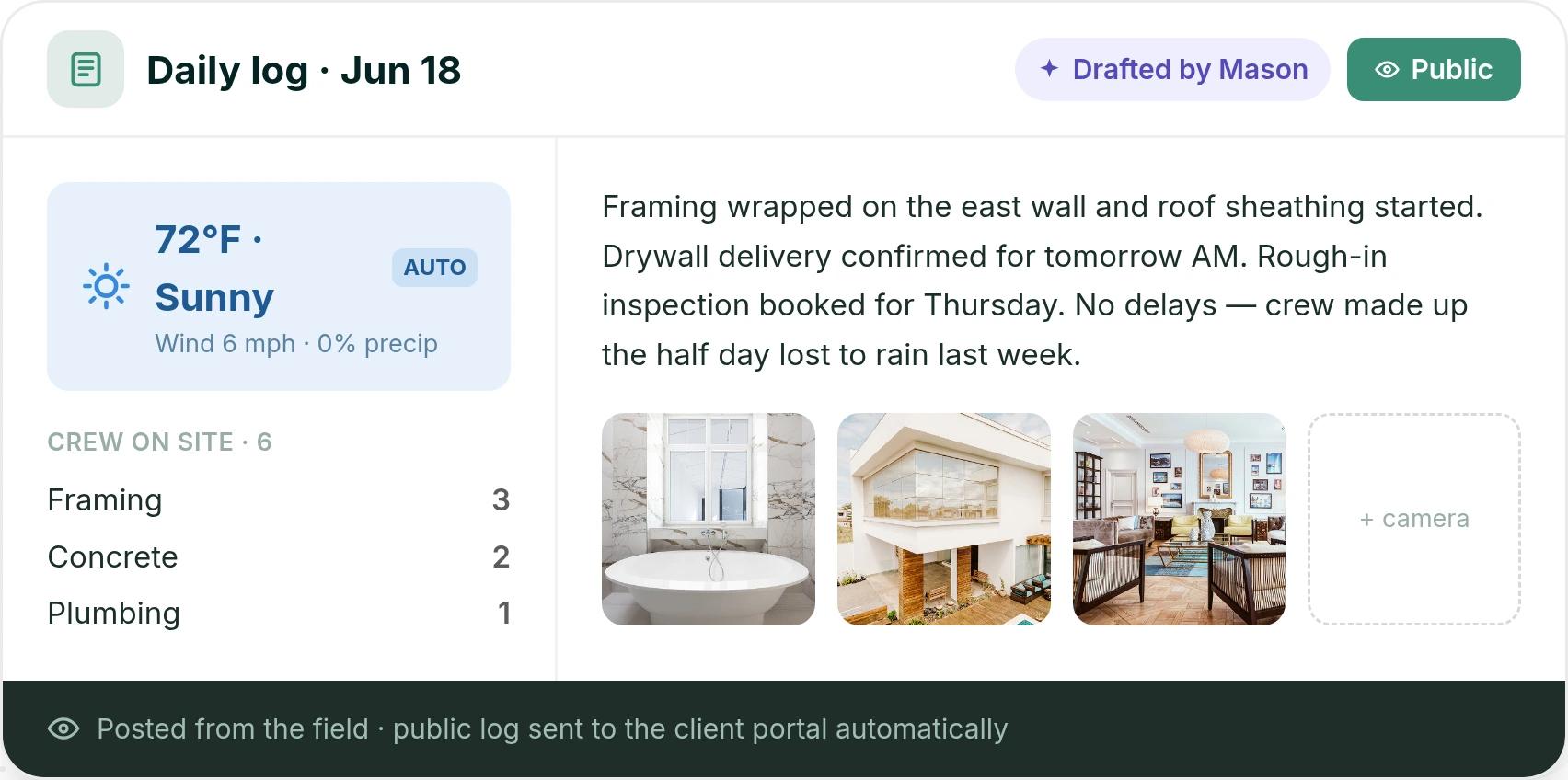
Your crew fills in the daily log from a phone. Weather fills in by itself, Mason AI drafts the entry from today's tasks, and public logs go to the client portal.
Moving off CoConstruct without starting over
Our onboarding team handles the migration, including jobs in progress, templates and workflows. Most teams are fully up and running within five business days. Every plan includes phone and chat support, so you talk to a person when a job is on the line.
Andy Kolp ran Epic Building Company on CoConstruct for years before moving. He calls Ressio "a major upgrade from Co-Construct" in the Epic story.
Want to see your CoConstruct jobs running in Ressio? Book a Ressio demo and bring a live project with open selections.
2. Buildertrend
Buildertrend is where CoConstruct customers are being moved. It is the official path, with a guided migration.
Best for: larger builders and remodelers running many jobs at once, plus commercial and specialty contractors. Buildertrend says it is built for builders who run five or more projects a year and want to grow "from 6 to 8 figures."
What it does well: one platform covers sales, schedules, budgets, daily logs, and client and sub portals. Users are unlimited, and setup, data migration and live training are included. Jessica S., an admin at a firm of 2 to 10 people, said it "streamlines scheduling, budgeting, and communication between teams and clients, which saves a lot of time" (Capterra).
Where it struggles: a platform this broad takes time to learn, and each sub needs their own login for its Sub Portal. Ben T., a renovation project manager, wrote that "not all subcontractors were fast to transition to the app" (Capterra).
How Ressio compares: in Ressio, subs and clients open a magic link in a text. There is no app to install and no password.
Pricing: Buildertrend starts at $499 a month. The final price depends on your yearly construction volume and onboarding package.
For a side-by-side look, see Ressio vs CoConstruct.
3. JobTread
JobTread is estimating and project management software with CRM, takeoff, budgets, change orders, selections, portals and a QuickBooks Online integration.
Best for: contractors who work across many trades. JobTread serves home builders and remodelers, but also pool builders, roofers, outdoor living and commercial contractors, and franchises.
What it does well: estimating, job costing and support. Customer and vendor portal users are free and unlimited. Bob H., an owner, wrote: "It saves me hours on budgeting, estimating, and job costing" (Capterra).
Where it struggles: selections, the workflow CoConstruct users lean on most. Philip K., a COO at a firm of 2 to 10 people, put it in five words: "Selections has a clunky UI" (Capterra). Reviewers also mention a long first setup.
How Ressio compares: we build Ressio only for custom residential work.
Pricing: JobTread is $199 a month with one internal user, plus $20 a month for each added internal user up to ten. Annual plans save 20%, and there is no contract or setup fee.
4. BuildBook
BuildBook is residential construction management software with estimating, client selections, budgets, scheduling, a client dashboard, daily logs and a QuickBooks integration.
Best for: small builders and remodelers who want a simple app their team can pick up fast. BuildBook says it "requires zero training."
What it does well: a clean, easy app for clients and crews. Justin W., an owner at a construction firm of 2 to 10 people, wrote: "It is set up to work well and its easy to navigate and use" (Capterra).
Where it struggles: depth on job costs and field setup. BuildBook's feature list does not name purchase orders. And Kristyn D., a designer at a small builder, said foremen without a computer on site had to "create an account first on a desktop before being able to use the app" (Capterra).
How Ressio compares: Ressio purchase orders tie each commitment to a budget line and warn you before one pushes that line over. Subs see their POs and tasks in our vendor portal by magic link.
Pricing: BuildBook does not show prices on its pricing page. New users start by booking a demo.
5. Houzz Pro
Houzz Pro is business software for remodelers, interior designers, architects and builders. It pairs estimates, selections and change orders with 3D floor plans, mood boards and marketing tied to the Houzz network.
Best for: interior designers and design-led remodelers who win work through Houzz and sell with visuals.
What it does well: design tools and the client experience. Patrick K., a vice president at a construction firm of 11 to 50 people, said his clients "can track the job progress, approve material selections, and make secure payments online" (Capterra).
Where it struggles: the budget tool, for some users. Geoffrey P., a VP of project management, wrote: "The budget tool is way too basic. The takeoffs aren't linked with the associated estimate for live edits" (Capterra).
Pricing: the Design plan starts at $99 a month for one user. Change orders, budgets and schedules come with Pro, from $199 a month. Plans run yearly after a 30-day free trial, and advertising packages cost extra.
6. Contractor Foreman
Contractor Foreman is construction management software for small and mid-sized residential and commercial contractors, including trade and service contractors. It covers estimates, change orders, a client portal, scheduling and QuickBooks.
Best for: general and trade contractors who mix job types, from service calls to commercial work, and want many tools at a low price.
What it does well: value. Nick H., a consultant at a firm of 11 to 50 people, wrote: "It is simplistic, and allows for great overall project management at a fair price" (Capterra).
Where it struggles: large estimates. Paul G., a project manager, wrote: "When making very large estimates the software slows down a lot" (Capterra).
How Ressio compares: we built Ressio estimating for complex, multi-phase custom builds. Selections and allowances feed the same budget as the estimate.
Pricing: plans start at $49 a month for one user on an annual plan. Standard is $105 a month for up to three users. There is a 30-day free trial and a 100-day money-back guarantee.
How to choose a CoConstruct alternative
Pick the option that matches what you want to keep from CoConstruct.
- If you want the least change right now, the Buildertrend migration is the default path.
- If you work across many trades or commercial jobs, JobTread or Contractor Foreman cover more job types.
- If design and marketing drive your business, look at Houzz Pro.
- If you build custom homes and want selections, change orders and the budget on one record, choose Ressio. We migrate your jobs in progress, and we ship new features every week.
Frequently Asked Questions
What is the best CoConstruct alternative for custom home builders?
For custom and semi-custom home builders, the strongest CoConstruct alternative is Ressio. We built Ressio on the same principles as CoConstruct. Selections, change orders and the budget all run from one estimate, and clients approve by magic link with no login.
Is CoConstruct shutting down?
CoConstruct is being folded into Buildertrend. CoConstruct's own site says its "transition to Buildertrend is entering its final phase" and asks customers to move now. It does not give a public end date.
Do I have to move from CoConstruct to Buildertrend?
No. Buildertrend is the path CoConstruct offers, but you can choose any platform. Many custom builders compare a few options first, since any move means retraining their team and their clients.
Can I move my CoConstruct jobs to Ressio?
Yes. Our onboarding team migrates your active jobs, templates and workflows, including jobs in progress. Most teams are fully up and running within five business days, with phone and chat support on every plan.
Does Ressio have selections like CoConstruct?
Yes. Ressio selections are released to your client's portal, approved from a link and timestamped on the job. Approved selections update your estimate and budget, and an overage on an allowance starts a change order.
Ready to see how your CoConstruct jobs would run in Ressio? Book a Ressio demo and we will walk through your selections, budget and client portal on a real project.