Introducing Ressio Takeoffs: Closing the Gap Between Your Plans and Your Estimate
What's on the plan? What should I buy? How much will it cost? All three answers now live in Ressio.

Ressio Staff
October 28, 2026
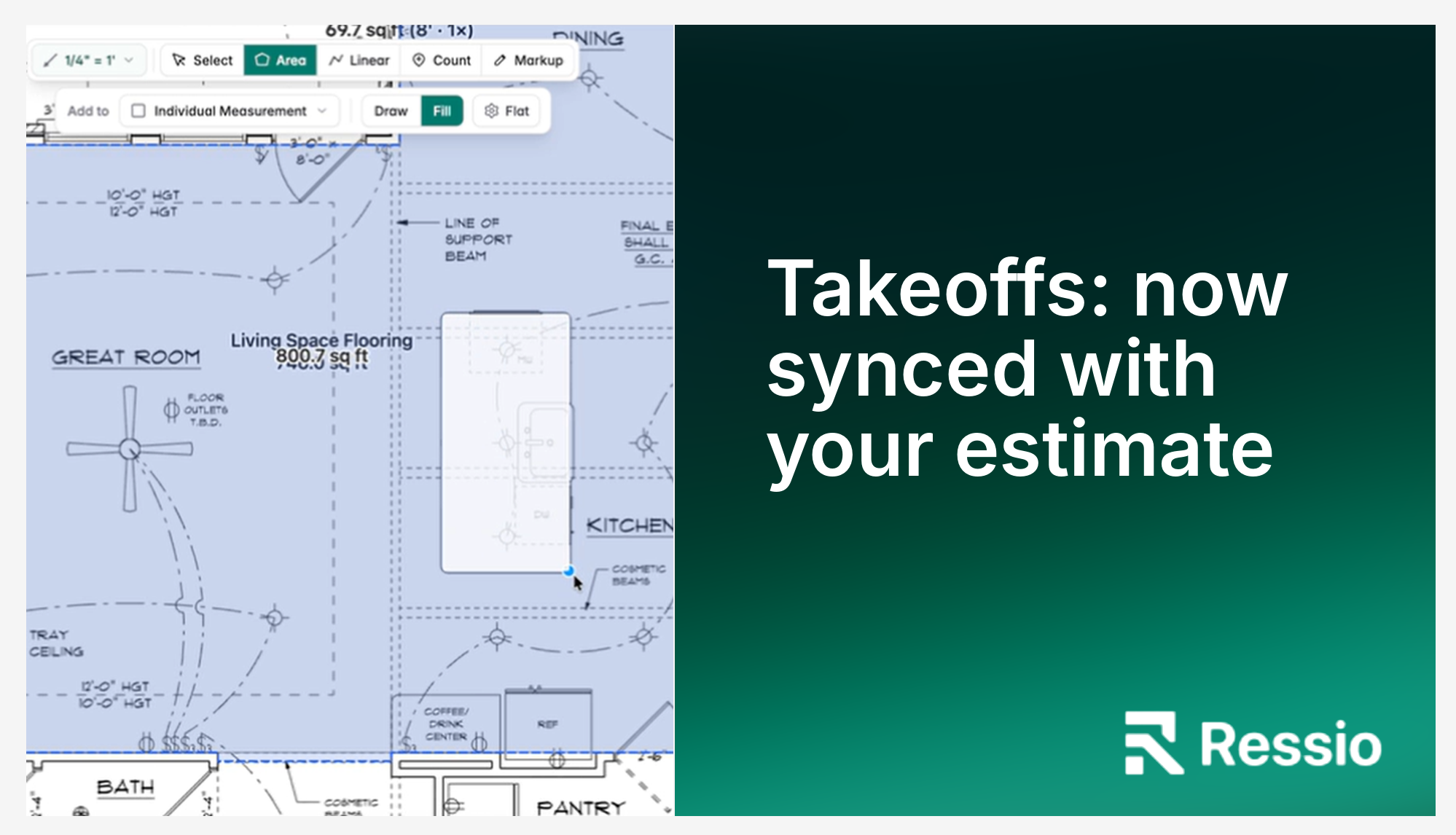
Every estimate begins with a takeoff. Before a builder can price a job, someone has to work through the plans and answer three questions: what is on the plan, what needs to be bought, and what it will cost. The quality of every bid, budget and purchase order that follows depends on how well those questions are answered.
For most builders, they are answered in different places. Quantities are measured in one program or on paper, adjusted for waste in a spreadsheet, then typed into the estimate by hand. This workflow costs builders dozens of hours per project and is highly prone to errors.
Today, we’re closing the gap between plans and estimates with the launch of a native takeoffs capability. Ressio takeoffs brings construction takeoff software directly into the Ressio estimate, so the measurement and the number it produces live in the same place.
Manual takeoffs are still the norm
In a recent internal survey, we asked home builders and remodelers a simple question: how do you do takeoffs today? Of the 153 respondents, 44% said they still do manual takeoffs, by hand or in a spreadsheet. That was the most common answer by a wide margin.
Another 41% use a dedicated digital takeoff tool, 8% outsource their takeoffs to a third party, and only 5% use takeoff functionality built into their construction software.
Which means that for the vast majority of these builders, plan measurements and estimates have never lived in the same place. Bridging that gap manually costs time and can lead to inaccuracies that come directly out of your margin.
Outsourced vs. in-house takeoffs: the hidden costs
Each common approach to takeoffs works. Each also carries costs that appear after the measuring is done.
Outsourced takeoffs. Takeoffs are skilled, tedious work, so many builders send them to a third-party service. That typically costs hundreds of dollars per plan set, with a one- to two-week wait. While the bid waits in someone else's queue, the client keeps talking to other builders.
The results typically arrive as a quantity spreadsheet and a marked-up plan set, separate files that someone still has to re-enter into the estimate. Checking a number means matching a spreadsheet line to a markup by hand, and once the plans change, neither file reflects the job anymore.
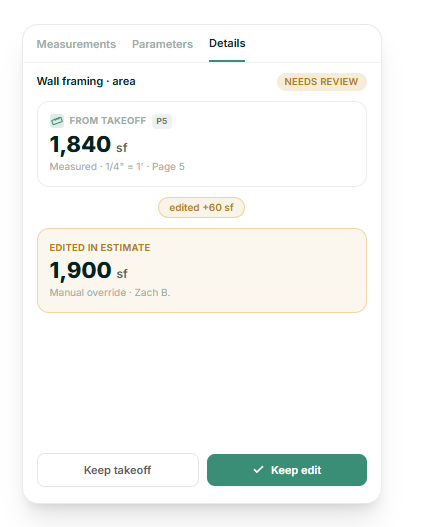
In-house takeoffs with bolt-on tools and spreadsheets. Dedicated digital takeoff tools measure plans well. The problem is that builders then answer the three takeoff questions in three different places: they measure in one program, calculate waste and order quantities in a spreadsheet, and type the results into the estimate. Every handoff is an opportunity for error. Late in the day, 1,480 square feet becomes 1,840. When plans are revised, all three records need updating, and they need to match. In many cases, the takeoff tool is also an additional subscription.
In both cases, the most expensive part is not the measuring. It is the gaps between steps: re-typing, reconciling, and waiting. The highest cost appears months later, when a number in the budget does not add up and nobody can trace it back to the plan.
“Takeoffs was always something we wanted to do as part of our mission to provide builders with one connected construction management system,” says founder and CEO Mitchell Kasselman, “just not something we realized we could do, until this year. Our engineering team has become so adept at leveraging AI in service of this market that it finally became possible to build a takeoffs to our standards. It's a major milestone and proof of our commitment to innovating in partnership with the builders we serve.”
Introducing Ressio Takeoffs
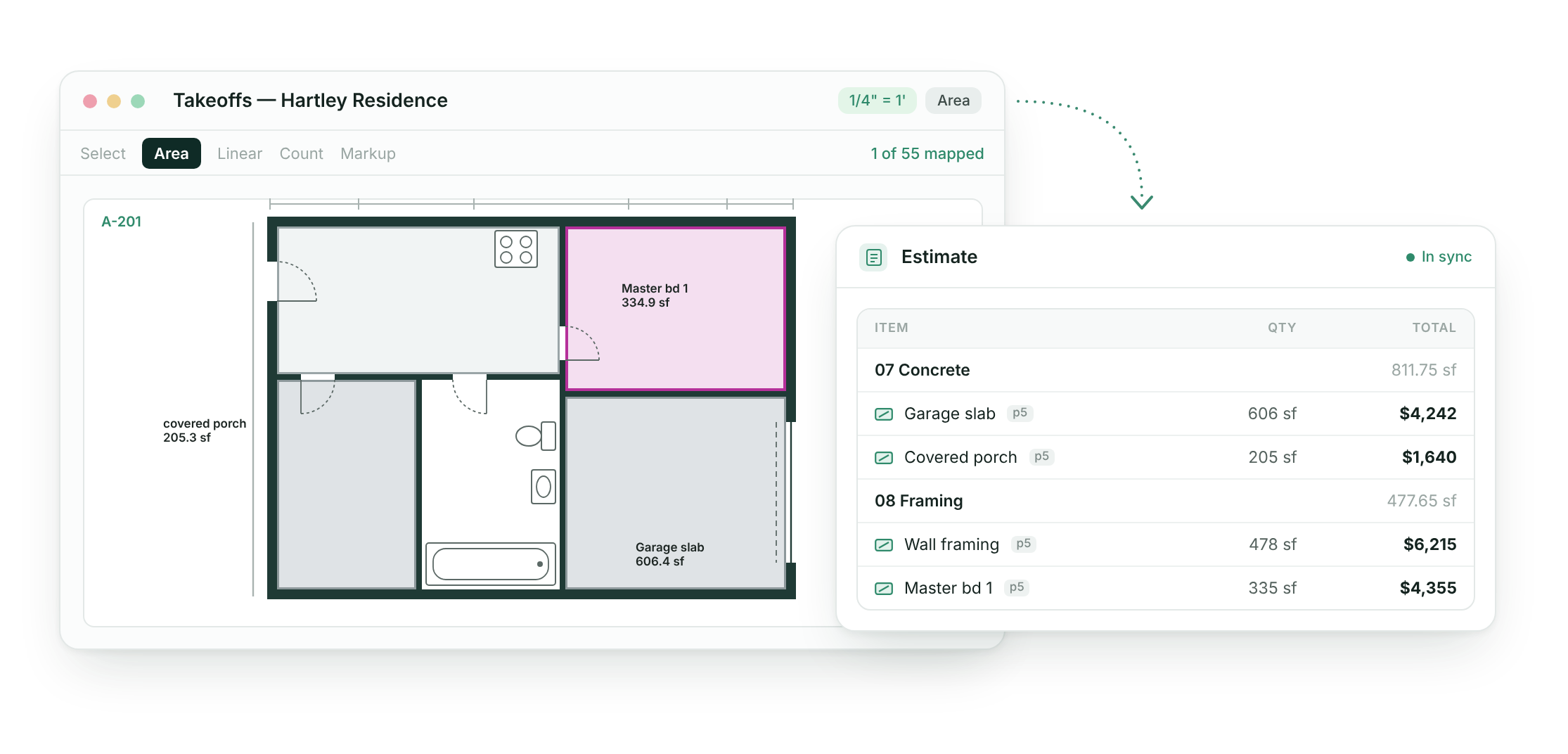
Ressio takeoffs answers all three takeoff questions inside Ressio. Builders upload their PDF plans, measure the quantities they need, and map those quantities to their estimate, where existing formulas turn them into order quantities and costs.
Takeoffs is not another standalone drawing tool, and it is not a button that performs the takeoff automatically. It is the connection between a builder's plans and their estimate, which is the part of the process that for many builders remains missing.
Three things set Ressio takeoffs apart from other takeoff tools.
Numbers never leave Ressio
Most takeoff tools stop at the measurement. From there, quantities are exported, pasted and re-typed. In Ressio, the measurement is the estimate input. Each measured quantity maps to an estimate parameter, and the builder's formulas take it from there.
Two-way sync, with the builder in control
Takeoff quantities and estimate parameters stay in sync in both directions. When someone changes a value in the estimate, Ressio does not block the change. It flags the difference for review, and the builder decides which number to keep. No one is forced back into the takeoff to make an adjustment.
Every number is traceable
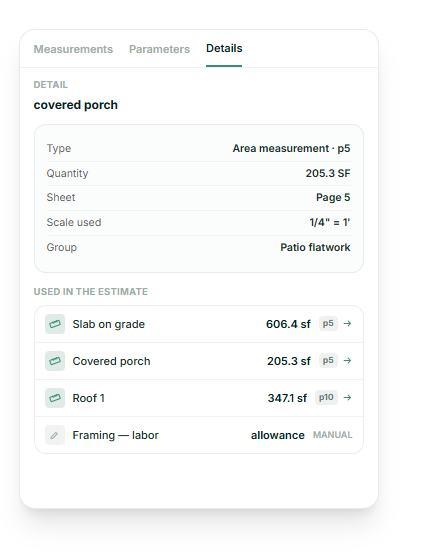
Each measurement records the plan page and scale it was taken from. In the estimate, an icon shows whether a value was entered manually or sourced from a takeoff, and one click returns to the plan. When a project manager asks where 1,840 square feet came from, the answer is on the screen.
From takeoff to estimate: what connected takeoffs mean for builders
No more double entry. Quantities are measured once. There is no spreadsheet in the middle and nothing to re-type, so the transposition errors that come with re-entry go away.
Quantities and bids you can defend. Scale is set before any measurement is taken, and measurements snap to the lines on the plan. Accurate, traceable quantities mean less missed scope, fewer incorrect orders and fewer surprises once the job is underway.
Revisions without rebuilds. When plans change, the builder re-measures in one place and the estimate updates. There are no longer three files to update and reconcile.
Where AI fits, and where it does not
AI can remove much of the tedious work in a takeoff, but builders have been clear that a plausible-looking wrong number is worse than no number at all. Ressio applies AI where it saves time and keeps the builder in charge of every quantity that reaches the estimate.
- AI scale detection. Ressio can read the scale from a plan page and set it, and the builder confirms it before measuring.
- Repeated symbol detection. Builders can use AI to automatically identify and count repeated symbols, such as those indicating outlets and fixtures.
- Estimate preparation with Mason. Ressio's AI assistant, Mason, can pull window and door schedules from a plan set into estimate rows, so the estimate is structured before measuring begins.
- Missed-scope checks. Mason can compare a new estimate against past projects and templates to flag items that may be missing.
Every AI suggestion can be reviewed, edited or rejected, and AI never locks an estimate value.
Product designer and feature owner Drew Price worked closely with customers to define AI’s ideal role in Ressio takeoffs. "We talked with more than two dozen builders while researching and soft-launching the takeoff beta, and one line stuck with the whole team: 'I won't know the job if AI does the takeoff.' Measuring the plans is how builders learn a project and catch what's missing, so full automation would have taken away the part they value most. Partial automation allows them to learn their jobs while saving time and minimizing mistakes."
Built for the takeoffs builders do every week
Ressio takeoffs is designed for the light-to-moderate takeoffs that custom builders and remodelers perform on nearly every project: flooring, walls and drywall, trim, roofing, fixtures and openings. Ressio takeoffs is the right tool whenever a quantity needs to drive the estimate. Learn more about Ressio's construction takeoff software.
Frequently asked questions about Ressio takeoffs
What is the difference between manual and digital takeoffs?
A manual takeoff is done by hand: an estimator measures printed plans with a scale ruler, or reads dimensions off a PDF and records quantities in a spreadsheet. A digital takeoff is done in software, where the estimator sets the plan's scale and measures areas, lengths and counts directly on screen. Digital takeoffs are typically faster and easier to check, but most digital tools still leave quantities to be re-entered into the estimate. Ressio Takeoffs is a digital takeoff that feeds the estimate directly, so nothing is re-typed.
Can Ressio perform a takeoff automatically with AI?
Not today. Ressio Takeoffs is a builder-led tool with AI assistance. AI detects plan scale, and Mason can extract schedules and check an estimate for missed scope, but the builder performs and approves the measurements. This approach keeps every quantity that reaches the estimate accurate and accountable.
How accurate are takeoffs in Ressio, and can I adjust the numbers?
Once the page scale is set, builders can begin taking measurements, which snap to the lines and corners on the plan for precision. Every value remains editable in the estimate, every change is flagged for review, and every number traces back to its plan page.
How do takeoff quantities flow into my estimate and budget?
Each measurement, or group of measurements, maps to an estimate parameter. Estimate formulas then use that parameter to calculate order quantities and costs, for example adding a waste factor to flooring or dividing wall area by sheet size for drywall. Once the contract is signed and the estimate locked, it feeds directly into the budget.
Can I use templates or assemblies with takeoffs?
Builders can start from their existing Ressio estimate templates and parameters, so a takeoff maps into a structure that is already set up. Takeoffs do not currently generate assemblies or material lists. Estimate formulas can produce many material breakdowns, such as drywall sheets, studs, trim, and gutter segments. Reusable measurement templates and measurement duplication are on the takeoffs roadmap.
Will takeoffs work for my trade, such as framing, tile, or siding?
Yes. Area, linear, and count measurements cover most residential scopes. Linear measurements can include a wall height to calculate wall area for drywall, siding or similar materials, and roof areas account for pitch. Detailed documentation on the feature’s capabilities is available in our knowledge base.
What file types does takeoffs support?
Takeoffs works with PDF plan sets, including large, multi-page sets. Best practice is to convert files to high-quality PDFs before loading them into Ressio for takeoffs.
How much setup does takeoffs require?
Takeoffs works best with a little preparation: create the project estimate from a template, set up the parameters you plan to measure, and use Mason to pull schedules into estimate rows. With that structure in place, the takeoff becomes a matter of measuring and mapping. Ressio's help center articles and webinar recording walk through the process step by step.
Does takeoffs cost extra?
No. Ressio takeoffs are included in the Ressio subscription.
How does Ressio takeoffs compare with other takeoff tools?
Dedicated takeoff tools are strong at measurement and markup, and AI-first tools focus on generating quantities quickly. Ressio takeoffs is built around what happens after the measurement: quantities that stay connected to an editable estimate, sync in both directions and trace back to the plan. Builders who need heavy markup can keep their existing tool and use Ressio wherever a quantity needs to drive the estimate.
See Ressio takeoffs in action
Takeoffs closes the gap between a builder's plans and their estimate, so the quantities behind every bid can be measured once, trusted and traced. To see how Ressio takeoffs and the rest of the Ressio platform can support your estimating process, schedule a personalized demo with our team.