Free Construction Estimating Software: 3 Options for 2026
Search for free construction estimating software and nearly every result is a paid product with a trial attached, which is a reasonable thing to sell and a misleading thing to call free. There are three real categories, and they behave very differently once a live job is sitting in them. We build Ressio, and the part we care about is what happens to the estimate after you win the job.

Ressio Staff
October 11, 2026
Free construction estimating software is hard to find. Search for it and most results are paid tools with a trial attached.
We checked every option on its own pricing page. Only three are free past a trial: a spreadsheet template, STACK's free plan and Houzz Pro's Free Basic Plan.
None of them takes a job from estimate to budget to invoice. This guide shows what each free option does, where it stops, and when a paid tool is worth it.
We build Ressio, a paid tool. We will say where it fits as we go.
Is there any free construction estimating software?
Yes, but only three options are free past a trial: a spreadsheet template, STACK's free plan and Houzz Pro's Free Basic Plan. A template is free forever, and STACK's free plan covers takeoff but not pricing. Houzz offers its free plan without listing what it includes.
| Free option | What is free | Where it stops | In Ressio |
|---|---|---|---|
| Spreadsheet template | The whole template, forever | Every number is typed again into the budget, change orders and invoices | The estimate becomes the job budget when you lock it |
| STACK Free | Takeoff on 1 active project a month, up to 300 plan pages and 50 measurements per project | Pricing, worksheet estimates and proposals are on the paid Pro plan | Prices the job and sends the proposal from the same estimate |
| Houzz Pro Free Basic Plan | A free account; Houzz does not list what it includes | Estimates are listed on Houzz Pro's paid plans | Estimates, proposals, budgets and change orders on one record |
Why look at Ressio before you pick a free tool
We built Ressio for custom home builders and remodelers, and it is paid software, not a free tool. Builders pay for it because their estimate does not stop at the estimate. In Ressio, the price you build becomes the proposal, the budget, the change orders and the invoices, so nobody retypes a number.

A free tool can get you a price. We keep that price true for the whole job. Book a demo and we will walk one of your own jobs through it, so you can compare it to the free options below.
1. Free construction estimate templates
A construction estimate template is a spreadsheet you fill in to price a job, and it is the only option that is free forever. You own the file, with no vendor, no cap and no expiry. Free templates come as Excel or Word files, and our construction estimate template guide walks through what goes in one.
Who it suits: A builder pricing a few jobs a year, or anyone learning how an estimate is built.
What it does well: It is fast, flexible and yours. You can lay out divisions, quantities, unit costs and markup any way you like.
Where it stops: A template only holds the estimate. Once you win the job, the same figures go into a budget, then change orders, then invoices.
Each copy is typed by hand, and each one can drift from the others. Formulas break when rows are added. Nobody can see which version the client signed.
How Ressio compares: In Ressio, you build the estimate from your own cost catalog on NAHB, CSI or NARI codes, or your own divisions. Markup calculates as you type. When the client approves, you lock the estimate and it becomes the job budget, so the number you priced is the number you track.
2. STACK Free: free takeoff, not free estimating
STACK Free is a free-forever takeoff plan: one active project a month, up to 300 plan pages and 50 measurements per project. Takeoff means measuring quantities off drawings, the first step of an estimate. The free plan gives you quantities, not a priced estimate.
Who it suits: Commercial estimators and trade contractors who measure off plans and price in another tool.
What it does well: The takeoff is quick. "It dramatically cuts down the time it takes to get an accurate takeoff together," wrote one estimator. (David L., estimator, Capterra, May 2026)
Where it stops: Worksheet estimating, labor and material assemblies, and proposals are all on STACK's paid Pro plan. One user also found pricing data slow to set up: "Importing material prices is VERY cumbersome." (Gary L., construction estimator, Capterra, October 2025)
How Ressio compares: In Ressio, you price the job and send the proposal from the same estimate. You type to pull items from your cost catalog, and the proposal goes to the client by a magic link. They sign it without a login.
Pricing: STACK Free is $0 with no credit card, and new accounts get 7 days of Pro features. Paid plans are per user per month: Premium is $299 billed yearly or $349 monthly, and Pro, which adds estimating, is $349 yearly or $399 monthly.
3. Houzz Pro Free Basic Plan
Houzz Pro has a Free Basic Plan, but its pricing page lists no features, users or project limits for it. The page offers it as "Try Our Free Basic Plan", next to paid plans that each list their features. Estimates first appear on the paid Design plan.
Who it suits: Remodelers and design-build firms who already get leads from Houzz.
What it does well: The paid plans are broad. Houzz lists CRM, estimates, invoices and online payments on its entry Design plan, and adds takeoffs, bid management and change orders on Pro.
Where it stops: Estimates are listed on the paid plans, not the free one. If you sign up to estimate for free, check what the account allows before you put a live job in it.
How Ressio compares: In Ressio, estimating, proposals, budgets and change orders work on one record, and change orders are built straight from estimate lines.
Pricing: Houzz Pro's paid plans are Design, Pro and Teams, with a 30-day free trial.
Tools that look free but are trials
Most tools sold as free construction estimating software are paid tools with a free trial. When the trial ends, so does the estimating, unless you start paying. Trials run from 7 to 30 days across the tools below, which is enough to test a tool on one job but not to run a business on it.
- Buildxact has no free plan in the US today. It offers a 14-day free trial, then plans from $199 a month.
- Houzz Pro's paid plans come with a 30-day free trial.
- STACK Pro features are free for 7 days on a new account, then the account drops to STACK Free.
A trial is a good way to test a tool on a real job. It is not a way to estimate for free.
What free construction estimating software cannot do
Free tools stop at the estimate, and the costly part of a custom build happens after it. Once the job is won, the estimate has to become a budget that change orders revise and invoices bill against. Then actual costs come back in, and every one of those numbers has to match the estimate.
In a free tool, each of those steps is a retype. Each retype is a chance for the budget and the estimate to disagree. You find out months later, when a job comes in over and nobody can say when it slipped.
The stakes are high. The NAHB Cost of Constructing a Home 2024 study puts the average construction cost of a single-family home at $428,215.
Here is an example with made-up figures. Partway through a custom home, the homeowner adds pantry shelves to the cabinet run. In Ressio, the builder flags the cabinet line in the estimate and builds a $1,250 change order from it, with cost and markup filled in.
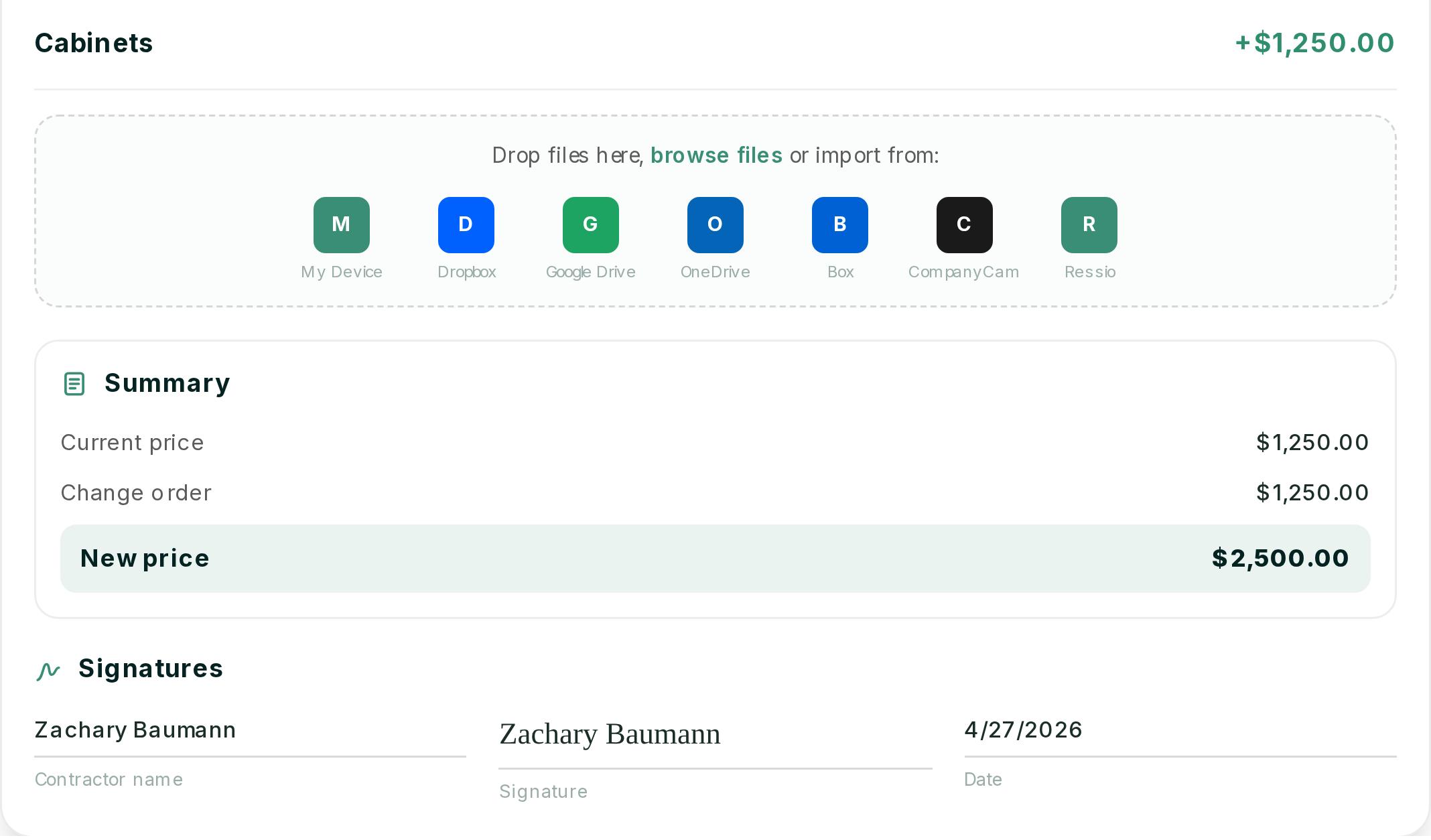
Once the homeowner signs, the budget carries the new amount and the next invoice includes it. Nobody retypes the figure, and the margin you see is still true.
Want to see your own change orders land in the budget without a retype? Book a Ressio demo and bring a live job.
How estimating works in Ressio
Our estimating software is paid, and you pay for what happens after the price: one estimate becomes the proposal, budget, change orders and invoices. You build the estimate once, and every later document reads from it. Here is how a job moves through Ressio, step by step.
Build the estimate your way
Use NAHB, CSI or NARI codes, or your own divisions. Add cost items under each category, and break complex lines into a third tier of cost details if you need to.
Start typing and we pull priced items from your cost catalog. Every project you build becomes a reusable template.
Markup that does the math
Enter quantity and unit cost. We work out builder cost, markup and client price as you go.
Set markup per item or across the whole project. There is no formula to break.
From estimate to signed proposal
Create the proposal from the estimate in one click. Choose what the client sees, such as quantities, unit costs or only totals. The client signs from a magic link, with no login.
The estimate becomes the budget
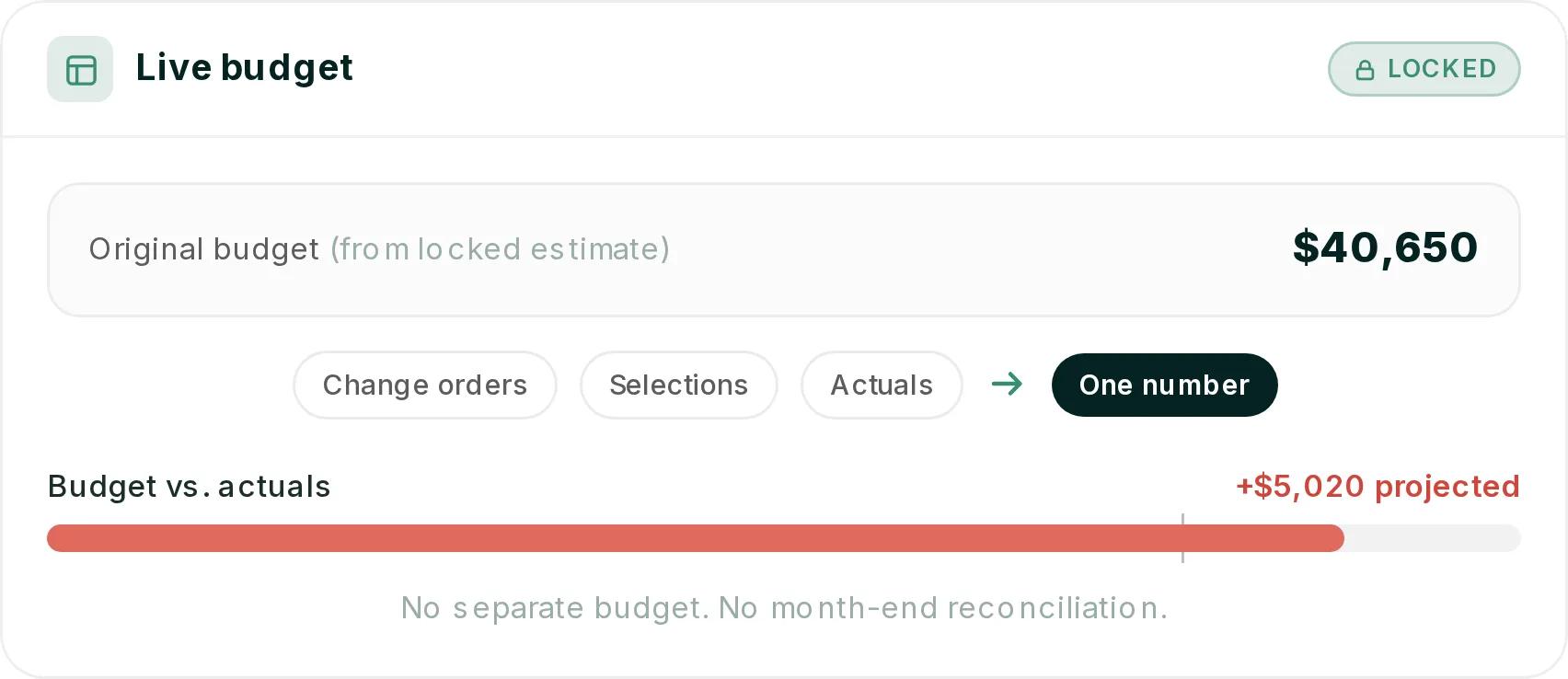
When the client signs, lock the estimate. It becomes the original job budget. Change orders, selections and actual costs all flow back to the same numbers, and budget vs actuals updates in real time.
Accounting without a second entry
We sync with QuickBooks Online, so your bookkeeper is not retyping the job either.
When paid estimating software is worth it
Paid estimating software is worth it when you build custom homes or remodel and re-entering numbers costs you hours or margin. If you price a few jobs a year, a free template will do. Once you run several jobs at once, each retype is time you pay for anyway.
Shade Tree Homes, a custom builder, finds Ressio easier to navigate than Buildertrend.
See the estimating feature for the full walkthrough.
Ready to stop retyping your estimate into four other places? Book a Ressio demo and we will build one of your jobs with you.
Frequently Asked Questions
What is the best free construction estimating software?
The best free construction estimating software depends on the job: a spreadsheet template for pricing, or STACK Free for takeoff. A template is free forever and covers the whole estimate. STACK Free measures quantities off drawings but leaves pricing to its paid plan, and most other tools only offer a free trial.
Does STACK have a free plan?
Yes, STACK Free is free forever, with no credit card. It covers takeoff on one active project a month, up to 300 plan pages and 50 measurements per project, with Pro features for the first 7 days. Worksheet estimating and proposals are on the paid Pro plan.
Is Houzz Pro free?
Houzz Pro has a Free Basic Plan, but estimates are listed on its paid plans. Houzz lists no features for the free plan. The paid plans list CRM, estimates, invoices and payments, with takeoffs and change orders on the higher tier, and come with a 30-day free trial.
Is Excel good for construction estimating?
Excel works for construction estimating on small or occasional jobs. It is free and flexible, and a good template teaches you how an estimate is built. It struggles after the job is won, when the same numbers must be retyped into a budget, change orders and invoices.
Does Buildxact have a free plan?
No, Buildxact has no free plan in the US today. Its US pricing page offers a 14-day free trial, then paid plans: Foundation at $199 a month, Pro at $399 and Master at $599, with 15% off when you choose yearly billing.