
Home Builder Selection Sheet Template
A free selection sheet template for custom home builders, with the columns that matter, a room-by-room checklist, and how to keep client choices tied to allowances and the schedule.

Ressio Staff
October 9, 2026
A selection sheet is where a custom build quietly wins or loses money. Every faucet, tile and cabinet pull the client picks has a price, a deadline and an allowance behind it.
This home builder selection sheet template gives you the columns to track and a room-by-room list to fill in. Copy it into Excel, Google Sheets or Word and use it on your next job.
We build Ressio, construction management software for custom home builders. Further down, we show where a spreadsheet stops working and how we handle selections instead.
What is a home builder selection sheet?
A home builder selection sheet is a list of every finish and fixture the client has to choose on a build. For each item, it records the option chosen, the allowance, the actual price, the deadline and the client's approval.
Builders also call it a selections sheet, a finish schedule or a new construction selection sheet. Whatever you call it, it has two jobs. It tells your trades what to install, and it proves what the client agreed to.
What should a selection sheet include?
A useful selection sheet tracks the choice, the money and the approval for every item. Most free templates only track the choice, which is why they fail at closeout.
These are the columns we recommend:
| Column | What goes in it | Why it matters |
|---|---|---|
| Category | Kitchen, primary bath, flooring, exterior | Groups items the way your estimate is built |
| Item | Kitchen faucet, backsplash tile | Names the decision |
| Location | Kitchen sink, main floor powder room | Tells the trade where it goes |
| Selection | Brand, model, finish or colour | What the trade orders and installs |
| Supplier | Showroom or vendor, with a contact | Who the client visits and who you order from |
| Allowance | The amount in your contract | The number the client agreed to up front |
| Actual price | The price of what they chose | What it really costs you |
| Over or under | Actual minus allowance | The amount that becomes a change order or credit |
| Due date | When the choice must be final | Keeps the schedule moving |
| Status | Pending, approved or declined | Shows what is still open |
| Approved on | Date and how it was approved | Your proof if the choice is disputed |
The last three columns do the most work. Without them, you have a wish list, not a record.
Free home builder selection sheet template, room by room
Use this list as the rows of your selection sheet template. Delete what your build does not include and add anything specific to your plans.
Exterior:
- Roofing material and colour
- Siding, stone or brick, and mortar colour
- Exterior trim and soffit colour
- Front door, garage door and hardware
- Windows: frame colour and grille pattern
- Exterior light fixtures
Kitchen:
- Cabinets: door style, wood or paint colour
- Cabinet hardware
- Countertops: material, colour and edge profile
- Backsplash tile and grout colour
- Sink and faucet
- Appliances: range, refrigerator, dishwasher, hood, microwave
- Pendant and under-cabinet lighting
Bathrooms:
- Vanity and top
- Faucets, shower trim and tub filler
- Toilet
- Floor tile, shower wall tile and grout
- Shower glass
- Mirrors, accessories and lighting
Throughout the house:
- Flooring for each room
- Interior doors and door hardware
- Trim and baseboard profile
- Paint colours, by room
- Light fixtures and fans
- Stair railing and balusters
- Fireplace surround
Mechanical and electrical:
- Plumbing fixtures not listed above
- Outlet, switch and plate style
- Low-voltage, data and smart-home items
How do allowances work on a selection sheet?
An allowance is the amount your contract sets aside for an item the client has not chosen yet. When the client picks something, the selection sheet compares the actual price to the allowance and shows the difference.
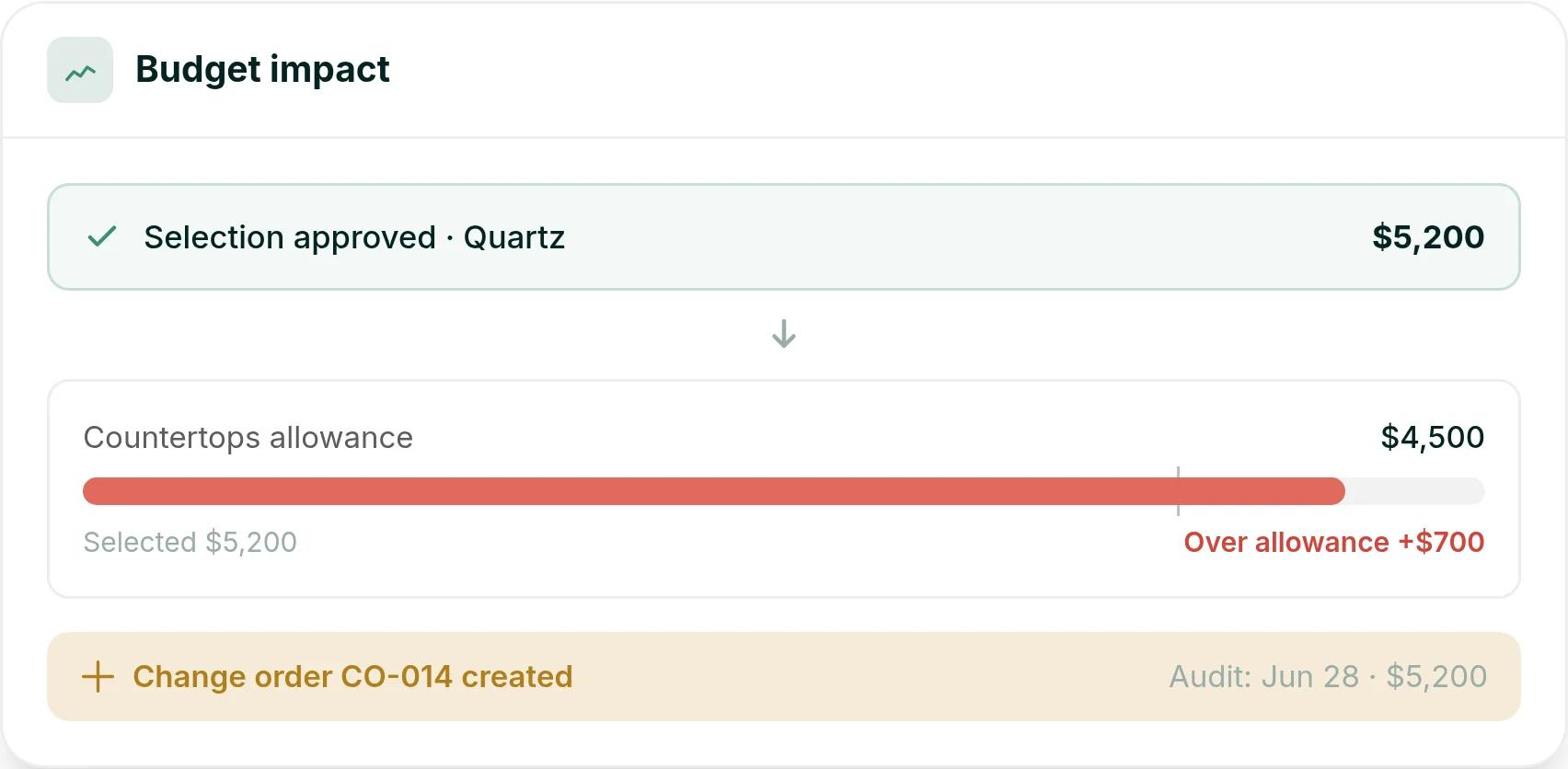
Say the contract has a $4,500 countertop allowance, and the client chooses a quartz slab at $5,200. That is $700 over, and the overage should become a signed change order before anything is ordered.
If the client comes in under, decide in your contract whether the difference is a credit. Whichever way you go, record it on the sheet so nobody argues about it at the final invoice.
How to set selection deadlines
Every selection needs a due date tied to the build schedule, not to the client's calendar. Work back from when the trade needs the material, then subtract the supplier's lead time.
For example, if cabinets go in at week 14 and the supplier quotes eight weeks, the cabinet selection is due by week 6. Tile, lighting and plumbing fixtures follow the same logic.
Our guide to the custom home building process shows where selections fall across a typical build. Share the deadline list with the client at the start of the job, so they know when each decision is due.
Where a spreadsheet selection sheet breaks down
Tracking construction selections in a spreadsheet works for one job and a careful client. It starts to fail when you run several homes at once or the client changes their mind.
These are the usual failure points:
- Version drift: The designer, the client and your office each edit a different copy. Nobody knows which one is current.
- Approvals by text and email: "Go with the darker one" sits in a text thread, not on the sheet. At closeout, the client says they never agreed to it.
- Budget gaps: An overage on the sheet never reaches the budget, so the change order is never written and the money is lost.
- Missed deadlines: A due date in a cell does not remind anyone, and the tile order slips.
Picture a client who picks a $5,200 countertop by text on a Saturday. On Monday, your super orders it. Nobody updates the sheet, nobody writes the $700 change order, and the margin on that kitchen is gone.
How we handle selections in Ressio
In Ressio, selections live on the project, organized by category to mirror your estimate. Each selection carries its status, its due date and its price, so you see what is pending, approved or declined in one view. See how it works on our selections and approvals page.
Here is what changes compared with a spreadsheet:
- The client approves in their portal: You release a selection to the client portal, and the client approves or declines through a magic link with no login. Every approval is timestamped and stored on the project.
- Approved selections update your numbers: The approved amount flows into your estimate and budget with no manual entry.
- Overages become change orders: A selection over its allowance starts the change order workflow, so the $700 gets written and signed.
- One list of everything waiting: Our approvals view shows pending selections alongside change orders, proposals and purchase orders.
Here is how that Saturday countertop goes in Ressio. The client taps Approve in their portal, the $5,200 lands in the budget, and the $700 change order is waiting for a signature before your super orders anything.
See selections in Ressio. Bring a current job and we will set up its selections live.
Frequently Asked Questions
What is a selection sheet in construction?
A selection sheet in construction is a list of every finish and fixture a client must choose for a build. It records the option, the supplier, the allowance, the actual price, the deadline and the client's approval. Builders use it to order the right material and to prove what the client agreed to.
What should be on a new construction selection sheet?
A new construction selection sheet should cover the exterior, kitchen, bathrooms, flooring, doors and trim, paint, lighting and plumbing fixtures. For each item, track the selection, allowance, actual price, over or under amount, due date, status and approval date.
When should clients make their selections?
Clients should make each selection before the trade needs the material, allowing for the supplier's lead time. Set every due date from the build schedule at the start of the job and share the full list with the client, so long-lead items like cabinets and windows are chosen first.
How do builders handle selections over the allowance?
When a selection costs more than its allowance, the difference should become a signed change order before the item is ordered. Record the allowance, the actual price and the overage on the selection sheet, so the amount reaches the budget and the final invoice.
Is there a free home builder selection sheet template?
Yes. The columns and room-by-room list in this guide form a free home builder selection sheet template you can copy into Excel, Google Sheets or Word. Add your own allowances and due dates from your contract and schedule.
Ready to retire the selection spreadsheet?
Book a Ressio demo and bring the selection sheet from a current job. We will show you how its allowances, approvals and change orders work in Ressio.