
Buildertrend competitors
Buildertrend is one of the established names in residential construction management, and most builders evaluating it are also looking at several competitors. The useful way to compare them is not feature by feature, because the lists converge. It is by what each one optimizes for, because that is what you feel a year in.

Ressio Staff
October 9, 2026
Buildertrend is one of the best-known names in residential construction software. Most builders shopping for a platform compare it with a few of its competitors.
The Buildertrend competitors below all handle estimates, schedules and client updates in some form. The difference is who each one is built for. This guide covers seven options, what each does best, and which one fits a custom home builder.
Buildertrend competitors at a glance
Here is the short version for a custom or semi-custom home builder.
| Product | Built for | Standout strength |
|---|---|---|
| Buildertrend | Residential builders and remodelers | A long feature list in one platform |
| Ressio | Custom and semi-custom home builders | One connected job file, from estimate to final invoice, with subs and clients on magic links |
| JobTread | Trade contractors | Estimating and job management with customer and vendor portals |
| Buildxact | Builders whose bottleneck is quoting | Fast takeoff and estimating |
| BuildBook | Small teams | A friendly client-facing side |
| Contractor Foreman | Small crews | Broad feature coverage for a small team |
| Houzz Pro | Design-led remodelers | Software attached to the Houzz lead channel |
| Procore | Commercial general contractors | Document control and compliance on large projects |
1. Ressio: best for custom home builders who want one connected system
Ressio is construction management software built for custom and semi-custom residential builders. We built Ressio for the builder whose estimate, schedule and budget keep drifting apart across separate tools. In Ressio, the number you quote is the number you build and bill against.
Builders who move to us from Buildertrend tend to say the same thing. One builder put it this way in a Capterra review: "We needed something easier to use and back to basics. Builder Trend started to become too much with too many bells and whistles."
Here is what that looks like on a job.
Your estimate becomes your budget
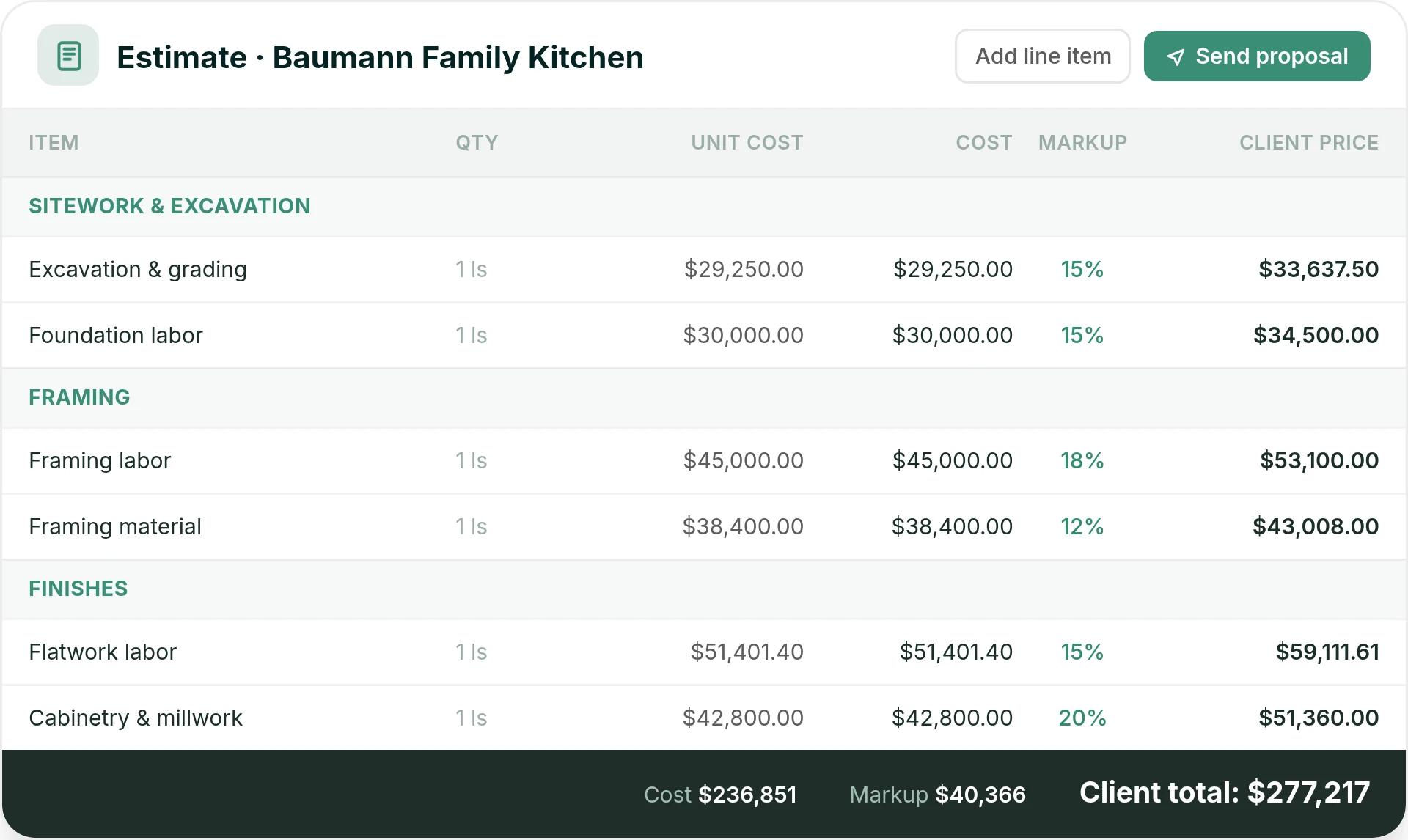
You build the estimate in Ressio estimating with your markup set once. Ressio works out builder cost, markup and client price as you enter quantities, and turns the estimate into a proposal in one click.
When the client signs by magic link, you lock the estimate and it becomes the job budget. Change orders, selections and invoices all run off that same number. So there is no second budget to rebuild, and no month-end reconciling.
Take a hypothetical kitchen job. Framing labor carries an 18% markup, cabinetry 20%, and the client total comes to $277,217, the same number you quoted from.
Subs get their tasks without a login
The most common Buildertrend complaint we hear is that subs never log in. They text you instead.
Our vendor portal works by magic link. A sub taps the link in an email and sees only their own tasks, dates, plans and documents. They can confirm a task, message you on it and upload a new insurance certificate, all without a login.
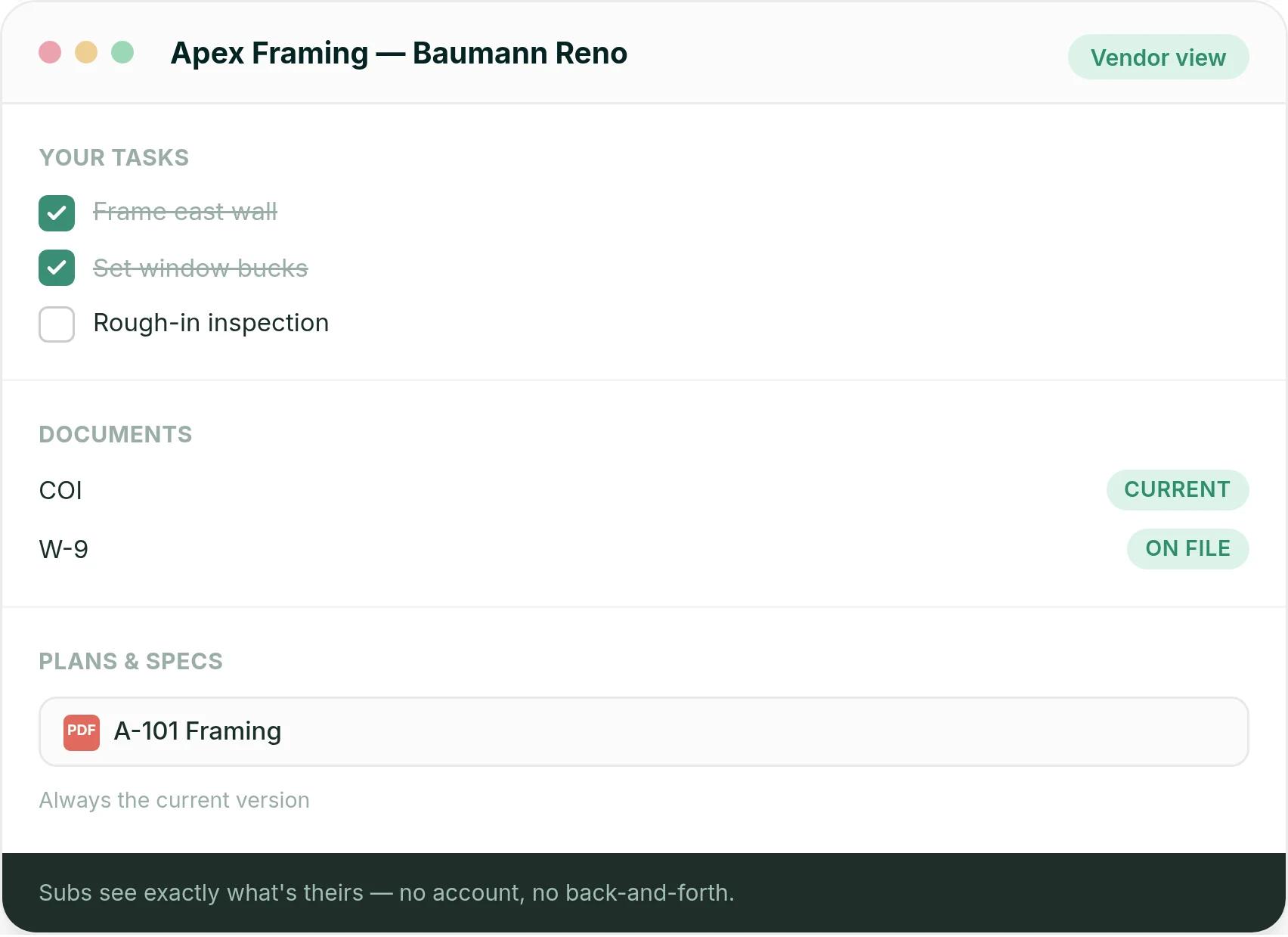
Ressio also sends the sub a reminder when their certificate of insurance is about to expire. They upload the renewal, and you get notified.
Clients approve changes from their phone
The client portal gives homeowners their schedule, daily logs, selections and invoices, again by magic link. No app and no password.
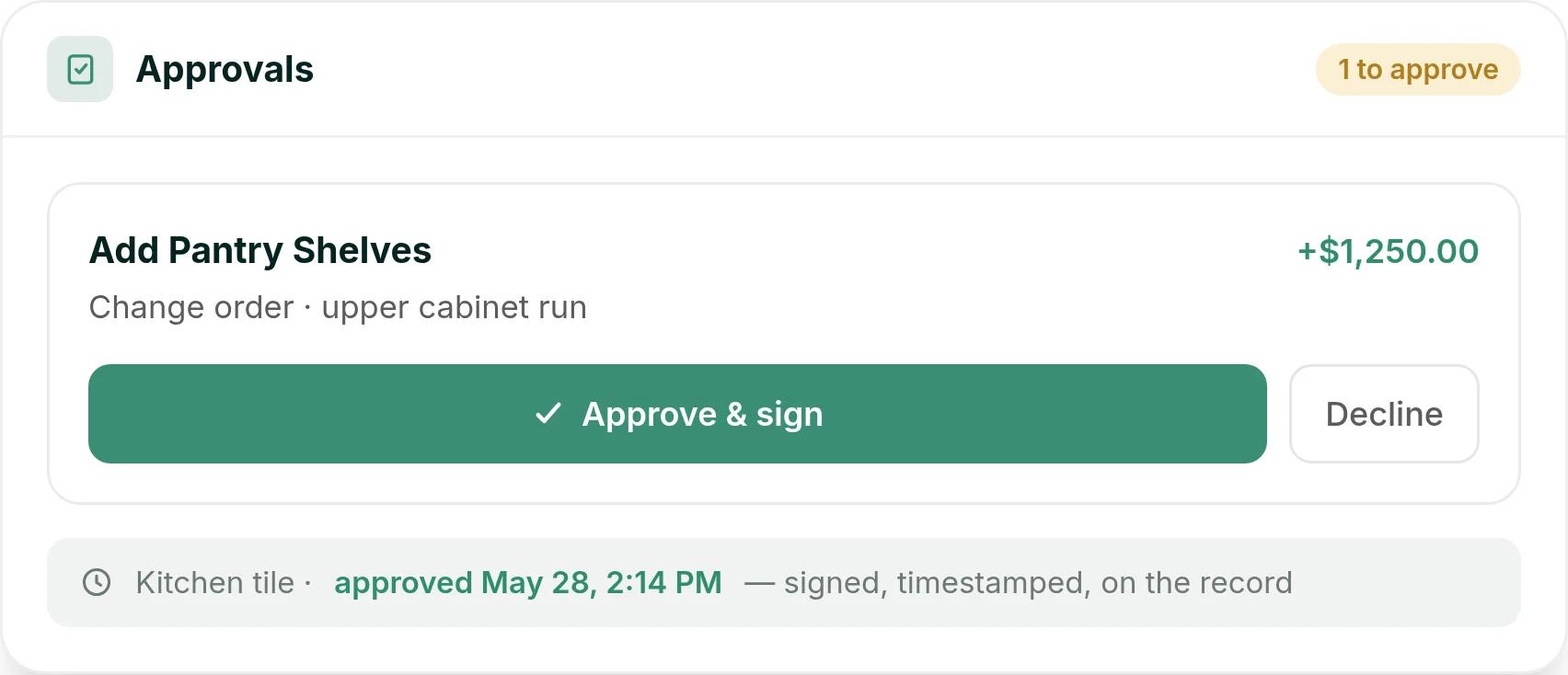
Picture a hypothetical kitchen reno where the client wants pantry shelves added to the upper cabinet run. You send a $1,250 change order. They tap Approve & sign on their phone, and the approval is timestamped on the project.
You see the margin while the job is running
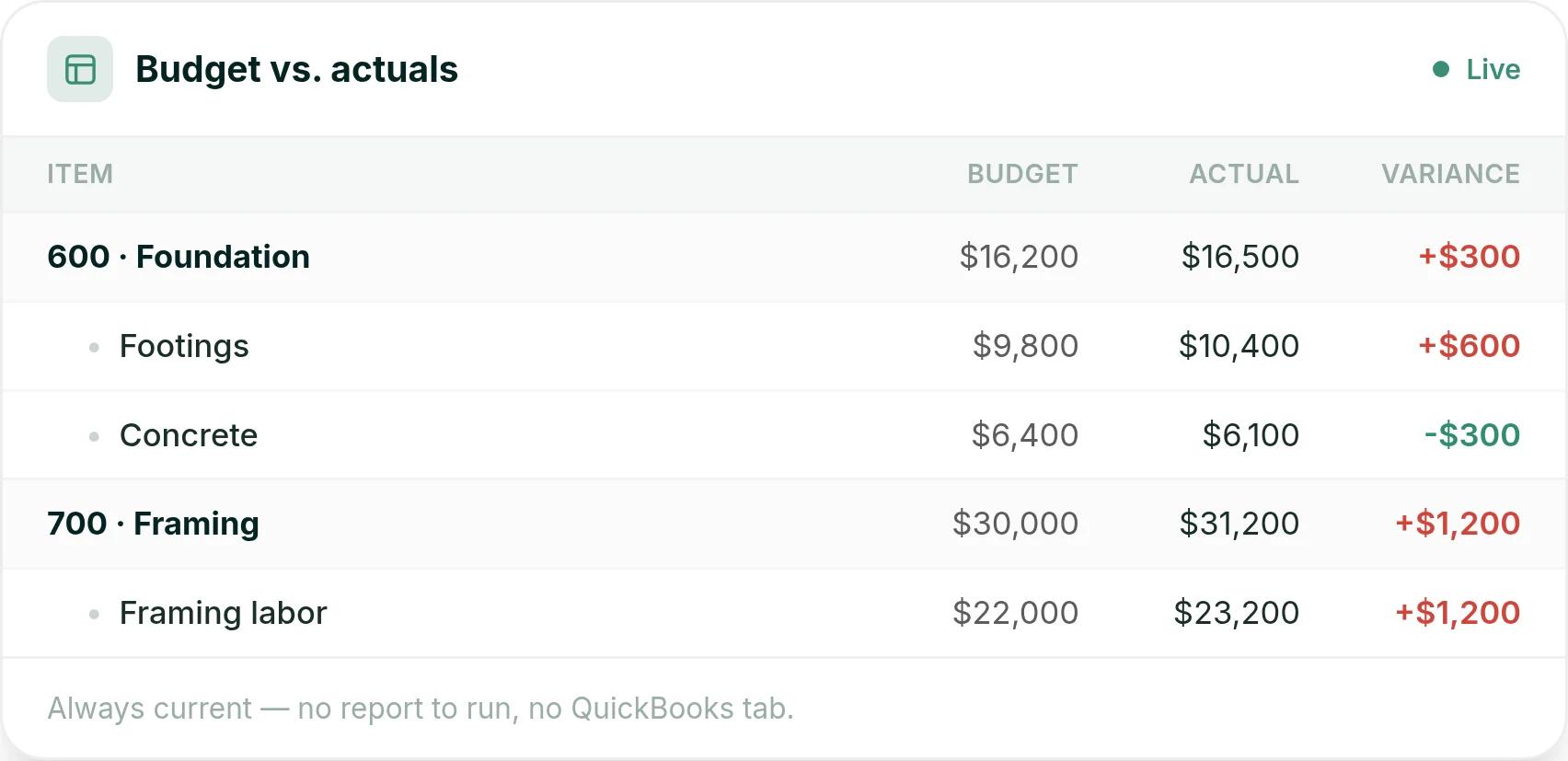
The budget updates as bills, time entries and purchase orders post. You see budget against actual on every cost code, plus costs that are committed but not billed yet.
So if framing labor is running $1,200 over budget, you see it on the budget page during framing, while there is still time to act.
Switching and support
If you are moving off another platform, we migrate your active jobs for you, so you do not start from zero. And when something breaks mid-job, Ressio support picks up the phone, on every plan, every day.
Builders who have made the move include Shade Tree Homes, who found Ressio easier to navigate than Buildertrend, and Epic Building Company, who called Ressio a major upgrade from CoConstruct.
See how this works on one of your own jobs: book a Ressio demo.
2. JobTread: best for trade contractors who want estimating and job management
JobTread is built for a wide range of contractors, from fence and electrical trades to general contractors. It suits trade contractors and lean teams that want estimating, job costing, and customer and vendor portals in one place.
Estimating and job costing are its strengths. One owner wrote: "It saves me hours on budgeting, estimating, and job costing." (Bob H., owner, Capterra, October 2025)
Some find client selections harder. A general contractor wrote that "the selection item would be the most difficult to use." (Houston T., owner and general contractor, Capterra, October 2025)
JobTread costs $199 a month plus $20 a month per internal user. Customer and vendor portal users are unlimited. Paying yearly saves 20%.
3. Buildxact: best for builders whose bottleneck is quoting
Buildxact is a takeoff and estimating tool first. It suits smaller builders, remodelers and trade contractors whose main job is pricing work off plans. Job management and schedules come on its higher plans.
Reviewers say it replaces spreadsheet estimating. "Buildxact makes it much easier to create accurate estimates without relying on multiple spreadsheets." (Dario W., estimator, Capterra, April 2026)
Getting help can mean a wait. A business manager wrote about "Not having someone to call straight away if there is an issue". (Katie B., business manager, Capterra, August 2025)
Ressio support picks up the phone, on every plan, every day.
Buildxact Foundation costs $199 a month with unlimited users. Pro adds job management and schedules for $399 a month, and Master is $599. Paying yearly saves 15%, and there is a 14-day free trial.
4. BuildBook: best for small teams focused on the client experience
BuildBook is lighter than the rest of this list. It suits small residential teams and specialty contractors who want a simple client portal more than deep job costing. Its strength is the homeowner side: progress, photos, selections and messages.
Reviewers say it takes almost no setup or training. "Very simple to use. There was no training needed." (Morgan R., partner, Capterra, December 2023)
That simplicity has limits. The same reviewer called it "a communication tool. Not an actual project management software."
Teams running several custom builds at once need the money side too. BuildBook does not list purchase orders. In Ressio, purchase orders tie each commitment to a budget line, and we warn you before one pushes that line over.
5. Contractor Foreman: best for small crews in any trade
Contractor Foreman is built for contractors of every kind, from plumbers and electricians to general contractors. It suits small crews who want a long feature list at a low price, including estimates, a client portal and change orders.
Clients get polished paperwork. "Clients love our detailed estimates, and the client portal is a huge plus." (Holly O., owner, Capterra, August 2025)
Some users find large estimates slow. "When making very large estimates the software slows down a lot", wrote one project manager. (Paul G., project manager, Capterra, October 2025)
Custom homes mean big, multi-phase estimates. Our estimating is built for complex custom builds and stays responsive as the estimate grows.
Plans start at $49 a month for one user, billed yearly, with a 30-day free trial. Standard is $105 a month for up to 3 users, and Plus is $166 for 8. Pro is $221 for 15, and Unlimited is $332.
6. Houzz Pro: best for design-led remodelers
Houzz Pro is the only option here that comes with a lead channel. It suits interior designers and design-led remodelers whose clients already browse Houzz. Its design tools include 3D floor plans, mood boards and room scanning.
The design side gets real praise. "It's also so easy to create 3D floor plans, even if you don't have CAD experience", wrote one interior designer. (Ana C., interior designer, Capterra, June 2025)
Some users find the money side thin. "The budget tool is way too basic." (Geoffrey P., project management VP and partner, Capterra, July 2025)
7. Procore: best of the Buildertrend competitors for commercial work
Procore is built for commercial general contractors, specialty contractors and owners. Every company on a project works in one system, and there are no per-user fees.
Its strength is document control: drawings, submittals and RFIs, which are requests for information. One general manager wrote that it keeps "drawings, RFIs, submittals, and communication organized in one place". (Murtaza L., general manager, Capterra, March 2026)
That depth is more than most home builders need. A project engineer wrote that "smaller projects don't need most of the features." (Matthew S., project engineer, Capterra, March 2025)
We build Ressio only for custom home builders and remodelers. You are not learning commercial tools you will never open.
Procore charges an upfront annual fee for each product. The fee is based on your annual construction volume, which is the total dollar value of the work across your projects.
What happened to CoConstruct?
CoConstruct is no longer a separate choice. Its pricing page now lands on the CoConstruct homepage, where the form books a Buildertrend demo.
If you are on CoConstruct today, you are moving your data either way. That makes now a good time to compare platforms instead of accepting the default route into Buildertrend.
How to choose between Buildertrend and its competitors
Start with the kind of work you do. Then check three things on a live demo with one of your own jobs:
- What happens when a date moves? In Ressio, you move one task and every downstream task reschedules on its own.
- What do your subs and clients have to do to see their part? In Ressio they tap a link, with no login.
- Does the estimate become the budget? In Ressio the signed estimate is the budget, so change orders and invoices run off one number.
If you build custom homes and those three answers matter to you, compare Ressio and Buildertrend side by side, or book a demo and bring a real job.
Frequently Asked Questions
Who are Buildertrend's main competitors?
Buildertrend's main competitors for home builders are Ressio, JobTread, Buildxact, BuildBook, Contractor Foreman, Houzz Pro and Procore. Ressio is built for custom and semi-custom home builders, Buildxact for fast estimating, and Procore for commercial general contractors. CoConstruct used to be on this list, but its site now books Buildertrend demos.
What is the best Buildertrend alternative for custom home builders?
Ressio is built for custom and semi-custom home builders. The signed estimate becomes the job budget, change orders and selections update it, and subs and clients work from magic links with no login. Active jobs are migrated for you when you switch.
Is Buildertrend good for small builders?
Buildertrend has a long feature list, and some small builders find it more than they need. One builder who moved to Ressio said Buildertrend "started to become too much with too many bells and whistles." Smaller teams often want fewer clicks and tools their subs and clients will use.
Can I move my jobs from Buildertrend or CoConstruct to Ressio?
Yes. Ressio migrates your active jobs for you when you switch, so you do not start from zero. Book a demo to plan the move around the jobs you have running now.