Construction Time Tracking: How Builders Capture Labor Hours That Reach the Job Cost
Construction time tracking only pays off when hours land against the right job and cost code. How time clock apps, QuickBooks sync, and crew habits decide whether labor cost is real.

Ressio Staff
October 9, 2026

TL;DR: Almost every builder captures hours. Far fewer capture them against the right job and the right cost code, and that gap is the difference between payroll data and labor cost you can manage a build with.
The tooling question is narrow: can a crew member pick the job at clock-in, does it work with no signal, and do approved hours reach accounting without anyone retyping them. Everything else is preference.
Capturing Hours and Capturing Labor Cost Are Not the Same Job
A time record that says a framer worked forty hours last week is payroll. It is enough to pay someone correctly and enough to satisfy a records requirement, and it tells you nothing about whether the framing phase on any particular build is over budget.
A time record that says twenty-six of those hours went to framing on one job, ten to a punch list on another, and four to shop and travel is labor cost. It is the same forty hours. The difference is attribution, and attribution is the part most systems treat as optional.
This is why builders who track time diligently can still be surprised by a job that loses money. The hours were captured. They were captured in a shape that could not answer the question.
Why Reconstructed Timesheets Drift in One Direction
Paper timesheets and Friday-afternoon recall are not inaccurate at random, which is what makes them worse than they look.
When someone fills in a week from memory, the day they spent half on one site and half on another becomes a whole day on whichever one they remember first.
Short interruptions disappear. Hours round to halves and wholes. Travel between two jobs lands on neither, or on both.
Each of those is small. Their direction is not. Reconstruction smooths variance, and variance is the entire signal.
The reason to track labor by job is to notice that a phase is running twenty percent over while there is still time to do something about it. A method that quietly averages the week away removes exactly the thing you were looking for, and it does so while producing a timesheet that looks complete and reasonable.
The other cost is timing. Hours that arrive on Friday, get approved Monday and reach accounting mid-week describe a problem that is already ten days old. On a phase that lasts three weeks, that is most of it.
What a Construction Time Clock App Has to Do
The category is crowded and most of the differences do not matter. Three do.
Job and cost code selection at clock-in. The crew member chooses what they are working on when they start, not at the end of the week.
This single behaviour is what converts hours into job cost, and it has to be fast enough that someone will do it standing in a driveway with gloves on. If selecting the job takes more than a couple of taps, the list will be ignored and everything will land on a default.
Offline capture. Job sites lose signal, especially below grade, inside steel, and in the first weeks of a rural build.
An app that requires connectivity to clock in trains crews to write it down and enter it later, which is the paper problem with extra steps. It needs to record locally and sync when it can.
Approval before anything moves. A supervisor or office manager should see the week, fix the obvious errors, and approve. Hours that flow straight from a phone into payroll carry every miskeyed job selection with them, and errors are far cheaper to fix before they exist in three systems.
Things that matter less than vendors suggest: minute-level precision, elaborate geofencing, and reporting depth inside the time tool itself. Six minutes of clock drift across a crew is noise. A day booked to the wrong job is a real problem, and no amount of GPS precision catches it, because the location was right and the job selection was wrong.
Getting Hours into Accounting Without Anyone Retyping Them
The reason time tracking and QuickBooks come up together is that most builders run payroll and books there, and the hours have to arrive.
What to confirm before buying, because it is the difference between a real integration and an export button: does the sync carry the job and cost code, or only the total hours? A sync that moves forty hours into payroll and drops the attribution has automated the easy half and left the valuable half on the floor. You will discover this in month two, when the accounting file balances and the job cost report is empty.
Two more practical points. Decide whether approved time syncs automatically or on demand, because automatic sync plus casual approval is how an unreviewed week reaches payroll. And check what happens to a correction after the sync has run, since an amended timesheet that does not propagate leaves two systems disagreeing, which is worse than either being wrong alone.
Adoption Is the Whole Problem
Time tracking fails on crew behaviour far more often than on software.
Crews adopt a system that is faster than what it replaces and reject one that is slower, and this judgement is made in the first week. If clock-in takes twenty seconds and the job list is a scroll, the system loses to a note on a phone regardless of what it can do.
Three things help. Keep the job list short by archiving finished work, so nobody scrolls past six closed builds to reach the current one. Name jobs the way the crew names them, which is usually the street, not the client's surname or an internal number.
And close the loop by showing a supervisor the weekly labor cost by phase, because a system that only ever takes data and never gives any back is experienced as surveillance.
It is also worth being straightforward with crews about what the data is for. Labor tracking that appears without explanation is read as a step toward performance monitoring. Framed as what it is, which is finding out which phases are priced wrong before the next bid, it tends to get cooperation, because the estimate being wrong is a problem the people doing the work already know about.
Where This Connects to the Rest of the Build
Labor hours by cost code are one input to job costing, and they are the input most likely to be missing or late. Materials arrive with invoices, subcontractors arrive with contracts and change orders, and both leave a paper trail whether or not anyone chases them. Labor only leaves a trail if someone records it at the time, and recording it is not optional: 29 CFR 516.2 requires an employer to keep the hours worked each workday and each workweek for every covered employee.
That makes time tracking the practical starting point for builders who want real job costs but do not want to rebuild their whole process at once. It is a contained change with an immediate output, and it feeds the reporting you would want next: cost by phase against estimate, margin by job while the job is still open, and the historical labor data that makes the following estimate less of a guess.
In our time clock, crew members clock in from their own phone and select the project they are on. For crew without a smartphone, a supervisor can clock the whole crew in from one device, and the office reviews and approves every entry before payroll.
Approved hours flow to job costing, so the job budget updates when time is approved rather than when someone gets to a spreadsheet. The Shifts report lists every entry by worker, project and cost code, and it can be exported for payroll.
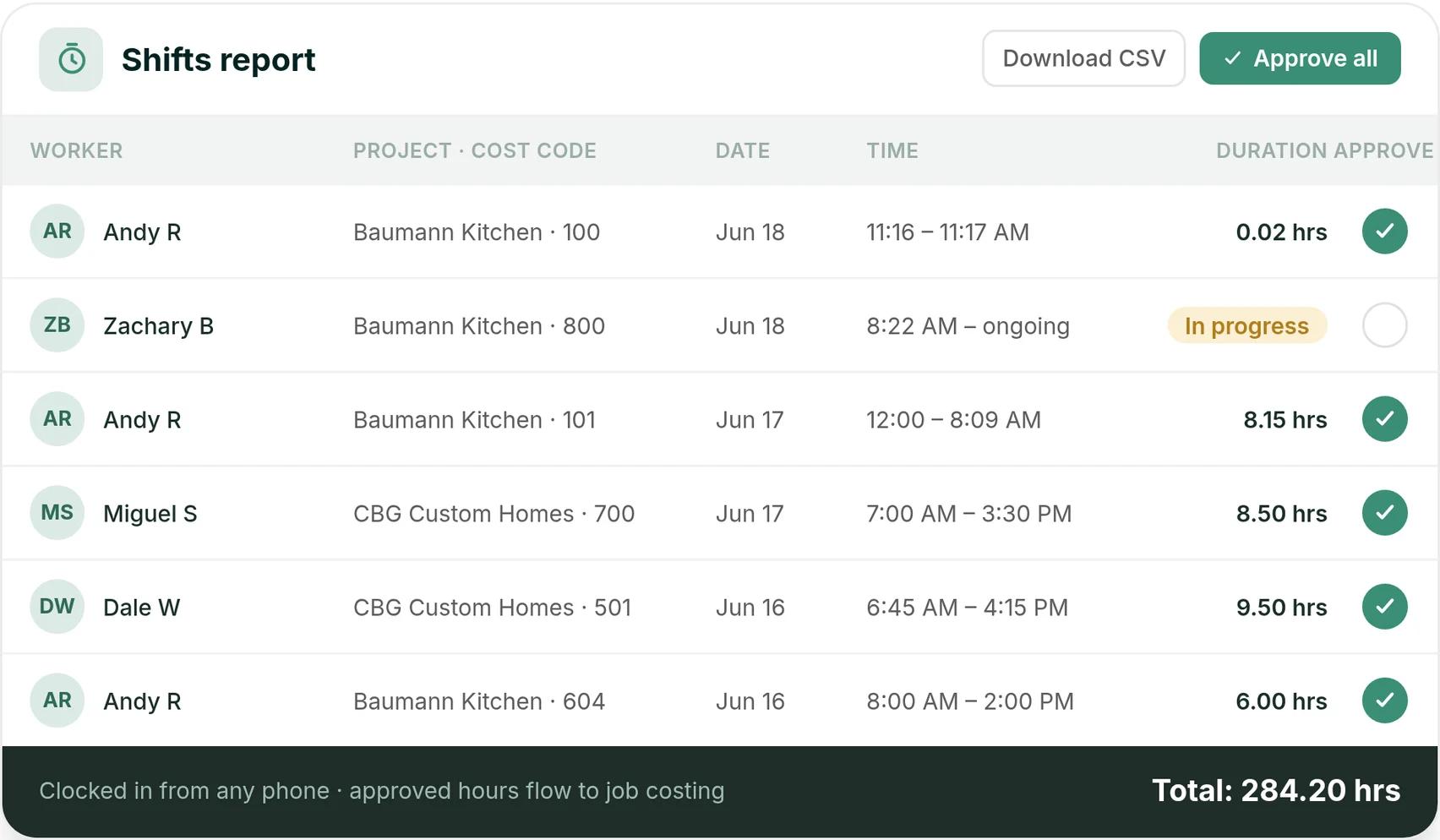
Take a hypothetical framing crew of five on a kitchen and addition. Two of them do not carry smartphones, so the lead clocks all five in from one phone each morning against the job, and the office approves the day's entries that afternoon.
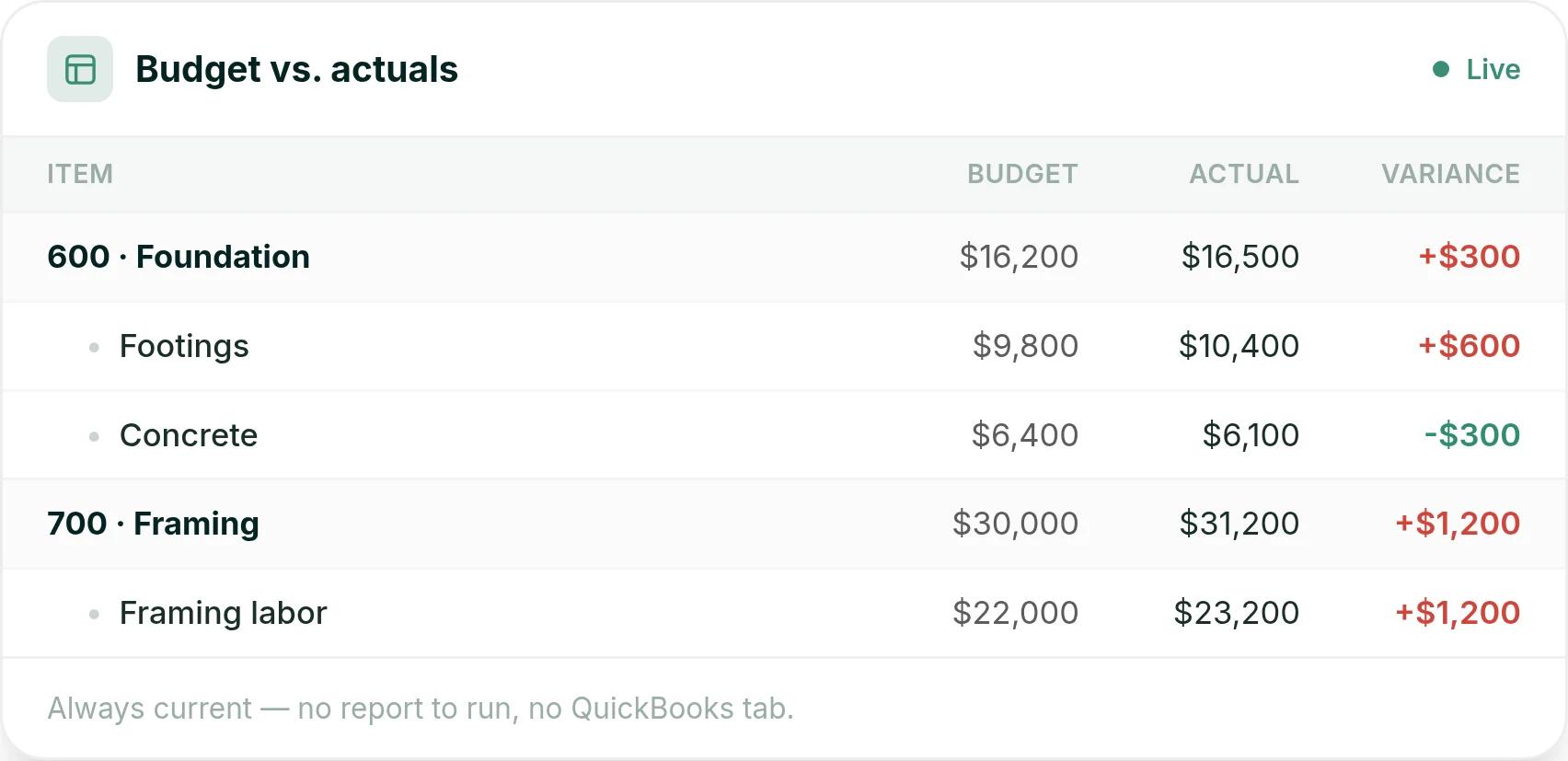
By the second week, the budget shows framing labor running ahead of the estimate while the phase is still open, which is when a builder can still change the crew plan or still talk to the client. To see approved hours land on the budget of one of your own jobs, book a Ressio demo.
For the wider picture of how labor lands alongside materials and draws once it reaches the books, see why a bank balance hides poor job costing.
Key Takeaways
- Hours are payroll. Hours attributed to a job and cost code are labor cost. Only the second answers whether a phase is on budget.
- Reconstructed timesheets do not err randomly. They smooth variance, and the variance was the signal you needed.
- Judge a time clock app on three things: job and cost code selection at clock-in, offline capture, and approval before anything syncs.
- Confirm the sync carries the job and cost code, not just the total hours. A sync that drops attribution automates the half that was never the problem.
- Adoption is decided in the first week. Short job lists, crew-familiar job names, and showing the numbers back are what make it stick.
- Labor is the input most likely to be missing, which is why time tracking is the most contained place to start on real job costing.
Frequently Asked Questions
What is construction time tracking?
Construction time tracking is the process of capturing the hours your crews and subcontractors work and attributing those hours to a specific job and, ideally, a specific cost code within that job.
The distinction matters. Recording that a carpenter worked eight hours is payroll. Recording that the same eight hours went to framing on the Maple Street build is job cost, and only the second one tells you whether that phase is on budget.
Why do paper timesheets cost builders money?
Because they are reconstructed rather than recorded. A sheet filled in on Friday for a week that started on Monday depends on memory, and memory rounds toward whole days and forgets the hour spent on a different site.
The errors are rarely random either. They tend to smooth out the variance, which is exactly the signal you needed to catch an over-running phase while it was still running.
What should a construction time clock app do that a generic one does not?
Three things. It should let a crew member pick the job and cost code at clock-in rather than at the end of the week, work offline because job sites lose signal, and push approved hours into payroll and accounting without anyone retyping them. A generic office time clock captures a start and a stop, which is enough for payroll and useless for job costing.
How does time tracking connect to QuickBooks?
Most construction time tracking tools sync approved time into QuickBooks so hours flow through to payroll and to the job or class the cost belongs against. The value is in what does not happen: nobody rekeys a week of hours, and the labor cost sitting in your accounting file matches the hours your crews recorded. Confirm before you buy that the sync carries the job and cost code, not just the total hours.
Should subcontractor hours be tracked the same way?
Not usually, because most subs are billing you a contracted amount rather than an hourly rate, so their cost enters through invoices and change orders instead of a time clock. What you do want is visibility of who was on site and when, which is a schedule and daily log question. Mixing sub attendance into employee time tracking tends to produce a labor cost number that is neither payroll nor job cost.
How accurate does time tracking need to be to be useful?
Accurate enough that the job and cost code are right, which matters far more than whether a clock-in was at 7:02 or 7:07. Six minutes of drift across a crew is noise. An entire day booked to the wrong job moves two budgets in opposite directions at once and is much harder to spot afterwards, because both numbers still look plausible.