
Construction Change Orders: A Builder's Guide to Pricing, Approving, and Getting Paid
A change order documents work added to or removed from the original contract scope, with the resulting price and schedule change. Here is what belongs on the form, the five-step approval process, and the mistakes that cost custom builders their margin.

Ressio Staff
October 9, 2026
A change order is a written amendment to a construction contract that documents work added to, removed from, or altered in the original scope, along with the resulting change to the contract price and the completion date. It is signed by both the builder and the homeowner before the work is performed, and once signed it becomes part of the contract.
That definition sounds procedural. In practice, construction change orders are where custom home builders either protect their margin or quietly give it away. A job can be estimated correctly, built well, and finished on time, and still lose money because eleven small scope changes were handled with a text message and a handshake.
What Are Construction Change Orders?
Every construction contract describes a scope of work: the drawings, the specifications, the allowances, and the schedule. A change order is the mechanism for altering that scope after the contract is signed. It covers three things at once: what is changing, what it costs, and how it affects the timeline.
Change orders typically come from four places:
- The homeowner asks for something different.
- A selection comes in over its allowance.
- A condition is found on site that nobody could see at bid time.
- A designer, engineer, or inspector requires a revision.
The origin matters less than the paperwork. A change is only a change order once it is written down, priced, and approved. Until then it is an expectation, and the builder and the homeowner are usually holding two different versions of it.
Why Change Orders Decide Whether a Job Is Profitable
On a custom home, the change orders are rarely the dramatic ones. They are the $600 and $1,900 items: an upgraded fixture, a relocated outlet, a different tile, a wall moved eight inches. Individually none of them feels worth the friction of formal paperwork.
Collectively they can exceed the job's entire profit.
Three costs stack up when the process is loose:
- The direct cost of the work, if it is never invoiced.
- The carrying cost of the delay, if the change stalls a trade and pushes the schedule.
- The relationship cost at closeout, when a homeowner gets a final invoice with charges they do not remember agreeing to.
The third one is the expensive one. A disputed change order at the end of a build turns a referral into a negotiation, and builders who work on referral cannot afford many of those.
What Belongs on a Change Order Form
A change order form does not need to be complicated, but it does need to be complete. Anything missing becomes the thing that is argued about later. At minimum, include:
- The project and contract it amends, plus a sequential change order number
- A plain-language description of the work being added, removed, or altered
- The reason for the change: homeowner request, allowance overage, site condition, or code requirement
- The cost breakdown, showing materials, labor, and markup rather than a single lump sum
- The revised contract total, stated as the previous total plus this change
- The schedule impact in days, including zero when there is none
- Signature and date lines for both parties
Two of those get skipped most often, and both are the ones that prevent disputes. Stating the schedule impact, even when the answer is zero days, stops the later argument that a builder's own changes caused the delay. And showing the revised contract total means the homeowner approves a new number, not just an increment, so there is no surprise at closeout about where the running total landed.
The Change Order Approval Process, Step by Step
A workable approval process has five steps, and the order is what makes it work.
- Identify and document the change as soon as it surfaces, before any work begins.
- Price it properly: real material costs, real labor hours, and the markup the contract entitles you to.
- Present it in writing with the cost and schedule impact shown together.
- Get written approval, and treat a signature or a documented in-system approval as the only acceptable form.
- Only then release the work to the trade, and update the budget and schedule so the job's numbers stay current.
The step builders skip under pressure is the fourth one. The trade is on site, the homeowner said yes verbally, and stopping to get a signature feels like bureaucracy that is slowing the job down. That is the change order that gets disputed four months later, when nobody remembers the conversation the same way.
Common Change Order Mistakes That Cost Builders Money
Doing the work first and pricing it later. Once the wall is moved, the builder has lost all leverage and is negotiating against work already performed.
Pricing changes at cost. A change order is real work. It carries the same overhead, supervision, and risk as contracted work, and it should carry the same markup.
Treating allowance overages as something other than change orders. When a homeowner selects a $9,000 range against a $4,000 allowance, that $5,000 needs the same documentation as any other scope change, or it becomes a closeout argument.
Bundling unrelated changes onto one form. If a homeowner disputes one line, the entire change order stalls, including the parts they were happy with.
Letting the running total drift out of view. Homeowners rarely object to individual changes; they object to discovering the cumulative number for the first time at the end.
When Spreadsheets Stop Working
Most builders start with a change order template and a folder of signed PDFs. That holds up on one or two jobs. It stops holding up when the same builder is running six, because the change order now has to stay synchronized with three other things: the job budget, the schedule, and the invoice.
The failure mode is not a lost document. It is a change order that was approved and never made it into the budget, so the job reports a healthy margin it no longer has. The paperwork was fine; the number it was supposed to update never moved.
That is the problem we built Ressio to solve. You flag the affected line items in your estimate and we build the change order from them, with quantities, unit costs and markup already filled in and photos attached to show what changed.
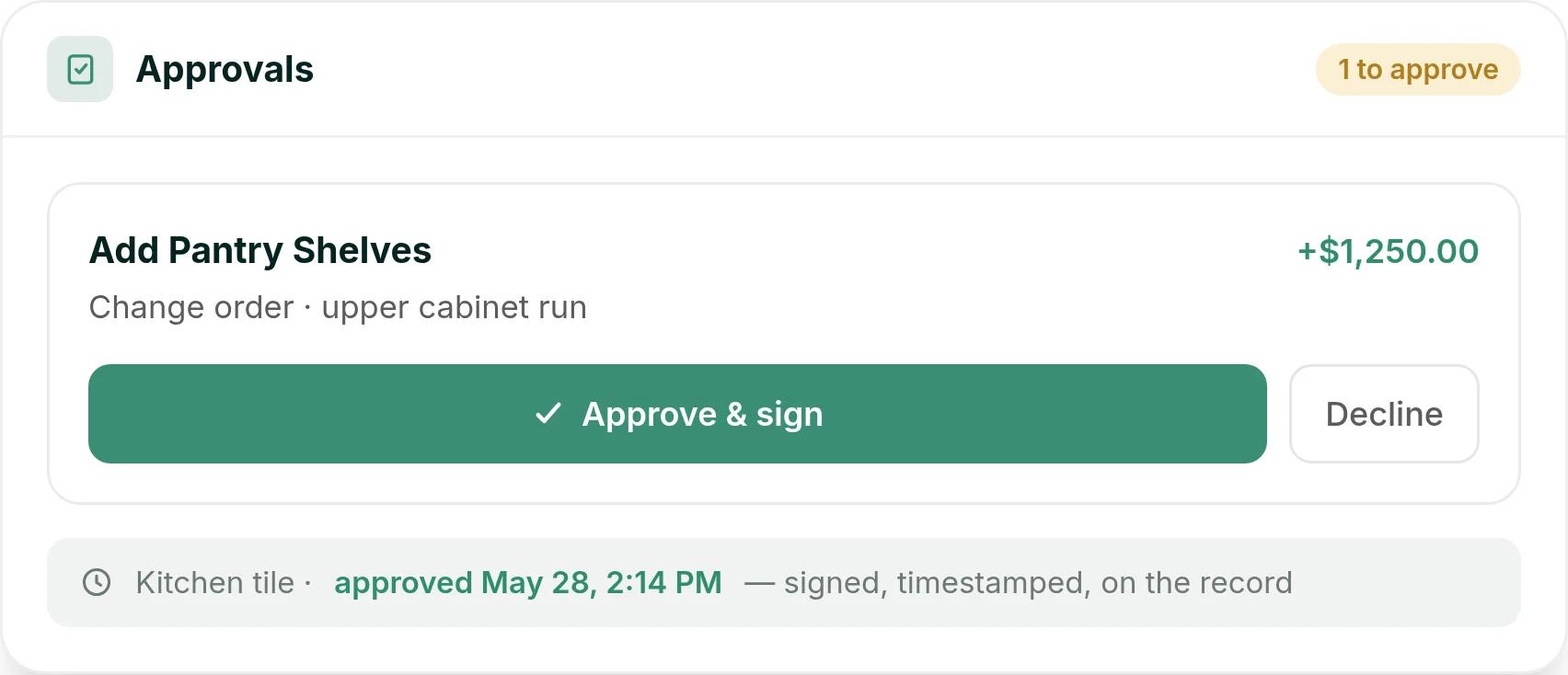
The homeowner gets a magic link, opens the change order on their phone without creating an account, and approves or declines it. The approval is timestamped, and the revised contract amount flows straight into the live budget, so the job's margin recalculates the moment they tap.
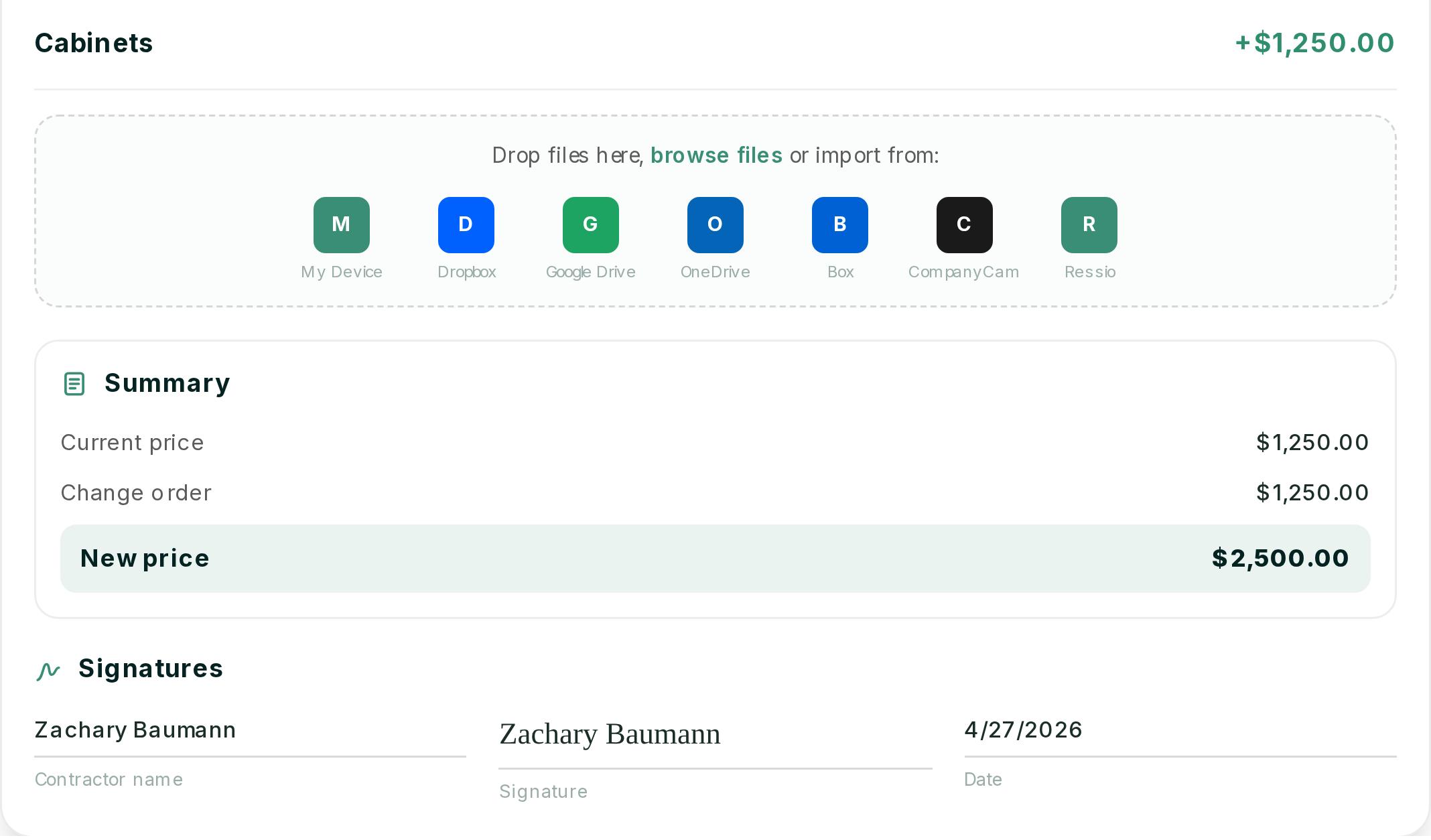
Take a hypothetical builder running six custom homes. On one of them, the homeowner decides partway through framing to add pantry shelves to the upper cabinet run. The builder flags the cabinet line in the estimate that afternoon, and the $1,250 change order reaches the homeowner before the trade is back on site.
They approve it from their phone that evening. The next morning the budget shows the new contract value, the next invoice picks it up, and the homeowner can open their client portal at any time to see every change they have approved, with the date and time. At closeout there is no running total for them to discover, because they have been able to see it all along.
Want to see a change order go from your estimate to the homeowner's phone to the budget? Book a Ressio demo and walk through the change order workflow end to end.
The Takeaway
Change orders are not administrative overhead. They are the record of what a job became.
Builders who write them promptly, price them honestly, and keep the running total visible to the homeowner finish jobs with their margin and their referral intact. Builders who handle them by text message finish with neither.
Frequently Asked Questions
Does a change order have to be in writing?
Practically, yes. Most residential construction contracts require written, signed changes, and many state contractor licensing rules require them for residential work. A verbal approval is not a document you can rely on in a dispute, and it is not something a homeowner is likely to remember the same way you do.
Who pays for a change order caused by a site condition nobody could see?
This depends on the contract's allocation of unforeseen conditions. In most residential agreements, concealed conditions (rot behind sheathing, an undocumented buried line, unexpected rock) are the homeowner's cost, because they were not visible at bid time. The safeguard is documenting the condition with photographs when it is found, not after.
Should a builder charge markup on change orders?
Yes. Change order work consumes the same overhead as contracted work, and often more supervision per dollar because it is unplanned. Building the markup into the contract's change order clause at signing avoids negotiating it mid-job.
How soon should a change order be presented?
Before the work happens, and ideally within a couple of days of the change surfacing. The value of a change order decays fast. The further the job moves past the decision, the harder it is to price honestly and the more it reads to the homeowner like a retroactive charge.
What is the difference between a change order and a change directive?
A change order is agreed by both parties before the work proceeds. A change directive is an instruction to proceed with a change while the price or schedule impact is still being settled. Directives are common on commercial work and should be used sparingly on residential jobs, because they ask the builder to perform work at an unagreed price.
Ready to stop giving away margin on change orders? Book a free Ressio demo and see how an approved change order reaches the budget and the next invoice.